7
Chapter 2 Installing the LED TV
Wall Mounting
How to remove the TV Stand
I
f you would prefer to mount your new TV on a wall instead of on the base, please remove the TV stand and
follow the instructions included in the wall mounting kit (not included).
R
ead all the instructions before proceeding with stand removal.
a. Open the box, and make sure all the necessary parts are in the box. The TV is assembled with the stand.
LED TV without TV Stand arm
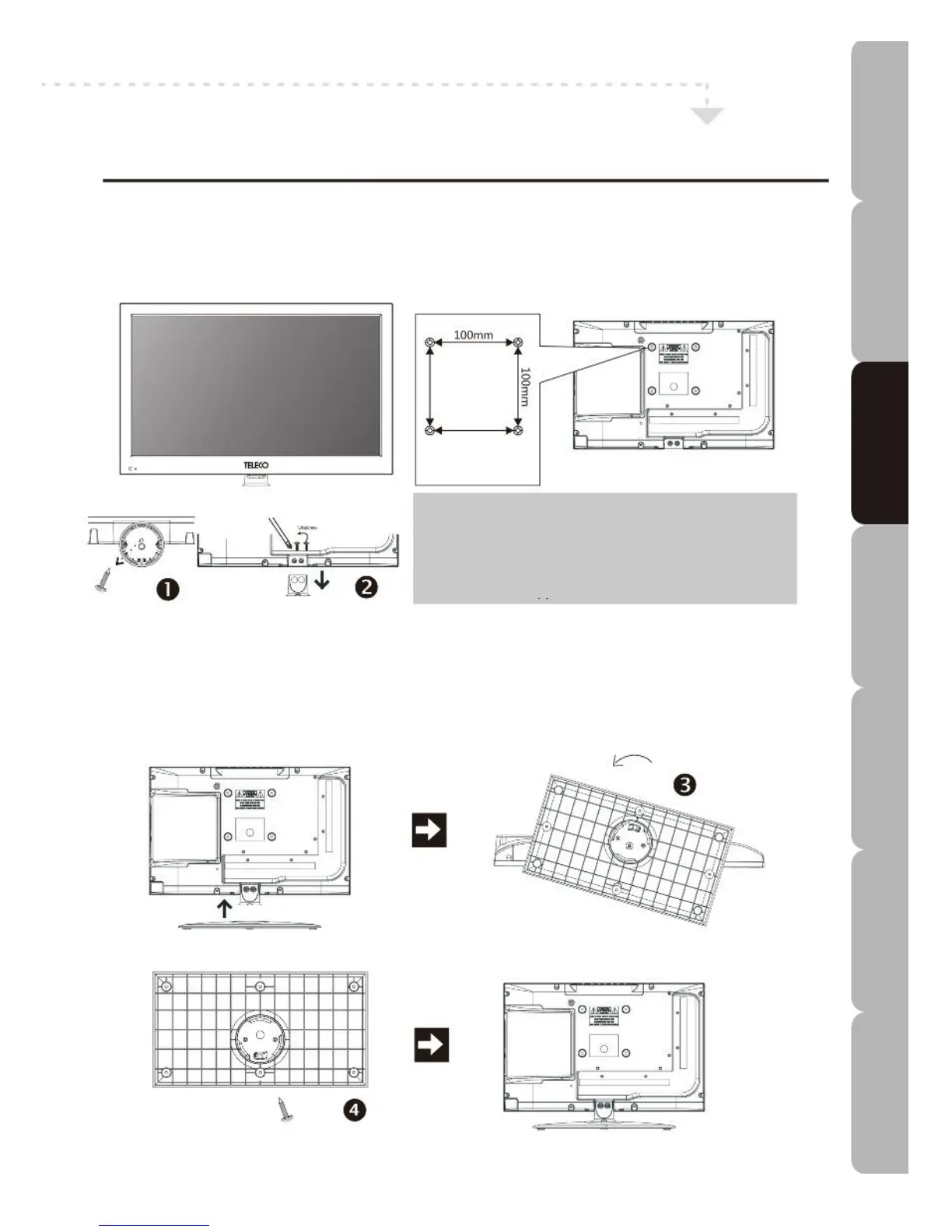
Four mounting holes
Size: M4 screws
How to wall mount the TV
Use four screws to mount the TV on the bracket.
This unit is VESA-compliant and designed to be wall-
mounted with a VESA-compliant 100x100mm mounting
kit. Mount this unit according to the instructions on the
wall bracket (not supplied).
b. Lay a soft cloth out on an even stable surface. Place the LED TV unit screen-down on the cloth. Unscrew one
screw anti-clockwise as shown in 1 and unscrew both screws in the same direction as shown in 2.
How to install the TV Base
a. If you want to attach the TV base, fit it onto the bottom of the stand arm as shown in 3, then rotate the base
anti-clockwise to its normal position.
b. Screw both screws back clockwise as shown in 4.
2 screws
ST4x6
Specifications Troubleshooting Using DVD Using TV Installing Introducing Safety Warnings
Features Features LED TV LED TV



 To Next Page