23
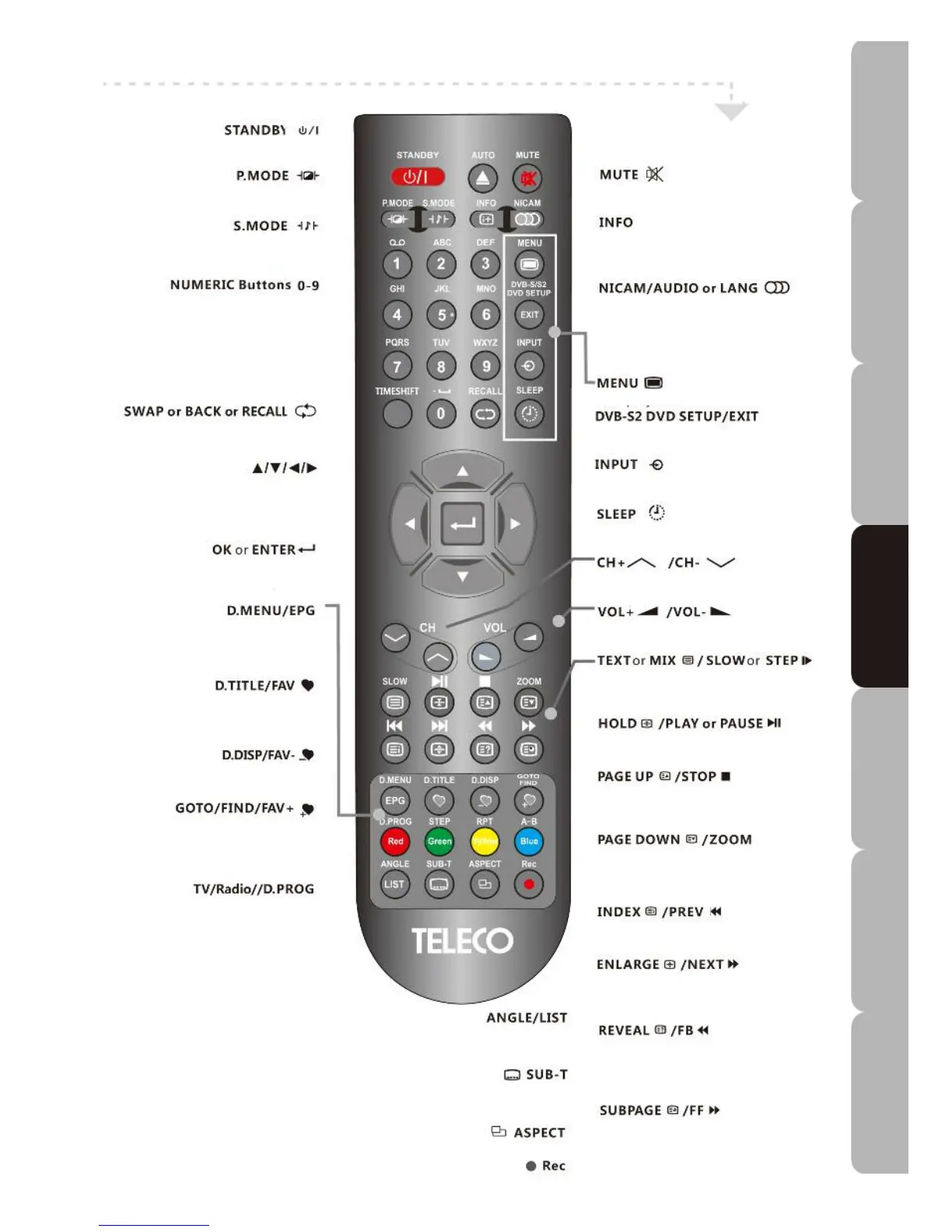
Remote control with S2 input source
• T
urns the TV on and sets it to standby
.
•
S
witches between different preset
picture modes
.
•
Switches between different preset
sound modes.
• Selects and switches to a channel using
the 0-9 buttons or edits the item name in
DVB-S2 menu.
• Press to return to previously viewed
channel
NAVIGATION buttons
UP/DOWN/LEFT/RIGHT
• Allows you to move, select and set up
the OSD options
• Allows you to confirm selection of OSD
options.
• Goes Back to the Disc menu.
•
Displays the electronic program guide in
DTV mode
.
• Scrolls through the customised
Favourite channels List
•
Down-changes FAVOURITE channels.
•
Searches for desired channel by
channel name
.
• Switches between TV or Radio in
DVBS2 mode.
Coloured buttons
(red/green/yellow/cyan)
•
Accesses the Teletext items or
corresponding pages. The coloured
buttons are also use for accessing the
interactive modes when the TV is in DTV
mode or menu mode
.
• Selects different DVD angle.
•
Press to display the channel list.
•
Displays your preferred sub-title in
DTV or DVD mode
.
Selects from among screen aspect modes.
• Recording Menu.
•
M
utes / restores TV sound
.
• Displays current TV status info, TV
Channel, input source, etc.
• Switches between different audio
languages in TV/DTV/DVD/DVB-S2
mode (only applicable when the TV
program has this feature).
•
Displays the TV Menu.
•
Displays the DVB-S2 or DVD SETUP
Menu or exits the OSD menu.
• Selects from among different input
sources
.
•
Sets the TV sleep time.
• Press to change channels up and
down.
•
Increases/decreases volume.
•
Turns Teletext function on/off.
• Starts or pauses playback.
•
Goes to next page in Teletext mode
• Stops or resumes playback.
•
Goes to previous page in Teletext
mode.
• Returns you to previous program.
• Goes to next program.
• Plays a program in fast rewind mode.
•
Plays a program in fast forward mode.
Specifications Troubleshooting Using DVD Using TV Installing Introducing Safety Warnings
Features Features LED TV LED TV



 To Next Page