Operation Model 7600
Teledyne Analytical Instruments 56
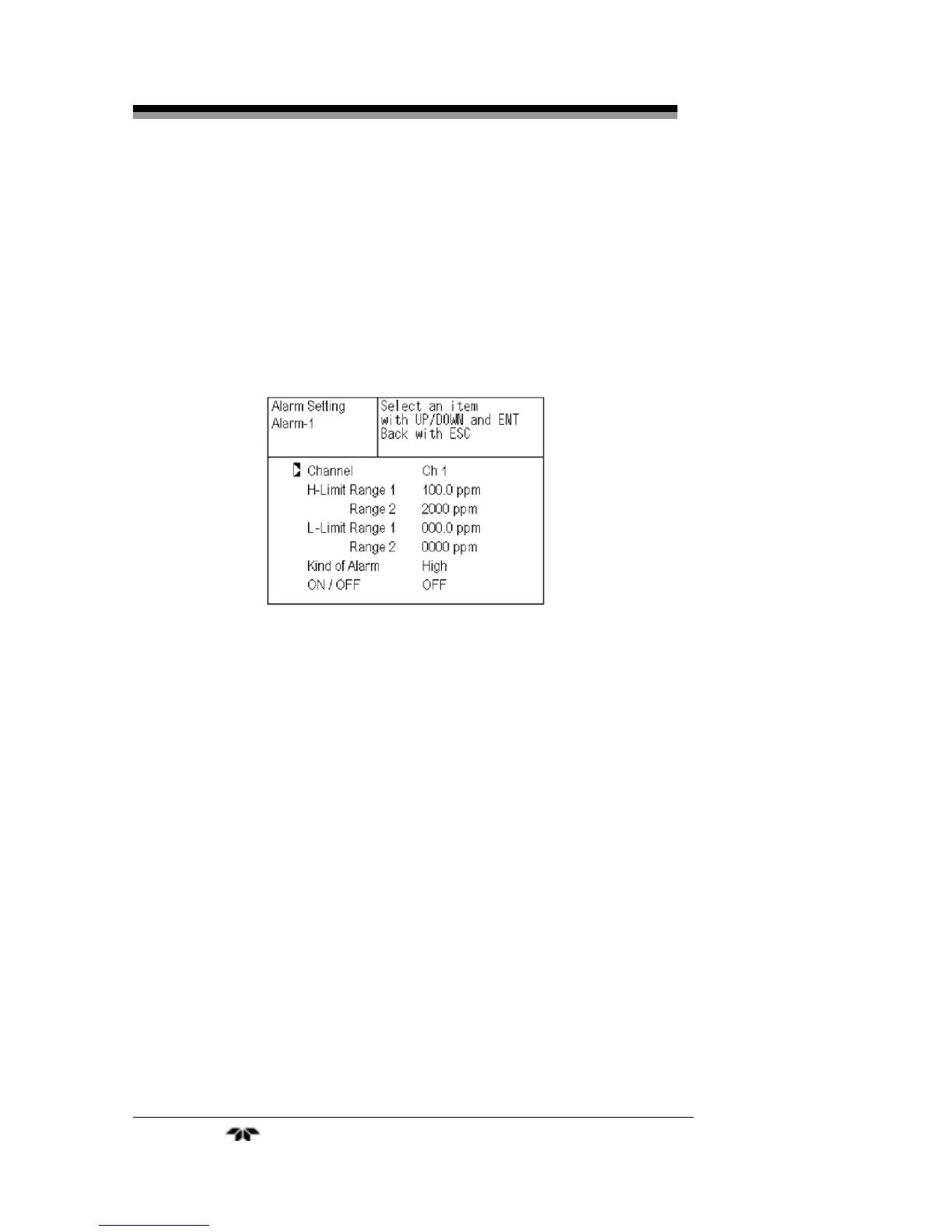
4. The alarm item selection screen will appear where you
can select the alarm type, assign it to a channel, define
setpoints, and enable or disable the alarm. Use the UP or
DOWN keys until the cursor is aligned with the desired
function and press the ENT key.
Note: Setpoints are adjustable form 0 to 100% of fullscale
however they must be defined so that H-limit value > L-limit
value and that (H-limit value- L-limit value) > hysteresis.
5.
After setting the last feature, store the values by pressing
ENT again.
To close the Alarm Setting screen or cancel this mode midway,
press the ESC key. The previous screen will return.
3.5.3.2 HYSTERESIS SETTING
The hysteresis setting is used prevent chattering of an alarm output
near the alarm setpoint. The hysteresis value range is 0-20% of fullscale
on any analysis range. Figure 3-6 shows the hysteresis width (in %
fullscale) set for a high limit alarm.


 To Next Page