Operation Model 7600
Teledyne Analytical Instruments 84
CO M: CO sensor input value
CO C: CO interference compensation sensor input value
Temperature: temperature sensor input value O
2
: O
2
sensor input
value
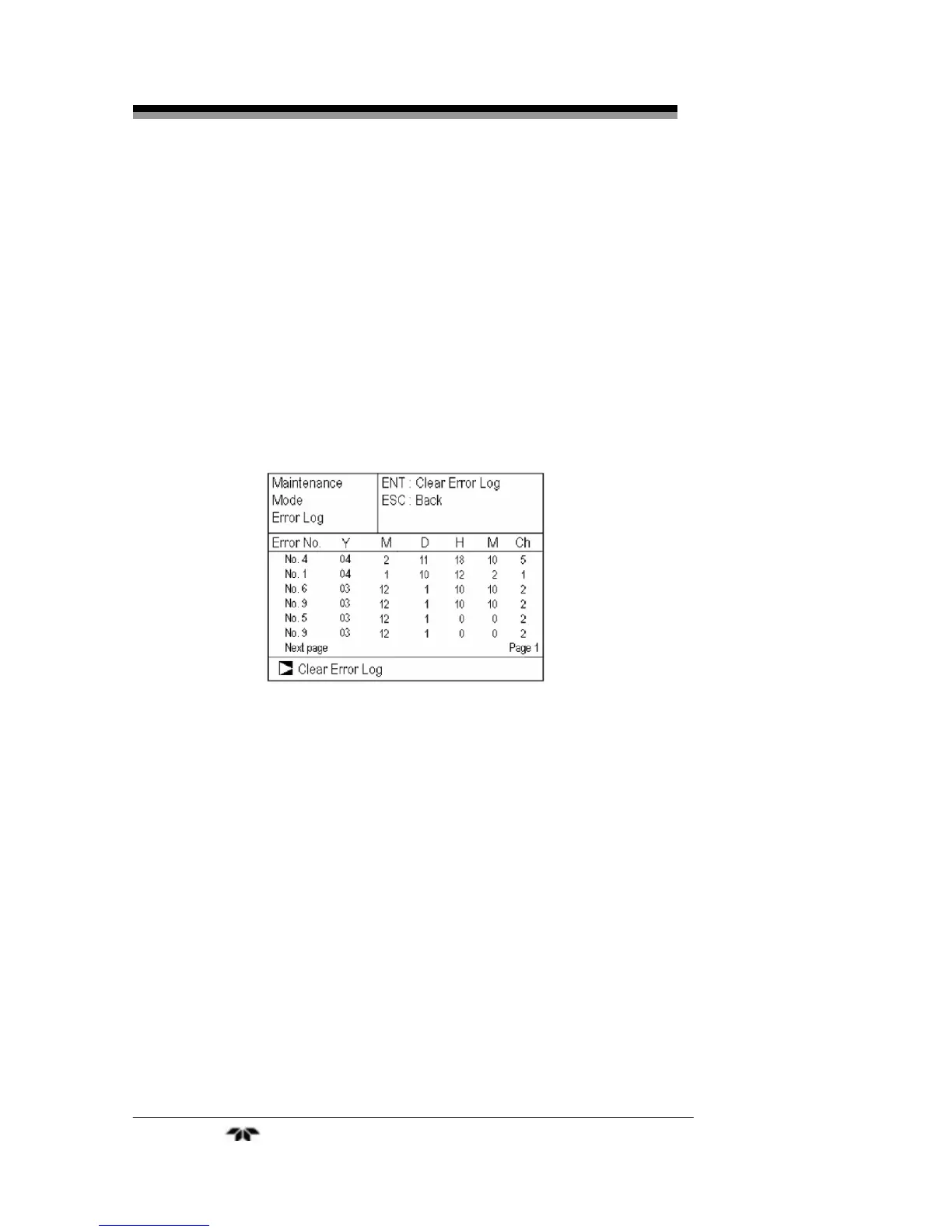
3.6.2 Error Log
This screen gives the error history for the last fourteen logged
errors. It also shows the date and time of occurrence (year, month day,
hour, minute) and the channel the error occurred on. For error number,
date and time of occurrence, channel and other details of error, refer to
Section 4.6
Error Messages.
To clear the error log, select Clear Error Log and press the ENT
key.
3.6.3 Calibration Log
The next screens detail the past calibration history on the analyzer.
The first screen allows you to choose the channel whose information
you want displayed. The next screen displays logged information on
sensor input value, concentration value, and the dates when zero/span
calibration were performed for that channel. The last 10 calibration
events are logged for each channel.
The first screen also gives you the opportunity to clear the log. To
erase the log, move the cursor to Clear Calibration Log and press the
ENT key. The calibration log is cleared completely.


 To Next Page