Infrared Gas Analyzer Operation
Teledyne Analytical Instruments 85
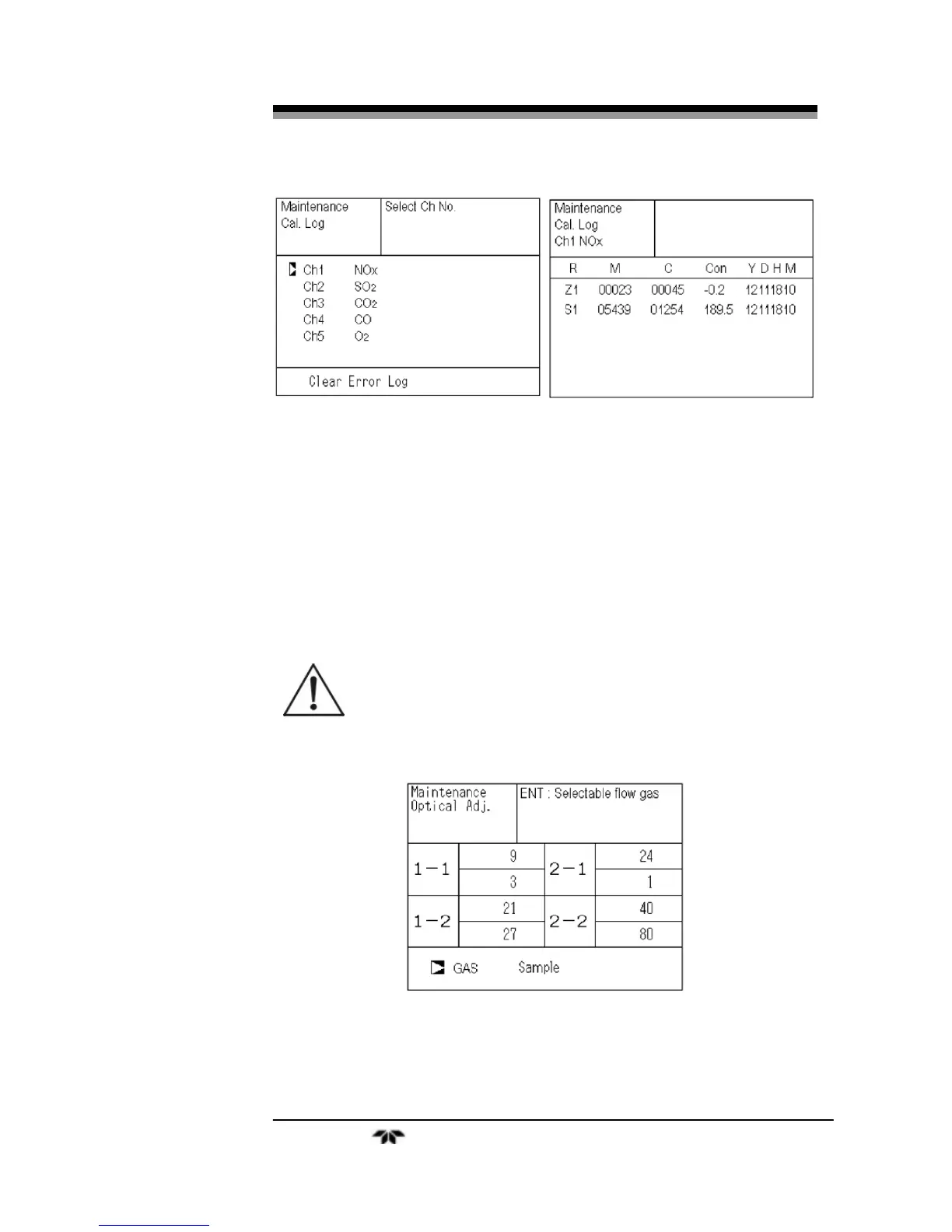
Z1: Zero calibration (Z) of Range 1
S1: Span calibration (S) of Range 1
M: Value of measuring detector at the time of calibration
C: Value of the interference compensation detector at the time of
calibration
Con: Concentration value displayed before calibration
3.6.4 Optical Adjustment
CAUTION: IF THE OPTICAL ADJUSTMENT IS MADE
INCORRECTLY, ANALYSIS MAY BE ADVERSELY
AFFECTED. CARRY OUT THE OPERATION WITH
UTMOST ATTENTION.
For details of this item, refer to Section4.4 Optical Zero
Adjustment.
Press ENT key and then turn ON the solenoid valve signal for each
calibration gas by using the UP or DOWN keys.


 To Next Page