Infrared Gas Analyzer Operation
Teledyne Analytical Instruments 83
7. Additional Parameters
a.
Password Set
b.
O
2
Reference Value
c.
Limit
d.
MODBUS Communication Station No.
e.
Range Setting
8.
Factory Mode
In the maintenance mode screen, point the cursor to the item you
want to set by pressing the UP or DOWN key and press the ENT key.
The appropriate screen will automatically display.
Note: “To Factory Mode” is used for factory service engineers.
Do not use this mode.
3.6.1 Sensor Input Value
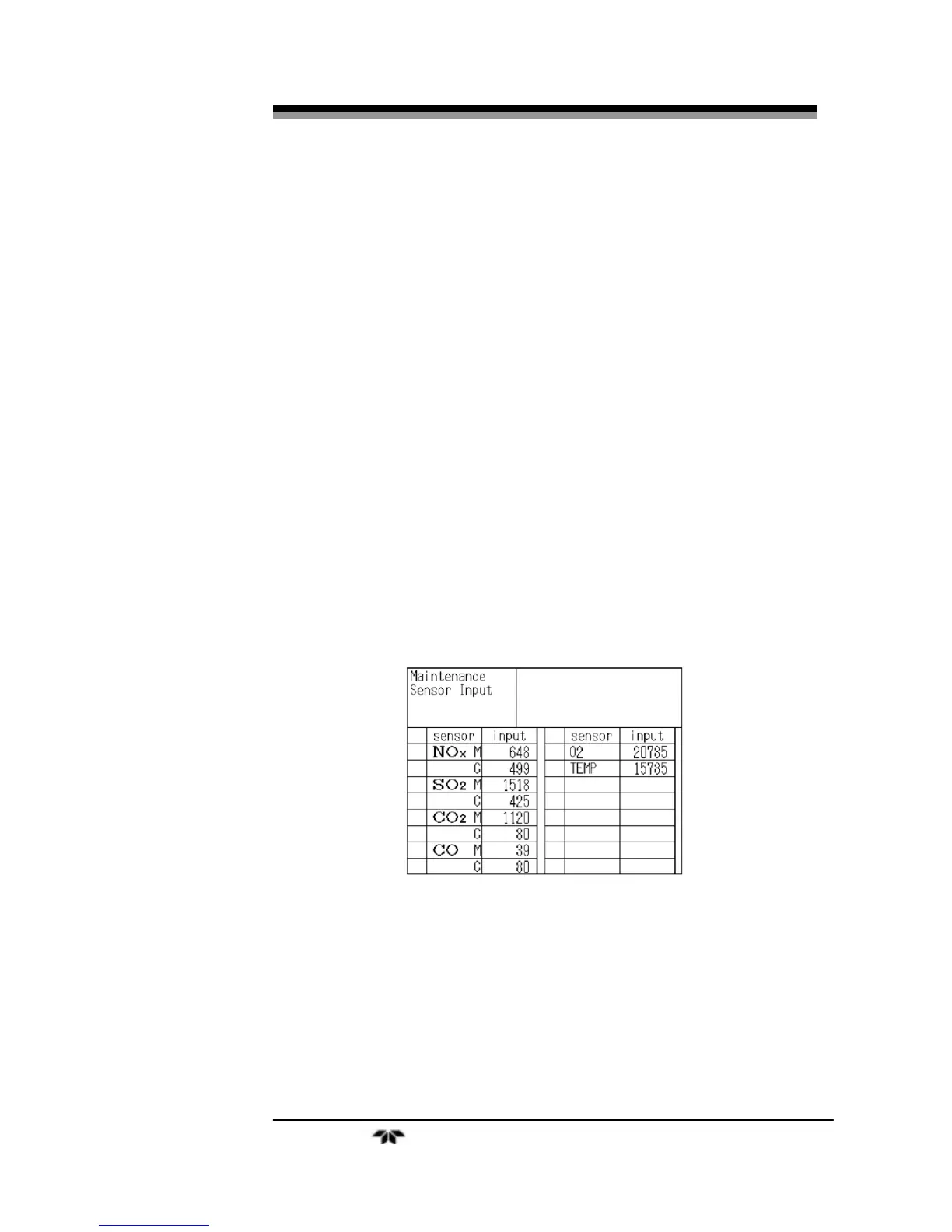
Upon selecting Sensor Input Value, the following screen will
appear. It lists the installed sensors along with the input value from the
measuring sensor (M) and the compensating detector (C).
Where:
NOx M: NOx sensor input value
NOx C: NOx interference compensation sensor input value
SO
2
M: SO
2
sensor input value
SO
2
C: SO
2
interference compensation sensor input value
CO
2
M: CO
2
sensor input value
CO
2
C: CO
2
interference compensation sensor input value


 To Next Page