Infrared Gas Analyzer Operation
Teledyne Analytical Instruments 71
3.
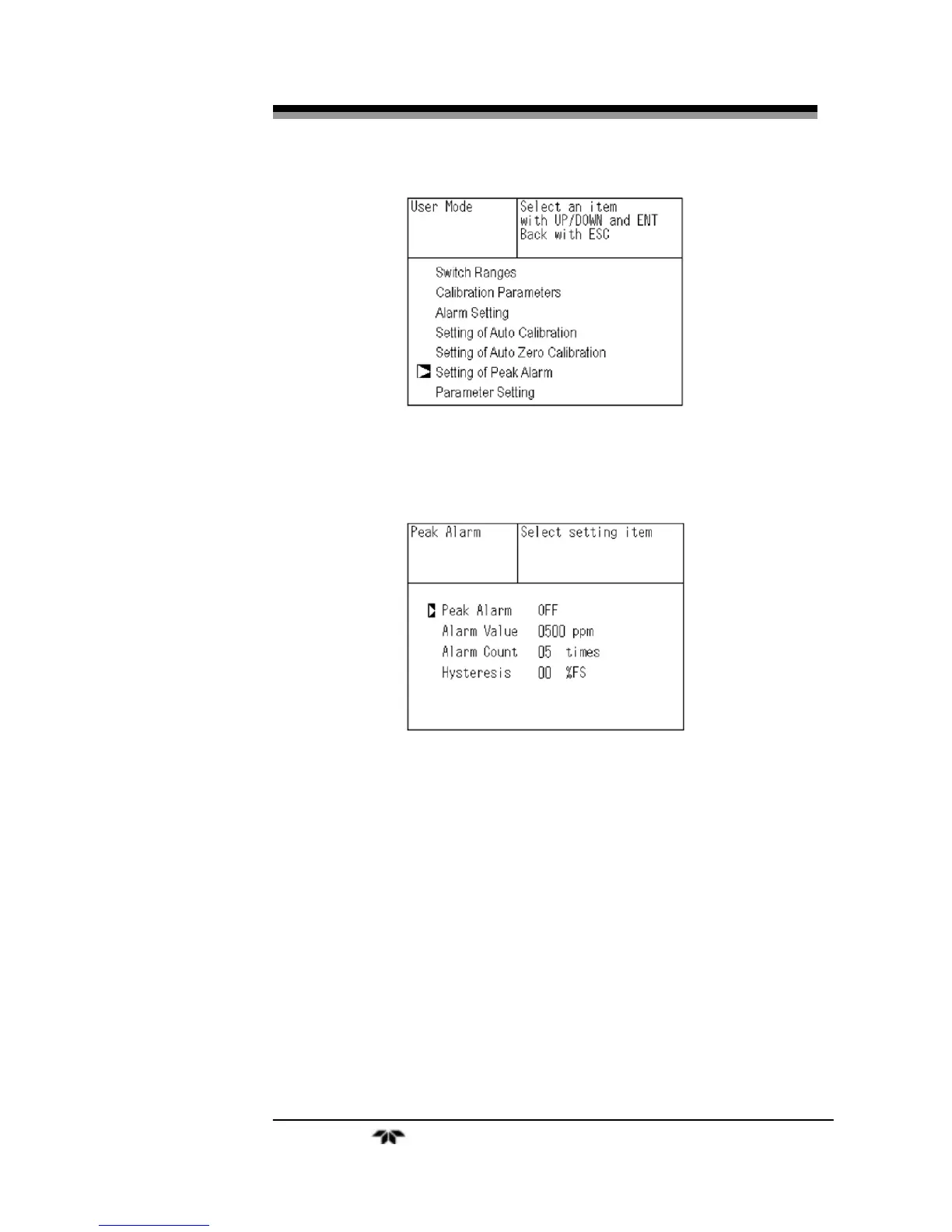
Press the ENT key.
4.
In the “Peak Alarm Setting” item selection screen that
appears, point the cursor to any item you want to set by
pressing the UP or DOWN
key. Then press the ENT key.
5.
Enter numeric values by using the UP or DOWN keys.
Use the SIDE key to move the cursor to the right. Press
the ENT key to save the change.
To close the “Peak Alarm Setting” or cancel the mode midway,
press the ESC key. A previous screen will return.
Description of setting items:
Peak Alarm: ON/OFF of peak alarm
Alarm Value: If measuring value exceeds the set alarm value in
ppm, a peak counter increments by 1.
Alarm Count: When a peak in excess of the alarm value occurs,
a peak count is incremented. The alarm count is


 To Next Page