MA365 • Rev. A2 27
Tellabs
®
6325 Edge Node 2 Installation Information
2.6 Installing the Transceivers
To insert and remove the
transceivers
Follow the instructions.
Step Action
1
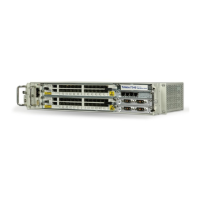
Insert the transceivers into the cages.
2 Push the transceiver lightly until it is locked.
3 If you need to remove the transceiver, turn the clip, that locks the
transceiver, to the horizontal position. Then you can pull the trans-
ceiver out of its cage.



 To Next Page