IBUC Operation Manual
Terrasat Communications, Inc.
Rev. A
7-19
Power Supply Connections
Refer to Chapter 4, pages 4-8 through 4-10.
Note: Rx 1+1 Systems include a “Y” adapter that allows the user to share the Power
Supplies with the Tx 1+1 System.
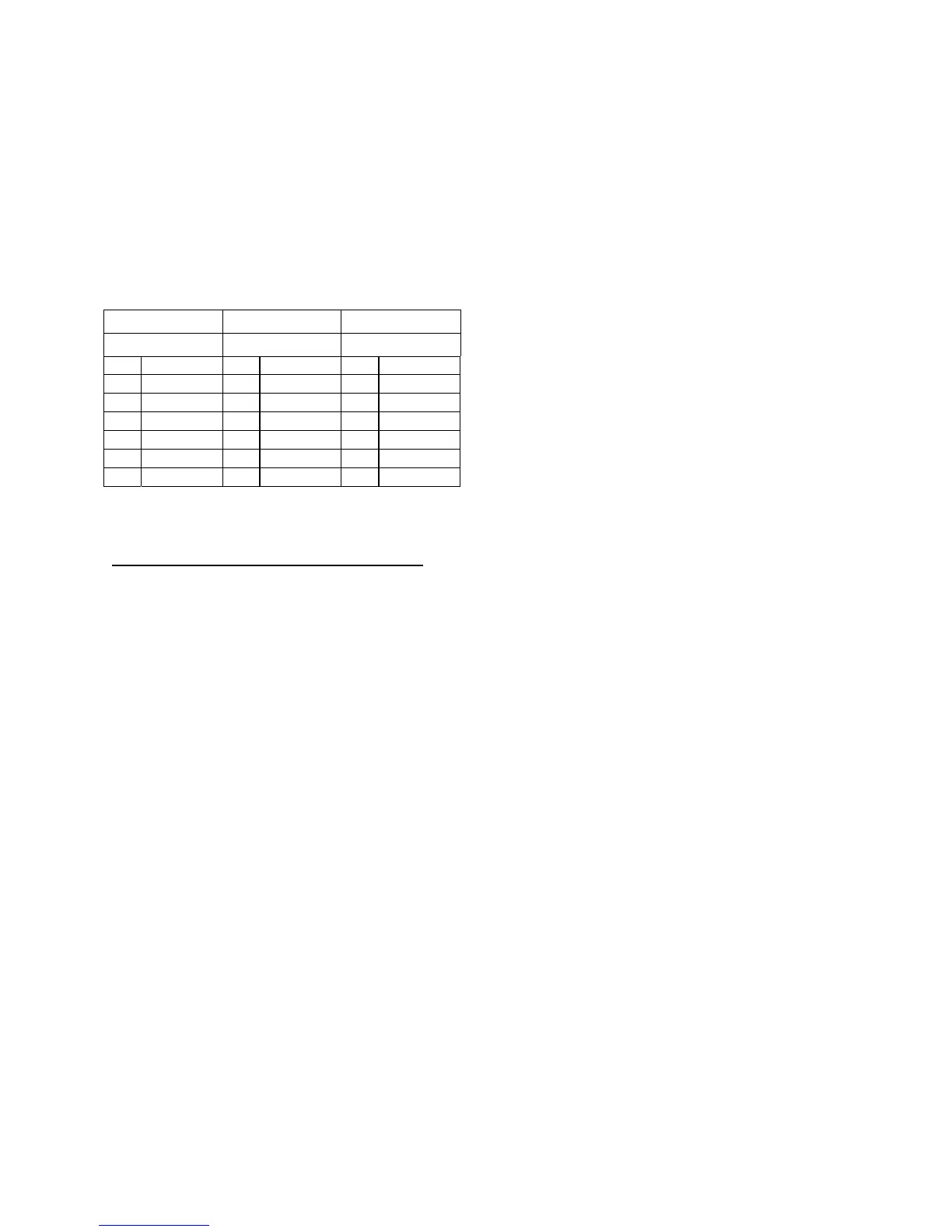
Table 7-8 “Y” Adapter Connector Schedule
Y ADAPTER J1 Y ADAPTER J2 Y ADAPTER J3
MS3106F14S-6P MS3101F14S-6S MS3101F10SL-4S
PIN FUNCTION PIN FUNCTION PIN FUNCTION
A VDC- A VDC-
B VDC- B VDC-
C VDC- C N/C A VDC-
D VDC+ D N/C B VDC+
E VDC+ E VDC+
F VDC+ F VDC+
Cable and Waveguide Connections
WARNING: Ensure that all power is disconnected prior to making the
following connections
When installing the cable and waveguide assemblies ensure that all connections are
weather-tight. If the optional RX reject filter has been ordered attach it to the Tx
Redundancy waveguide output. Ensure that proper gasketing is used to prevent water
damage.
Waveguide connection:
Connect a section of flexible waveguide between the OMT transmit port and the Tx
Redundancy TX RF Output (or optional RX reject filter). The waveguide should be
attached to the antenna feed per the manufacturer's instructions. Ensure that proper
gasketing is used to prevent water damage.
Typical Configuration:
Connect the IFL coaxial cable between the Tx 1+1 Interface Module J6 (TX L-band In)
and the Modem.
Connect the coaxial cable between the Rx 1+1 Interface Module J6 (RX L-band) and
the Modem L-band RX INPUT.
Connect the M&C cable between the Tx 1+1 Interface Module J3 (User Interface) and
the appropriate M&C computer or LAN connection.


 To Next Page