HYDRAULIC PULLER TENSIONER PT2450
Manual: MI-PT2450-050-00-GB Date: 28.07.2018 Author: AT Page: 46 of 89
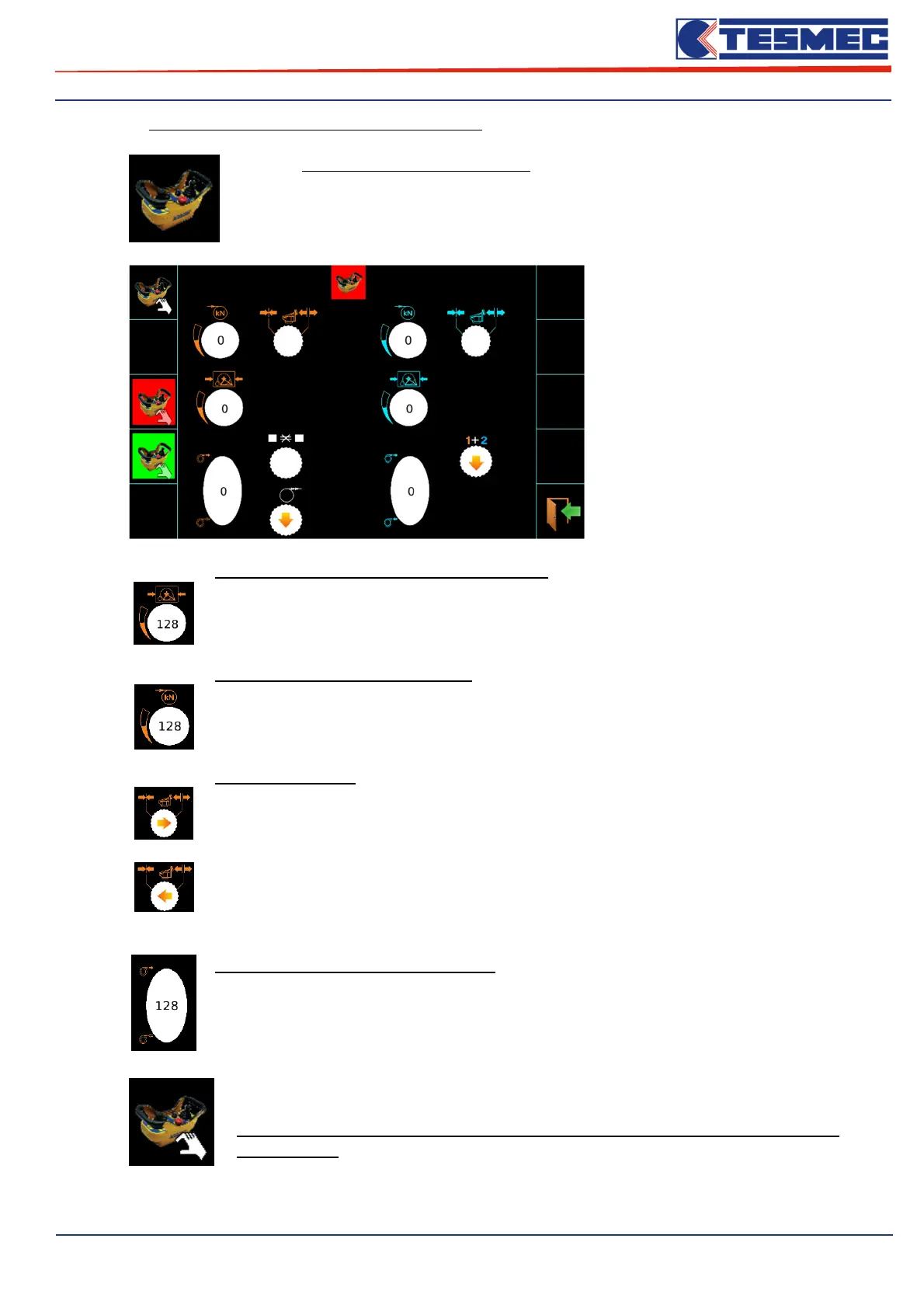
Submenù “Test radio remote control functioning”:
Only the submenu inputs electronic cards, you can access the menu to monitor the
operation of the main commands available on the car radio control.
Turning the potentiometer for
adjustment of the pull or the reel
elevator system pressure, or move
the joystick to the bull-wheels
control, the values are displayed
that may give the operator an
indication on the proper functioning
of the controls on the radio control.
Reel elevator command circuit potentiometer
If the operator rotates the potentiometer it’s possible to have:
- displays values between 128 and 256 = Regular Operation;
- displays values different from 128 and 256 = Malfunction;
Machine pull setting potentiometer
If the operator rotates the potentiometer it’s possible to have:
- displays values between 128 and 256 = Regular Operation;
- displays values different from 128 and 256 = Malfunction;
Rope clamp switch
If the operator moves the switch in open position, it’s possible to have:
- displays right arrow = Regular Operation;
- arrow is not displayed = Malfunction;
If the operator moves the switch in close position, it’s possible to have:
- displays left arrow = Regular Operation;
- arrow is not displayed = Malfunction;
Command joystick bull-wheel rotation
If the operator moves the joystick control of the bull-wheel, it’s possible to have:
- displays values between 128 and 256 = Regular Operation;
- displays values different from 128 and 256 = Malfunction;
In radio operation monitoring screen control, there is another button that lets you access
a menu by password.
This menu can be used only and exclusively under Tesmec assistance
authorization.


 To Next Page