Input basic programming data
50
Link between time and correct data
To ensure that the naming of the file and the time and date details in
the file are correct, the time function must work properly. If the battery
drains, the date is automatically set to 1.1.2011, 12:00 and the data is
stored. Data is not lost, since new measurement values and errors
are appended to existing files. However, only one file is described in
each case, since the month and day are not subject to change.
Storing measurement values
The storing of measurement values on the SD card is activated when
in the menu
=> Basic program => Function SD-Card => Store
measurement
is activated.
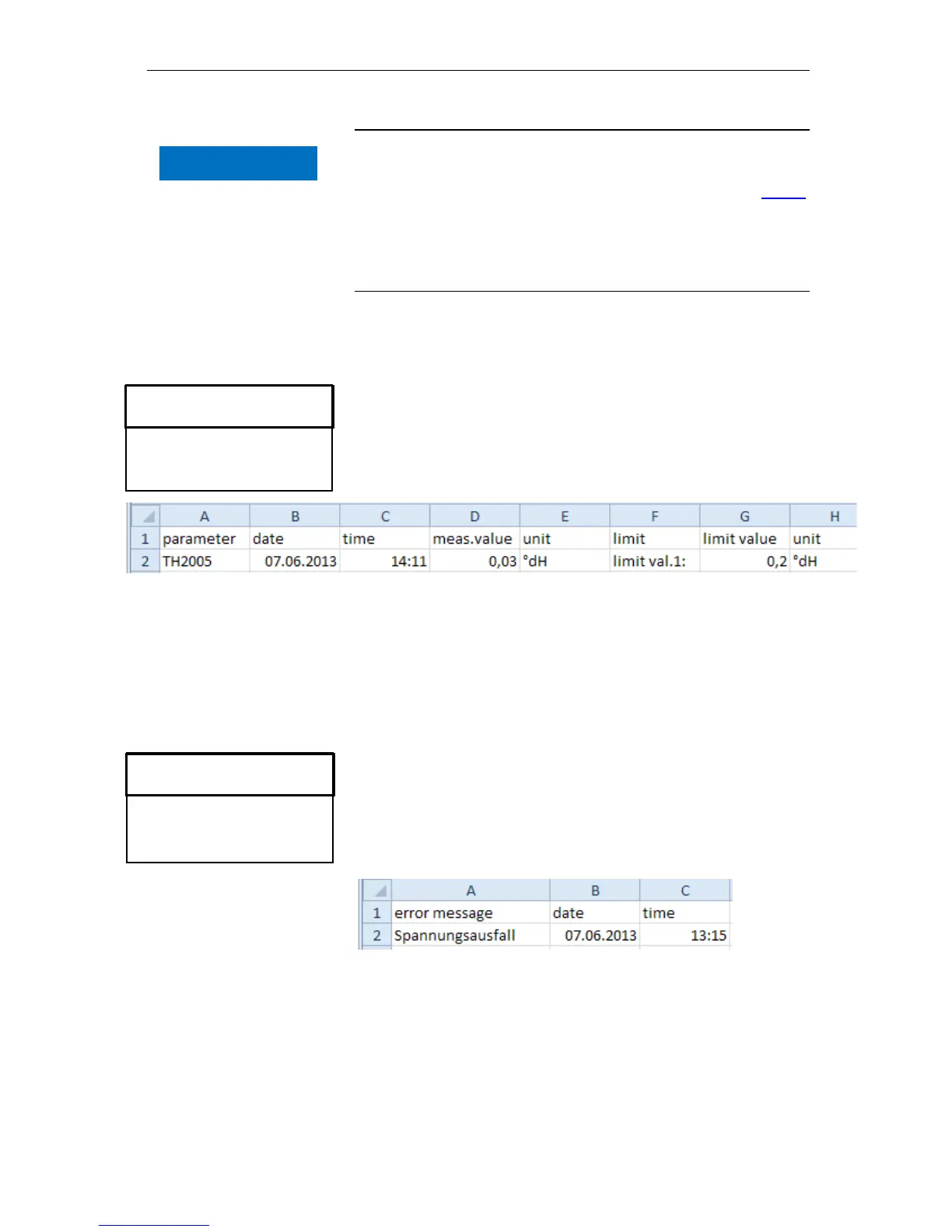
Example for a CSV file imported into Excel:
Within the file, the comma is included as a separator in the first line
"sep=,", so that it can be imported directly into Microsoft Excel. If
OpenOffice/LibreOffice Calc are used, this line appears after the im-
port. It may be deleted.
Store error
The storing of the error on the SD card is activated, when in the
menu
=> Basic program => Function SD-Card => Store
error
is activated.
Example for a CSV file imported into Excel:
Within the file, the comma is included as a separator in the first line
"sep=,", so that it can be imported directly into Microsoft Excel. If
OpenOffice/LibreOffice Calc are used, this line appears after the im-
port. It may be deleted.



 To Next Page