30
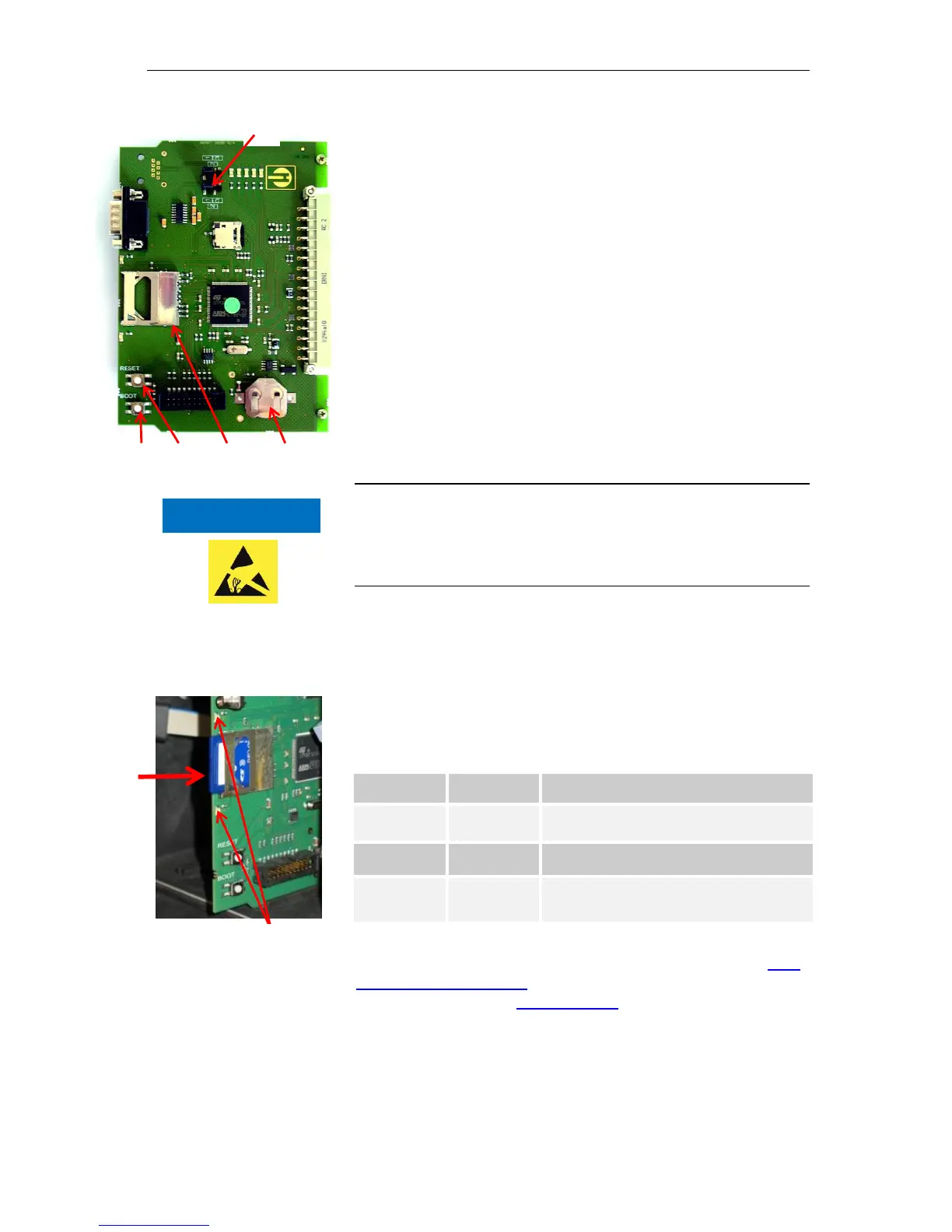
Control elements on the control board
Battery holder: The battery holder houses a CR2032 lithium
battery to retain the time setting even if the device is switched off.
Plug-in slot for SD card : SD or SDHC cards with a maximum
capacity of 32GByte are suitable. The card must be FAT or FAT32
formatted.
RESET button : To reset the controller, proceed as for switching
on and off
BOOT button : Only used when a menu-driven firmware update
is not possible.
Jumper field : Both jumpers must be plugged into the marked
Position 1. All other positions will render the serial interface unusa-
ble.
Mounting the SD card
Inserting the WLAN SD card
If the optional WLAN SD card is used for wireless access, please
observe the operating instructions in the User manual that accompa-
nies the card.
Slide the SD card into the plug-in slot provided, as shown in the
diagram.
Gently press in the SD card until it audibly clicks into place.
The process of mounting the SD card is now complete.
Status displays of the SD card
Further information on possible errors is included in the section Error
messages/troubleshooting. How and whether these errors are shown
can be configured in the Alarm/message menu.



 To Next Page