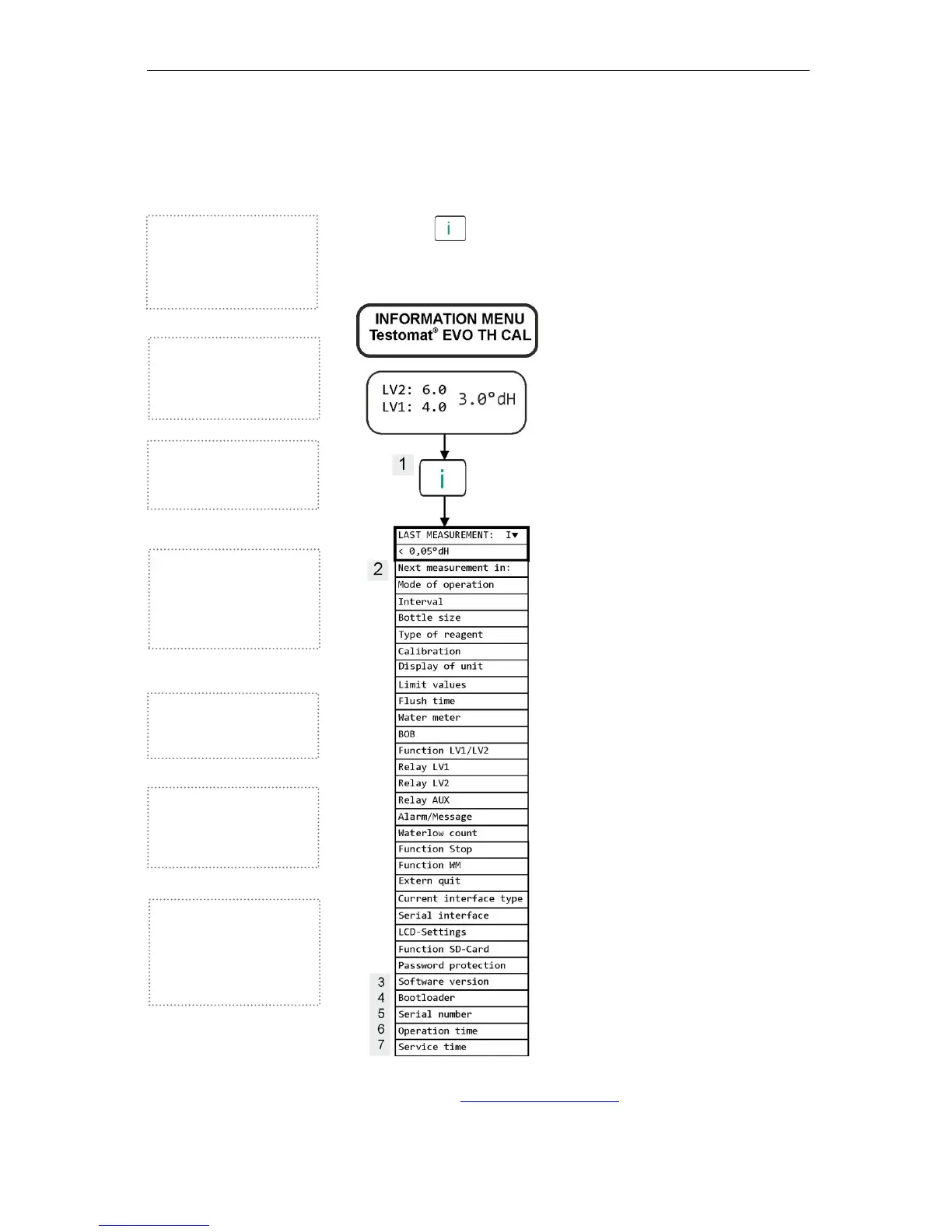
Information menu "i"
56
Information menu "i"
The information menu gives you scope to query current settings and
states of the device.
Call (1)
The button allows you to call up the information menu.
Scope for queries: Operating values and program values, such as
software version, container size and indicator type
Further notes on programming and setting individual menu options
can be found in Basic programming data.
Software version (3)
Indicator showing the installed
software version
Bootloader version (4)
Indicator showing the installed
bootloader version.
The bootloader is needed to
execute the firmware update.
Serial number (5)
Indicator showing the serial
number of the device.
Call (1)
Remote access in the infor-
mation menu to check or query
the settings and operating
values.
Next measurement (2)
Indicator showing the time
remaining before the next
measurement.
Operating time (6)
Indicator showing the operating
time of the device. Can be
reset in the service menu.
Maintenance (7)
Indicator showing the time
before the next maintenance.
Once the maintenance is
acknowledged, the counter is
reset.



 To Next Page