Page | 17
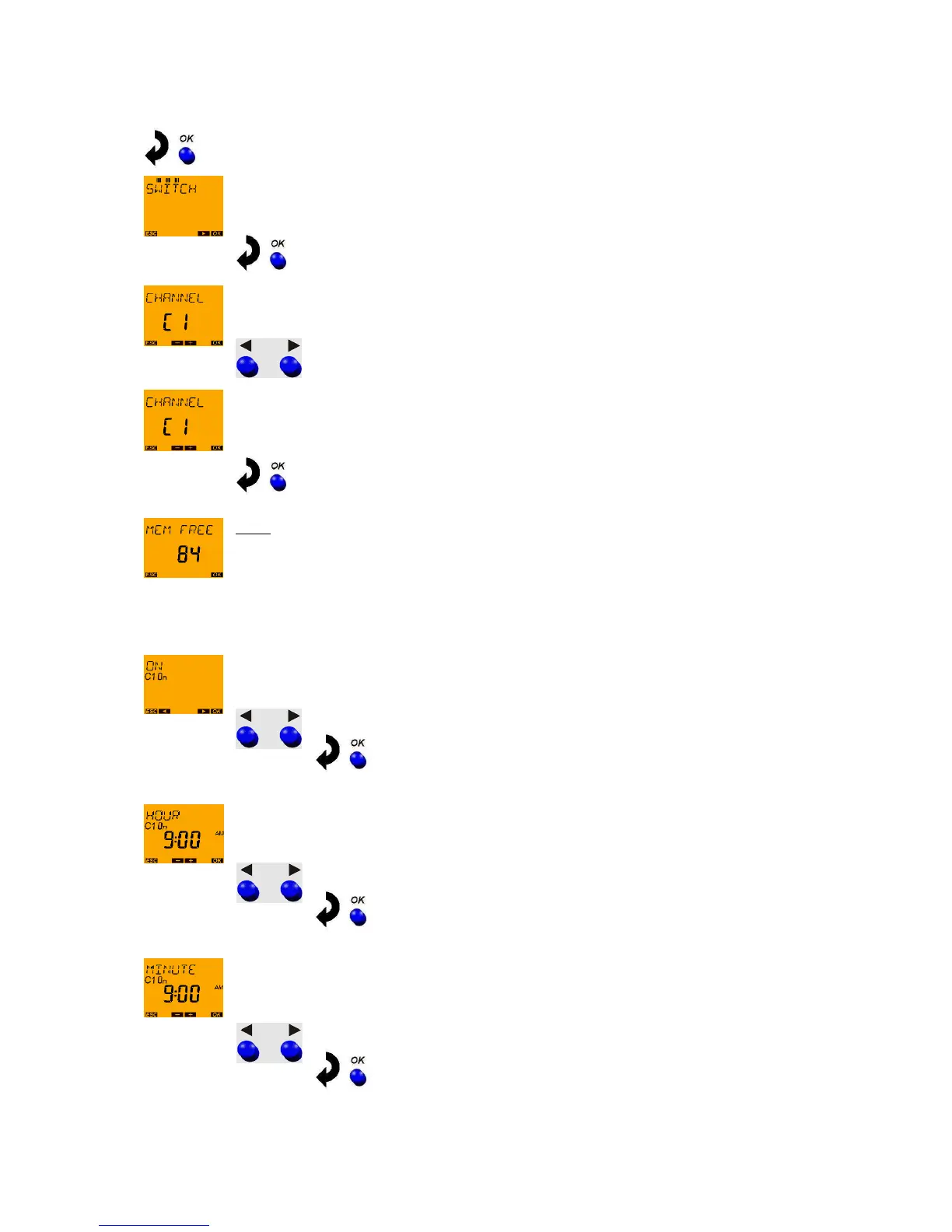
Press OK button. SWITCHING TIME appears on the display.
(only in devices TR 611 top2, TR 622 top2 and TR 611 top2 RC).
Press OK button. CHANNEL C1 appears on the display (only with the 2-channel devices).
Select channel 1 with arrow push buttons ◄ and ►.
Confirm channel 1 by pressing OK.
Note:
A brief fade-in now occurs which is only for the programming of the free memory locations
e.g. FREE 84 (if none of the 84 memory locations is occupied yet).
This fade-in can be prematurely ended by pressing the OK push button.
With the arrow push buttons ◄ and ► select channel status ON followed by confirmation
using the OK push button.
With arrow push buttons ◄ and ► set the HOUR for the switch-on (9:00 am)
and confirm with the OK push button.
With arrow push buttons ◄ and ► set the MINUTES for the switch-on (00 minutes)
and confirm with the OK push button.





 To Next Page