Page | 72
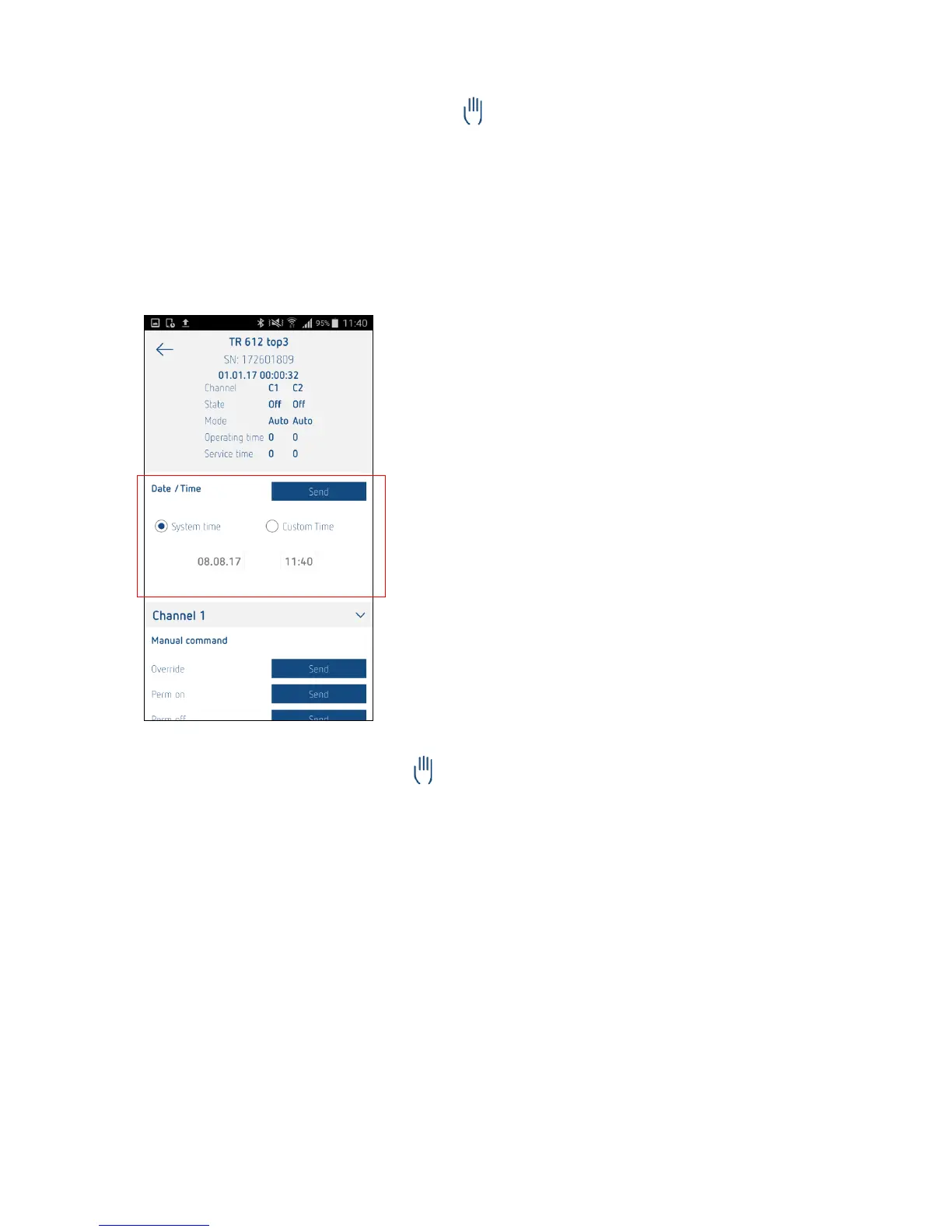
Sending the time and date to the time switch
You can use this app function to correct or modify the time switch time over Bluetooth.
.
There are two ways of doing this:
1. The mobile device time and date (system time) are transferred to the time switch.
DD/MM/YYYY – hh/mm/ss
2. A user-defined time and date are transferred to the time switch.
DD/MM/YYYY – hh/mm/ss
Executing a manual switch command
You can use this function to switch the channels of the time switch manually (irrespective of the
programmed switching times).
The following options are available:
Manual switching/switching preselection
Permanent ON
Permanent OFF
Manual switching/Switching preselection
The channel status (ON/OFF) is reversed. The programmed switching program remains active in the
time switch and is executed automatically again on the next switch command.
Permanent ON/OFF
The switching program in the time switch is deactivated and the selected channel is permanently ON or
OFF.





 To Next Page