Page | 33
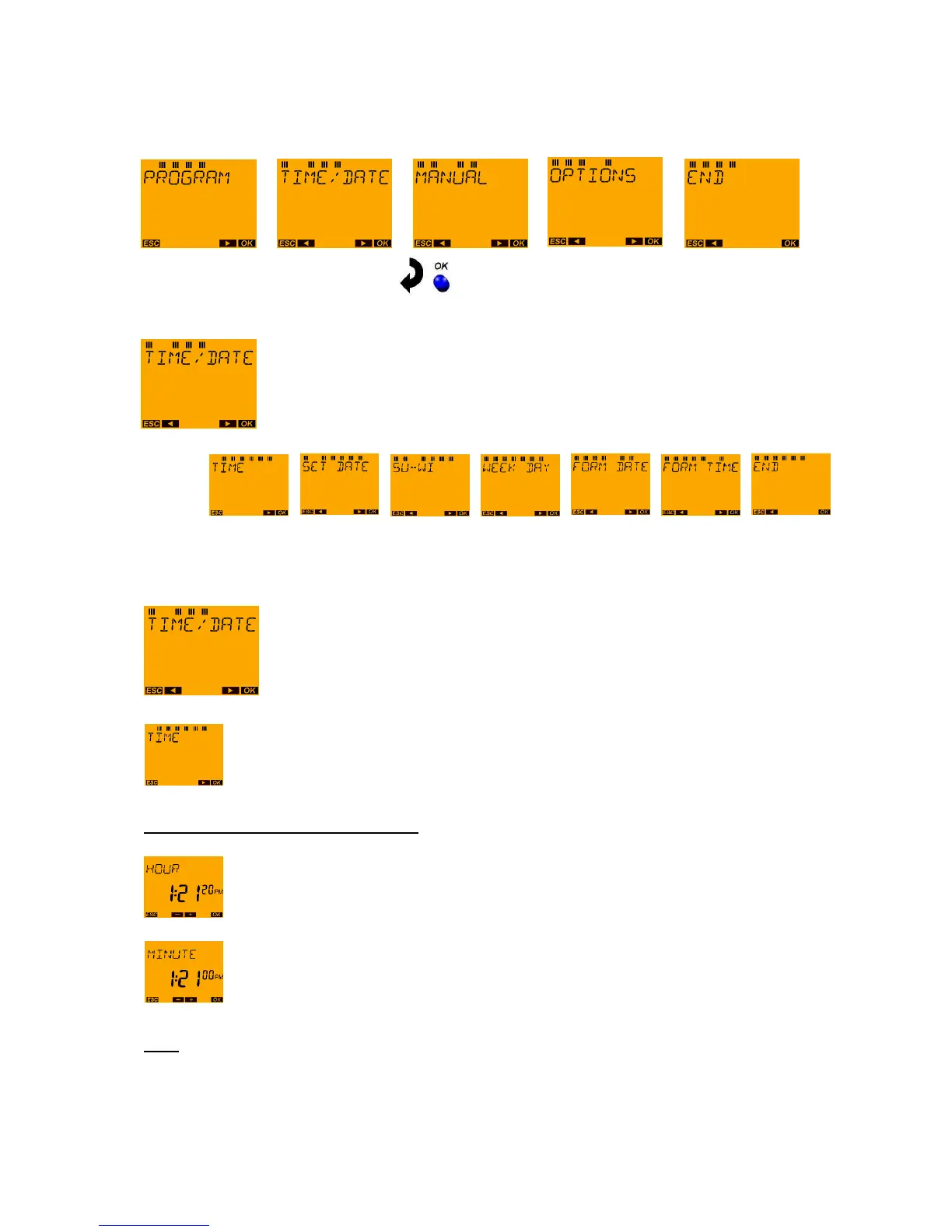
10 Menu: TIME/DATE
With the MENU push button request the main menu from the auto mode:
Submenu TIME/DATE:
10.1 TIME/DATE menu: TIME
Press OK button.
Press OK button.
Example: The time 1:21 pm should be set.
Set the correct time using the ◄ and ► push buttons. To do so, set the hours followed by
confirmation using the OK push button.
Proceed to set the minutes with the ◄ and ► push buttons and confirm with the OK push
button.
Note:
As soon as the hours or minutes have been changed the seconds remain at "00". It is not until the
minutes of the newly set time have been confirmed with the OK push button that the time switch
continues to run. As such, the time switch can be restarted synchronised to the second with real time.
In the event that the time was only checked but not changed, a return is made to the TIME menu item.





 To Next Page