Page | 81
Programming switching times in the graphical view (optional)
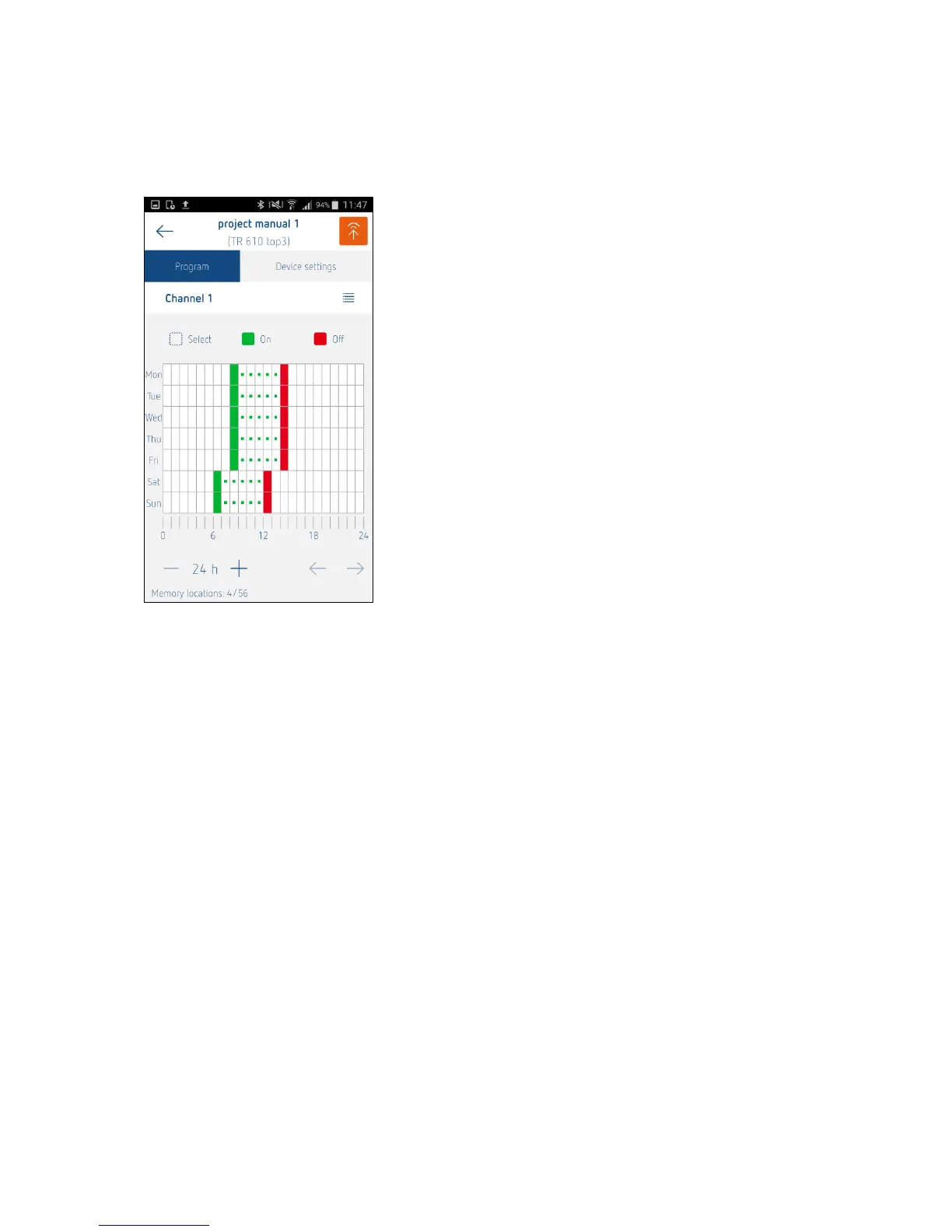
It is possible to define switching times by touching a graphical user interface.
Example: Mon - Fri, 8:00 AM - 2:00 PM each day
Sat and Sun, 6:30 AM - 12:00 PM
With graphical programming, you can touch the screen to set the switching times for each channel in a
grid. The resolution (time unit per grid element) can be scaled using the zoom function "– 24 h + " (1
hour, 30 minutes, 15 minutes). If the time unit is shorter than 1 hour (30 minutes, 15 minutes), you can
scroll the programming area to the left or right with the arrows.
The switching status (ON/OFF) must be calculated for the range between switching times. For OFF, the
corresponding box stays empty, for ON, a green dot is shown.
If there are several switching points in a grid range, the box is black.
If you tap Select and a switching time, a pop-up menu appears with the options "Copy", "Paste", "Edit"
and "Delete".
Copy, Paste, Delete: An individual switching time or a selected range
Edit: An individual switching time
A graphical switching time is edited in the list view.





 To Next Page