Page | 67
Read out operating hours
Setting a project weekly program
A project always consists of a program (e.g. Monday to Friday, 8:00 AM ON and 8:00 PM OFF) and
device settings.
All data (program + device settings = project) can be transferred simultaneously. It is also possible to
transfer just the program or just the settings. Check this in the app before starting the data exchange.
A project is always intended for a specific device type (e.g. switching program for TR 612 top3) and can
only be transferred to that same device type too.
! If a device is locked with a PIM code, this is requested before the data is transferred.
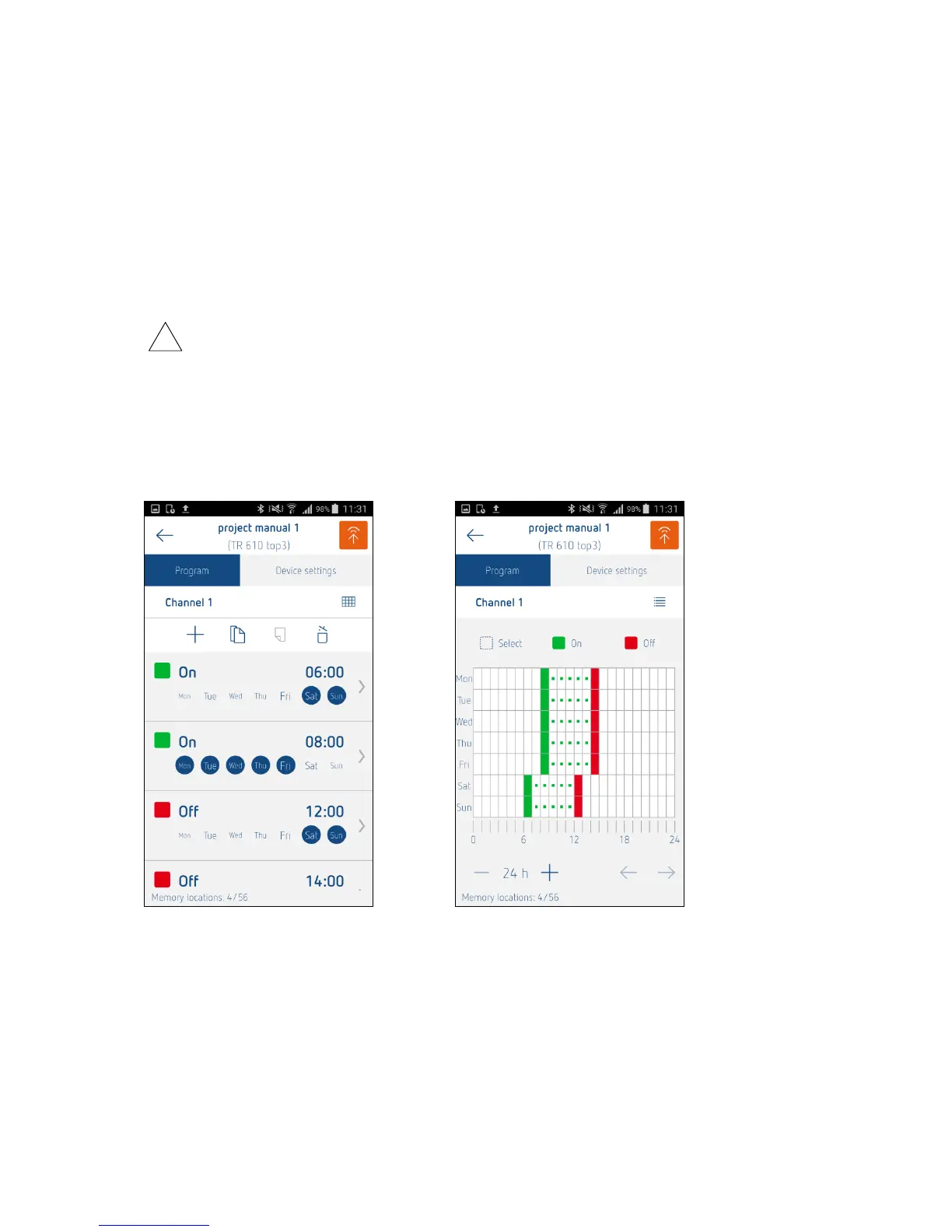
Any switch-on and switch-off times you like can be defined for each day of the week. The switching
times are set to the minute (hh:mm) either via a list view or, alternatively, a graphical input interface,
similar to that found in the OBELISK PC software.
List view (smartphone): Graphical view (smartphone) – optional:
The following device parameters are available as selection boxes:
Time format
o 12 h
o 24 h
Date format
o 31.12.00
o 12/31/00
o 00-12-31





 To Next Page