Page | 66
top3 app
The new top3 generation of Theben devices can be programmed and controlled from mobile end
devices (smartphones and tablets) via an app. As well as transferring switching programs, you can also
send direct switch and configuration commands to the device.
The app has been developed for Android and iOS operating systems (Android 4.4 KitKat [API18] and
higher, iOS 8 and higher).
Communication
Communication takes place via Bluetooth Low Energy (BLE). The BLE interface takes the form of a
plug-in Bluetooth dongle, which is inserted into the standard OBELISK interface and activated.
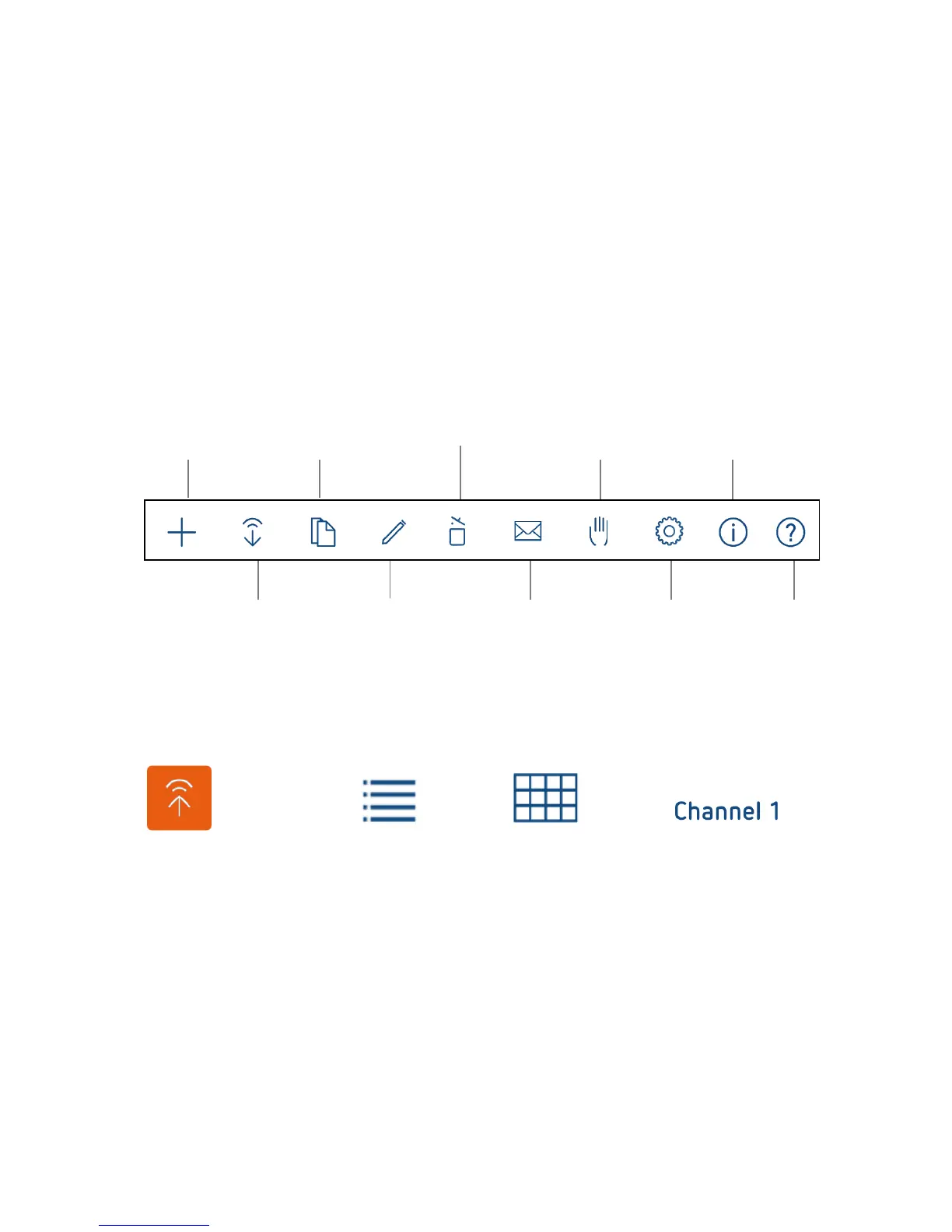
Symbols in the app start menu
New Copy Delete System time/ General
project projects Manual commands Information
Download Rename Send/receive Settings Online help
from device project e-mail,
save to cloud
Other symbols in the app
Send project/transfer
to device List icon Graphical view Channel switchover
App functions
Projects:
Create a new project
Edit existing projects on the mobile device
Duplicate existing projects on the mobile device
Transfer existing projects from the mobile device to the time switch
Transfer existing projects from the time switch to the mobile device
Send projects from the mobile device via e-mail
Import/open projects from an e-mail attachment
Save or load projects to a cloud
Direct commands/Device status:
Send time and date to the device
Execute manual switch command
Enter/delete holiday program





 To Next Page