Page | 51
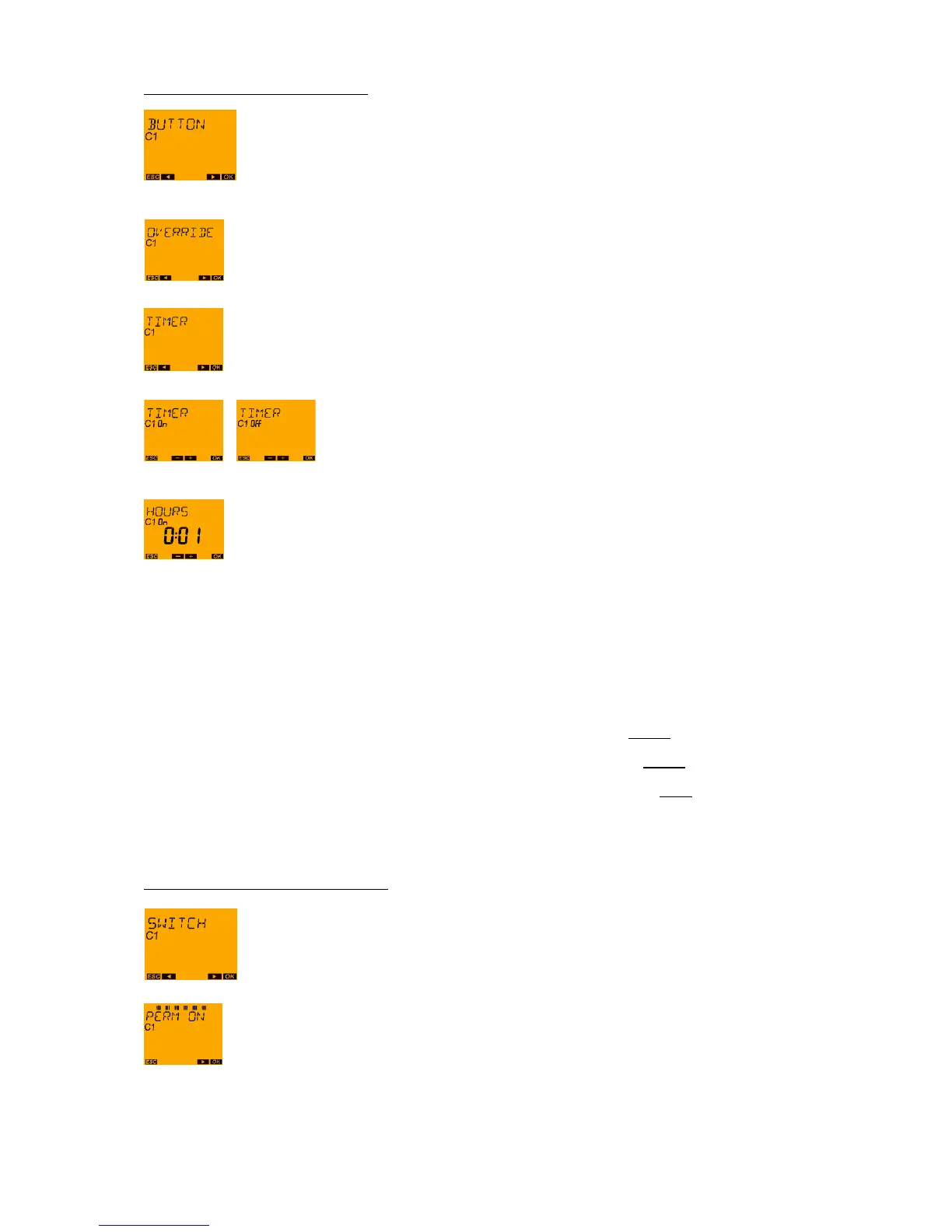
PUSH BUTTON - TIMER Function
Confirm by pressing OK.
With push button ► change to TIMER
Confirm by pressing OK. With push buttons ◄ and ► an ON/OFF selection can now be
made.
The ON or OFF selection can be confirmed with the OK push button.
Proceed to set the hours with the ► push buttons and confirm with the OK push button.
Proceed to set the minutes in the same way and confirm with the OK push button.
A return is now made to EXTERNAL INPUT. The TIMER mode (hourglass function with the set
sequence duration) is set as the function for the connected push button.
12.2.3 SWITCH - Functions
Select the switch function:
o PERMANENT ON switches the channel ON in the case of closed switch.
o PERMANENT OFF switches the channel OFF in the case of closed switch.
o CHANNEL RELEASE switches the channel OFF in the case of open switch. This
ensures that the time can also run in the "Stand-by" mode without the switching
function being executed. If required, the time and the switching program programmed
with it can be activated by closing the switch.
SWITCH - PERMANENT ON function
Confirm by pressing OK.
Confirm by pressing OK.
The function of the External Input is activated. A return is now made to EXTERNAL INPUT.





 To Next Page