CUTMASTER 58
OPERATION Manual 0-5544
4-2
4.02 Preparations for Operation
At the start of each operating session:
WARNING
Disconnect primary power at the source before as-
sembling or disassembling power supply, torch parts,
or torch and leads assemblies.
Torch Parts Selection
Check the torch for proper assembly and appropriate
torch parts. The torch parts must correspond with the
type of operation, and with the amperage output of this
Power Supply (60 amps maximum). Refer to Section
4T.07 and following for torch parts selection.
Torch Connection
Check that the torch is properly connected. Only Ther-
mal Dynamics model SL60QD or SL60 / Manual or SL100
/ Mechanical Torches may be connected to this Power
Supply. See Section 3T of this manual.
Check Primary Input Power Source
1. Check the power source for proper input voltage. Make
sure the input power source meets the power require-
ments for the unit per Section 2, Specifications.
2. Connect the input power cable (or close the main
disconnect switch) to supply power to the system.
Air Source
Ensure source meets requirements (refer to Section 2).
Check connections and turn air supply ON.
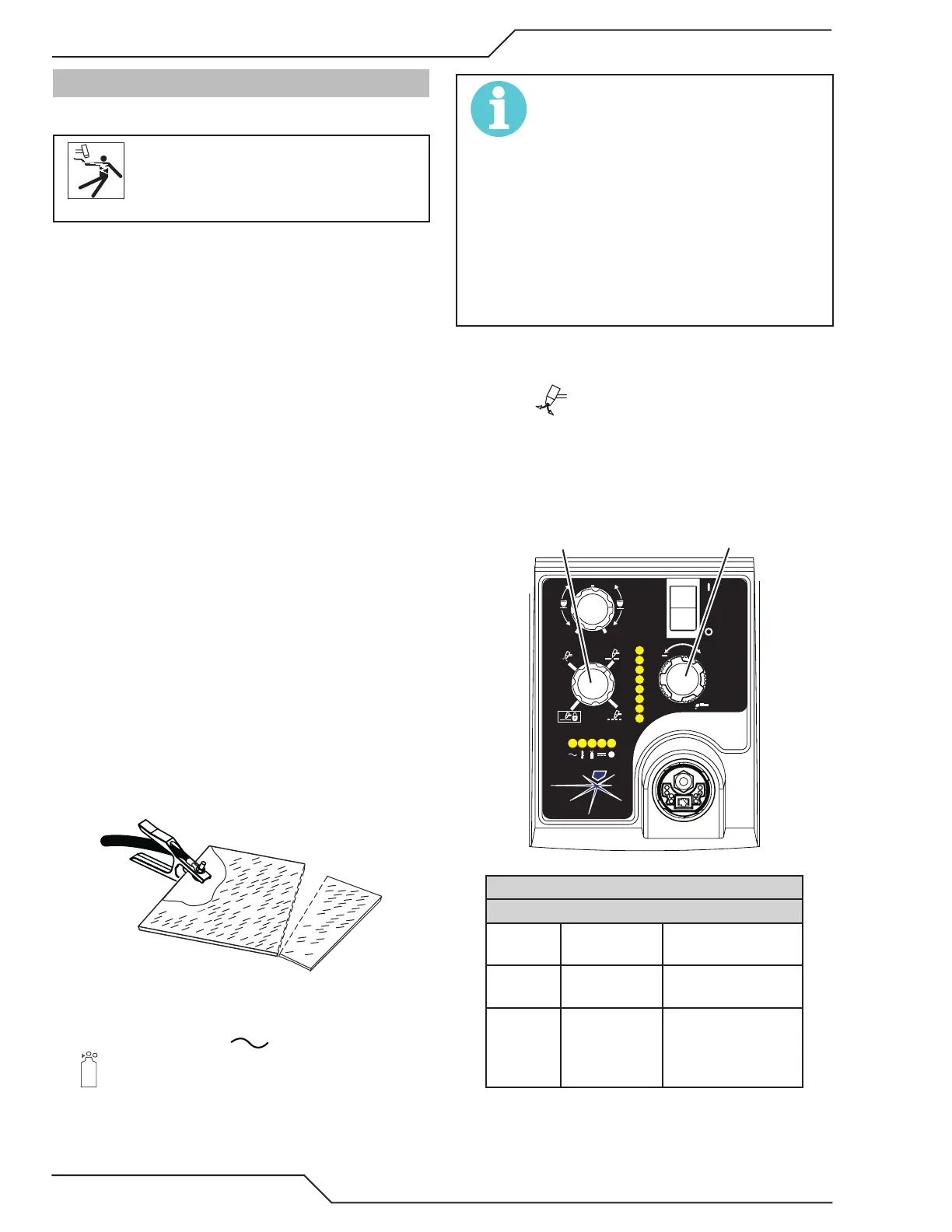
Connect Work Cable
Clamp the work cable to the workpiece or cutting table.
The area must be free from oil, paint and rust. Connect
only to the main part of the workpiece; do not connect
to the part to be cut o.
Power ON
Place the Power Supply ON / OFF switch to the ON (up)
position. AC indicator turns ON. Gas indicator
turns ON if there is sucient gas pressure for power
supply operation and the cooling fans turn ON.
NOTE!
Minimum pressure for power supply operation is
lower than minimum for torch operation.
The cooling fans will turn ON as soon as the unit is
turned ON. After the unit is idle for ten (10) minutes
the fans will turn OFF. The fans will come back ON as
soon as the torch switch (Start Signal) is activated
or if the unit is turned OFF, then turned ON again. If
an over temperature condition occurs, the fans will
continue to run while the condition exists and for a
ten (10) minute period once the condition is cleared.
Set Operating Pressure
1. Place the Power Supply Function Control knob to the
SET position. Gas will flow.
2. For Standoff cutting, adjust gas pressure from 70 - 85
psi / 4.8 - 5.9 bar (LED's in center of control panel).
Refer to the Standoff chart for pressure setting details.
A
+
PSI BAR
MAXMAX
MINMIN
!
MIN
MAX
STANDOFF
CutMaster 58 Gas Pressure Settings
Leads
Length
SL60QD
(Hand Torch)
SL100
(Mechanized Torch)
Up to 25'
(7.6 m)
75 psi
5.2 bar
75 psi
5.2 bar
Each
additional
25'
(7.6 m)
Add 5 psi
0.4 bar
Add 5 psi
0.4 bar










 To Next Page