REVUE THOMMEN AG
CH-4437 Waldenburg
AD20 Standby Altimeter
Page 21 of 72
07-Sep-2009 Document No: AD-INSOP-800 Revision: 1.6
2.2.2.1 Display
2.2.2.1.1 Digital Altitude Display
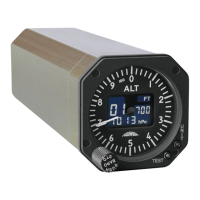
The aircraft's altitude is displayed on the digital display window with the range from –1’000 up to
55'000 ft, in 10, 20, 50 or 100 ft increments.
2.2.2.1.2 Altitude Pointer
The Altitude pointer moves with 1000 feet increments. The dial is marked with 100 (major) and 20
(minor) feet [meter] graduations.
2.2.2.1.3 Altitude Scale Setting ft/m
The Altitude scale setting FT/M indicates the scale unit in feet or meter. The scale unit has
manufacturer preset value and can be set to different scale settings (hPa/ft, inHg/ft, hPa /m) by
pushing the UNIT setting button.
2.2.2.1.4 Baro Setting Display
The Baro Setting Display shows the barometric pressure which ranges between 20.67 to 31.00 inHg
or 700 to 1050 hPa.
2.2.2.1.5 Baro Scale Setting inHg/hPa
The Barometric Scale setting indicates the barometric pressure unit which can be set in inHg or hPa.
2.2.2.1.6 Battery Engagement Indicators A, B and C
A – Indicates that the Battery is is aged and must be replaced.
B – Indicates that the Battery is activated.
C – Indicates that the maintenance mode (calibration) is in progress.


 To Next Page