REVUE THOMMEN AG
CH-4437 Waldenburg
AD20 Standby Altimeter
Page 60 of 72
07-Sep-2009 Document No: AD-INSOP-800 Revision: 1.6
5.3 Manual Maintenance Mode
The manual maintenance mode gives access to internal settings and maintenance functions.
The sub modes of the manual maintenance mode are:
Display 1: Battery Capacity Test
Display 2: High Resolution Altitude
Display 3: Lighting Curve Selection
Display 4: Lighting Curve Adjustment
5.3.1 Entering Manual Maintenance Mode
The manual maintenance mode is entered by pushing the UNIT button (or the equivalent
button at MD21 bezel) during startup of the instrument.
Then display 1 appears, indicator “C” is displayed and WFV discrete output is set high
(invalid).
Push the UNIT button to select the next display. Display 4 will roll over to display 1.
The manual maintenance mode can be left by pushing the TEST button for > 3 s.
5.3.2 Display 1: Battery Capacity Test (provision)
This test determines the current capacity of the battery. Activate the battery test by the
following procedure:
1.) Apply primary power and charge battery completely for at least 4 h
2.) Activate battery activation discrete input
3.) Enter manual maintenance mode and select battery capacity test display
4.) Disconnect primary power supply to start the test
Note: The battery test is only possible if the battery is completely charged. If it is not possible
indicator ‘B’ blinks.
During battery test indicator ‘A’ blinks. The discharged accumulated current in mAh is
displayed at center line and decimals are indicated on the right side at bottom line. Display 1
is indicated at bottom line on the left side.
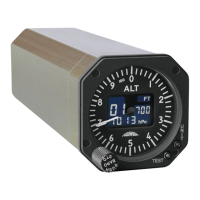
Refer to example of display 1 below indicating 1500.25 mAh:


 To Next Page