REVUE THOMMEN AG
CH-4437 Waldenburg
AD20 Standby Altimeter
Page 22 of 72
07-Sep-2009 Document No: AD-INSOP-800 Revision: 1.6
2.2.2.2 Controls
2.2.2.2.1 Baro Setting Knob
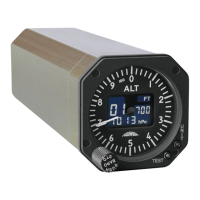
Barometric pressure is a four digit readout in the lower part of the display and is used to adjust
barometric setting. By rotating the Baro Setting knob the barometer setting value changes ranging
between 20.67 to 31.00 inHg or 700 to 1050 hPa. The knob also allows the altimeter to indicate zero
altitude with any existing ground level pressure ranging between 20.67 to 31.00 inHg or 700 to 1050
hPa as selected. This extended adjust range allows QFE settings so altimeter reads zero at field
elevation.
2.2.2.2.2 Push to Standard Knob
By pushing the Baro setting knob (push-to-standard) function the baro pressure value will
automatically change to the international standard of the barometric pressure of 29.9213 (29.92
displayed) inHg or 1013.25 hPa.
2.2.2.2.3 UNIT Button
Pressing the UNIT button results in a barometric scale display change to indicate ‘inHg’ or ‘hPa’ as
applicable. Optionally the altitude setting scale is displayed in ‘feet’ or ‘meter’ according to the
configuration.
The altimeter continuously operates to display the scale selected for all subsequent flights until the
selection is changed again. This is possible "in flight" also. The following combinations are
parametric:
• hPa / ft, hPa / m (fixed hPa)
• hPa / ft, inHg / ft (fixed feet)
• hPa / ft, inHg / ft, hPa / m (all combinations)
2.2.2.2.4 TEST Button
The “TEST” button is flush mounted and located on the bezel of the AD20 Standby Altimeter. By
pushing and holding the TEST button for few seconds, the instrument performs the self test function
(Built-In-Test) for the internal circuitry and the LCD. If the Built-In-Test (BIT) fails "Err" (Error) word
appears on the altitude display window.


 To Next Page