- 41 -
SETTING UP THE WEEKLY SCHEDULER
The Scheduler can be programmed to start and stop the engine based on time of day and the day of
week. Up to 24 events can be set. Each event is programmed in the Scheduler Configuration menu.
A single event can be an engine run that starts the engine on Monday at 12:00 PM and stops it at
12:30 PM. A single event can also be a daily run, where it starts the engine at 12:00 PM, stops it at
12:15 PM every day of the week. Cycle power to the module after changing or setting up events.
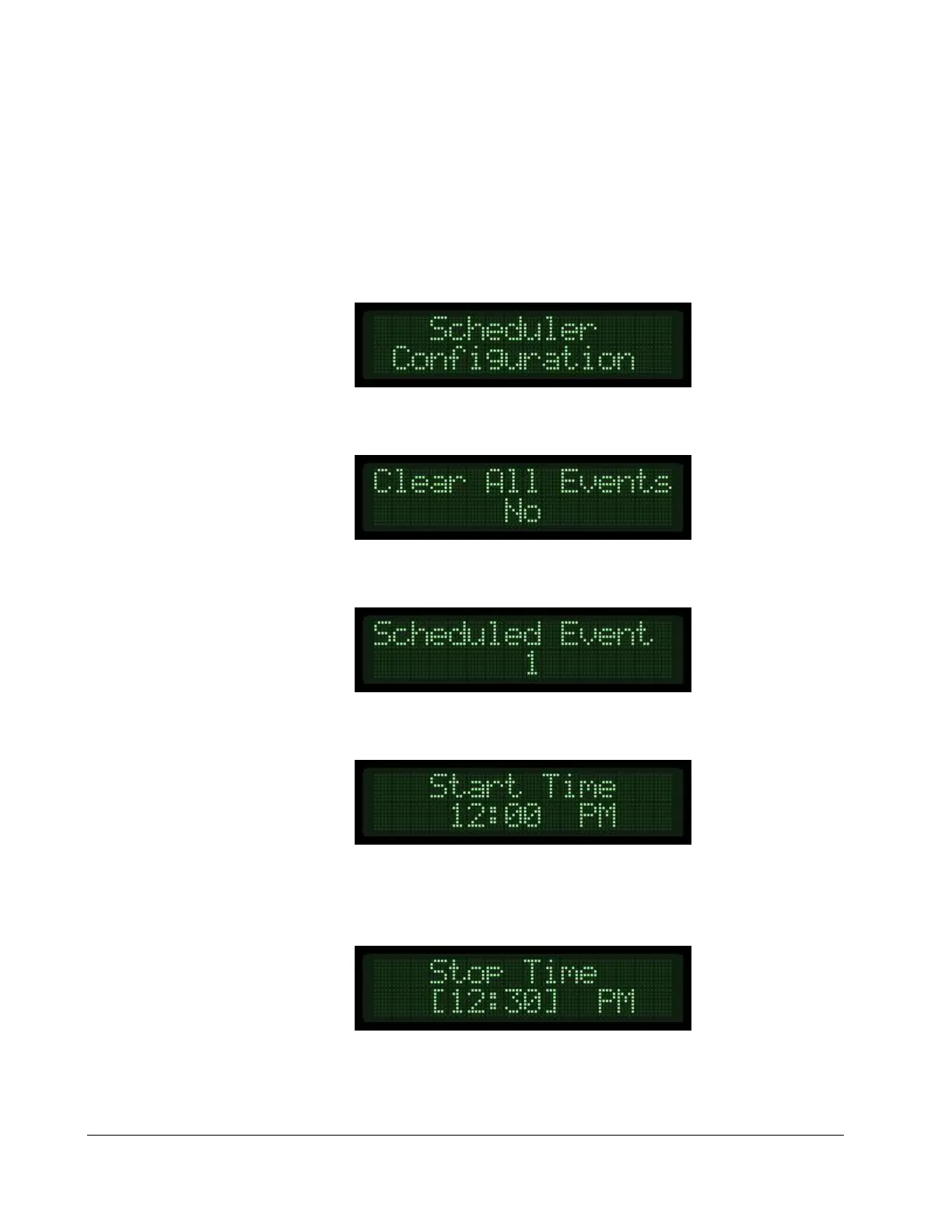
1) Locate the Scheduler Configuration menu in the Controller Setup are of the menu.
2) Press the up arrow key to access the Clear All Events page. Press Enter and the Up arrow to
change the No to a Yes if desired. Press the Enter key to confirm the clear command.
3) Press the up arrow key to select the event you wish to modify. Always use events in
numerical order to avoid forgotten events.
4) Press the up arrow key to see and/or change the event Start Time. To change the start time,
press the Enter key, use the up or down arrows to set, and press the Enter key again to save.
5) Press the up arrow key to see and/or change the event Stop Time. To change the stop time,
press the Enter key, use the up or down arrows to set, and press the Enter key again to save.


 To Next Page