EasyManua.ls Logo

Tigo EI - DC Disconnect and Enclosure Knockouts; Status Indicators

Tigo EI
77 pages
Print Icon
To Next Page IconTo Next Page
To Previous Page IconTo Previous Page
Loading...
The EI Inverter – Enclosure Overview
EI Residential Solar Solution US Installation Manual | www.tigoenergy.com | Help Center 8
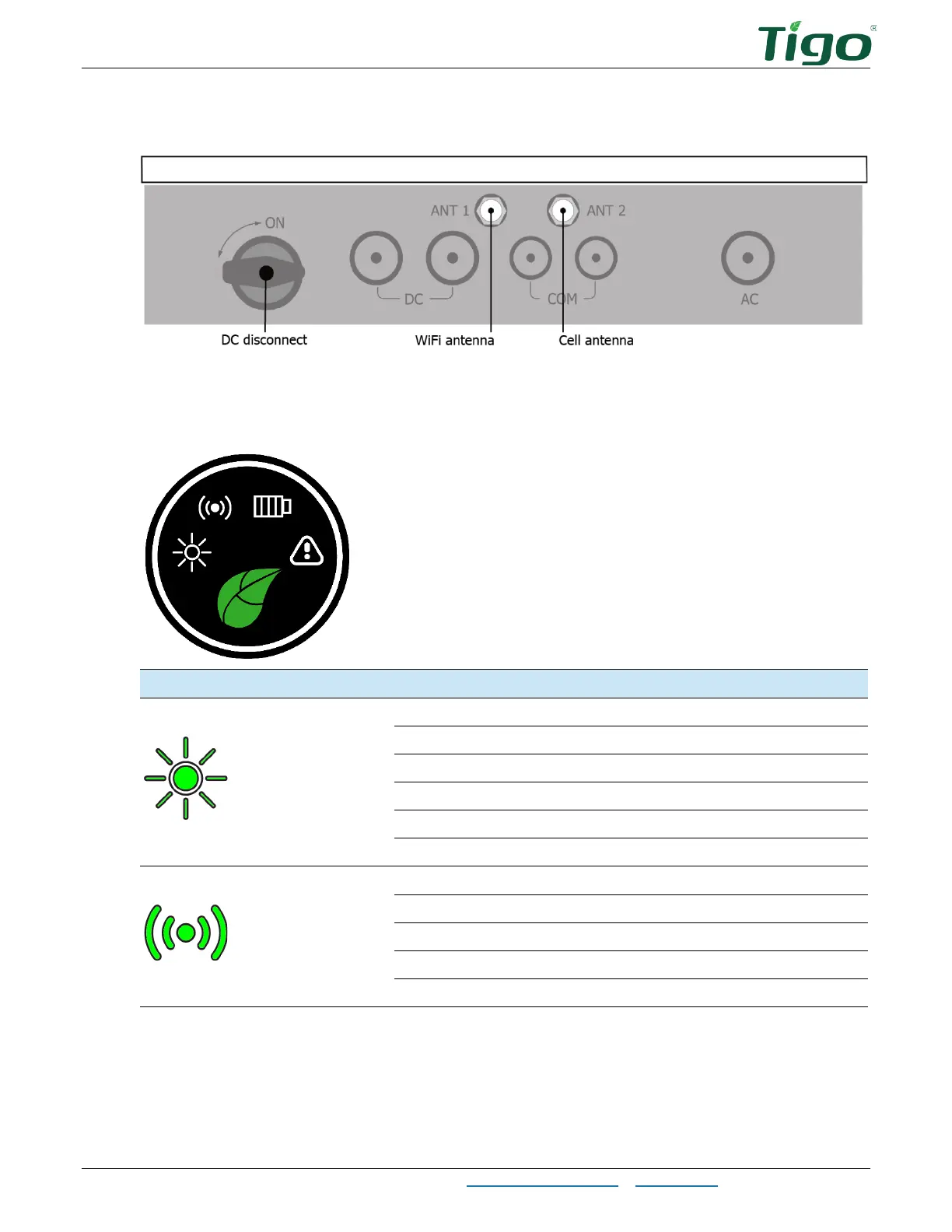
DC Disconnect and Enclosure Knockouts
Status Indicators
The status indicator LEDs in the center of the inverter front panel show the EI system’s current
operating conditions.
Symbol
Action
Description
Power
Continuous
Feed in grid
Flashing 3s on/1s off
DC on/AC off
Flashing 1s on/3s off
DC off/AC on
Flashing .5s on/.5s off
Checking
Flashing 2s on/2s off
Standby mode
Off
Disconnected
Communications
Continuous
4G/WiFi, local WiFi ok
Flashing .5s on/.5s off
Local WiFi connecting
Flashing 1s on/1s off
4G/WiFi failure, local WiFi ok
Flashing 1s on/3s off
Local WiFi failure, 4G/WiFi ok
Off
Failure

Other manuals for Tigo EI