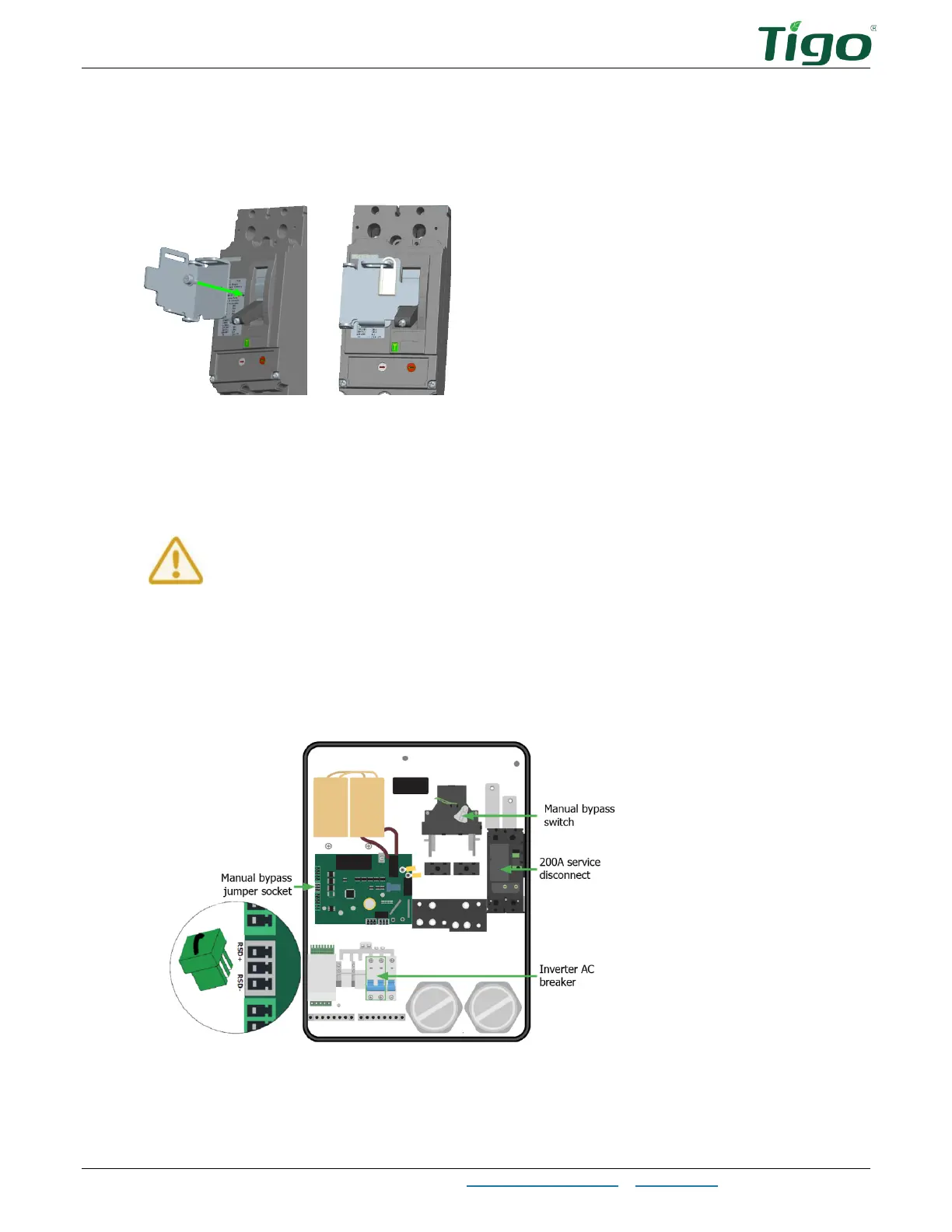
The EI Automatic Transfer Switch (ATS) – Service Disconnect Lock
EI Residential Solar Solution US Installation Manual | www.tigoenergy.com | Help Center 31
Service Disconnect Lock
To install the lock plate and screw (located in the ATS
Accessories
bag) on the 200A service
disconnect, pull back or cut the label to reveal the lock plate screw hole and attach the plate.
Manual Bypass Switch
This switch lets you provide full electrical service for homeowners while installing,
commissioning, or maintaining a residential solar solution. It isolates inverter, battery, and PV
components while routing power from the grid to the home service panel.
Before using the manual bypass switch, turn the 200A service disconnect and
the inverter AC breaker to OFF. Wait until no ATS LEDs show power before
proceeding.
To avoid damaging equipment and to safely bypass the ATS, follow these instructions carefully
with particular attention to:
• Installing the manual bypass jumper found in the ATS
Accessories
bag.
• Letting the ATS automatically reset the manual bypass switch during restart – it must
not be manually reset.



 To Next Page