41
8.19. Bus Assignment and Crosspoint Gain Settings
ON
[IN 1] ASSIGN
[OUT1] ––––––––
M
PARAMETER
PUSH-ENTER
CHANGE
• Rotate the Setting knob to select the output channel bus (1 – 8 or
MicB*), then press the function ON/OFF key to enable or disable
the assignment.
* Microphone bus : The "M" indication is displayed when enabled.
[Setting example]
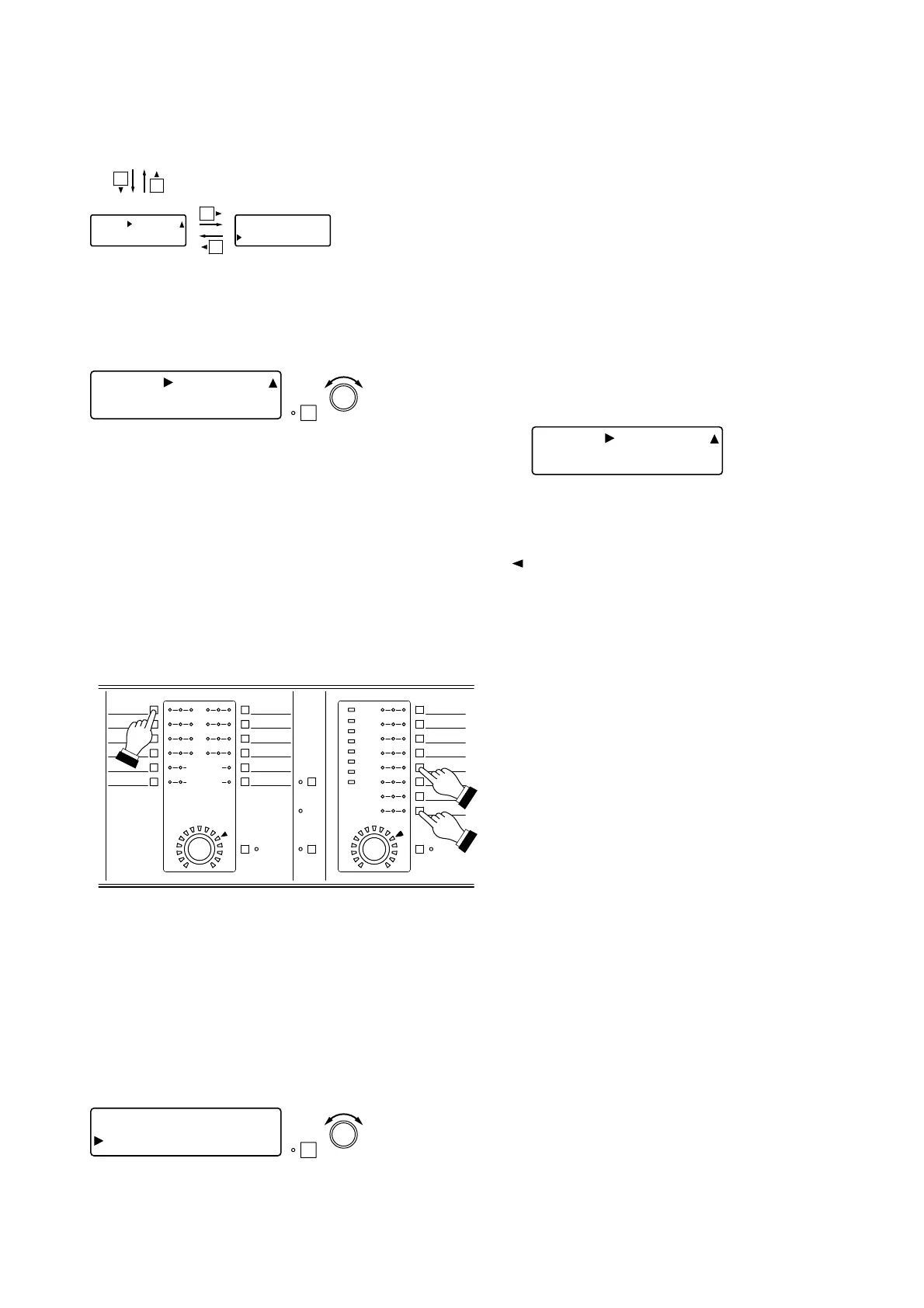
• Pressing an Input channel selector key permits the bus
assignment to be set for that channel. The [IN 1] indication
changes to the selected channel number indication.
• The setting screen reverts to the Input/Output Gain Setting
screen when the shift key is pressed.
Bass assignment
Crosspoint gain
Input channel gain settings (previous page) or Input channel group trim gain settings (previous page)
[IN 1] ASSIGN
[OUT1] –––
–
––––M
[ IN 1] GAIN
OUT 1 0 dB
8.19.2. Crosspoint gain settings
ON
MIC BUS
FBS
EFFECT
8
7
6
5
1
2
3
4
5
612
11
10
9
8
7
INPUT OUTPUT
4
3
2
1
ON
SEL
+12dB
+6dB
0dB
-6dB
PEAK
-40dB
-20dB
-12dB
0N SIG SEL
SEL SIG 0N 0N SIG SEL
(Example: Input channel 1 → Output channels 5 and 8)
Press the desired Output channel selector
key(s) while holding down the Input channel
selector key.
The set output channel's indicator [SEL] lights.
Pressing the microphone bus selector key sends
the signal from the selected input channel to the
microphone bus.
Tip
The channel is simultaneously assigned to both L and R channels when assigned from "stereo-linked" input
channels to "stereo-linked" output channels. (Refer to p. 56 Stereo Link Settings.)
[Example] When Inputs 1 and 2 and outputs 1 and 2 are both "stereo-linked," pressing the Input Channel 1
selector key and Output Channel 1 selector key sets the assignment of Input 1 → Output 1 and Input 2 →
Output 2, causing the Output Channels 1 and 2 indicators [SEL] to light.
[IN 1] ASSIGN
[OUT1] 123–––––
M
Note
The bus assignment settings can also be performed using only the input/output channel controls on the front
panel.
8.19.1. Bus assignment settings
Set input-to-output signal paths.
ON
[IN 1] GAIN
OUT 1 ] 0 d
B
PARAMETER
PUSH-ENTER
CHANGE
• Rotate the Setting knob to set the crosspoint gain.
Parameter setting range: –INF (–∞) to 0 dB in 1 dB steps
• Pressing an Input channel selector key permits the input channel
selection.
• Pressing an Output channel selector key permits the output
channel selection.
• Pressing the function ON/OFF key enables or disables the
selected assignment.
[Screen display operations]



 To Next Page