67
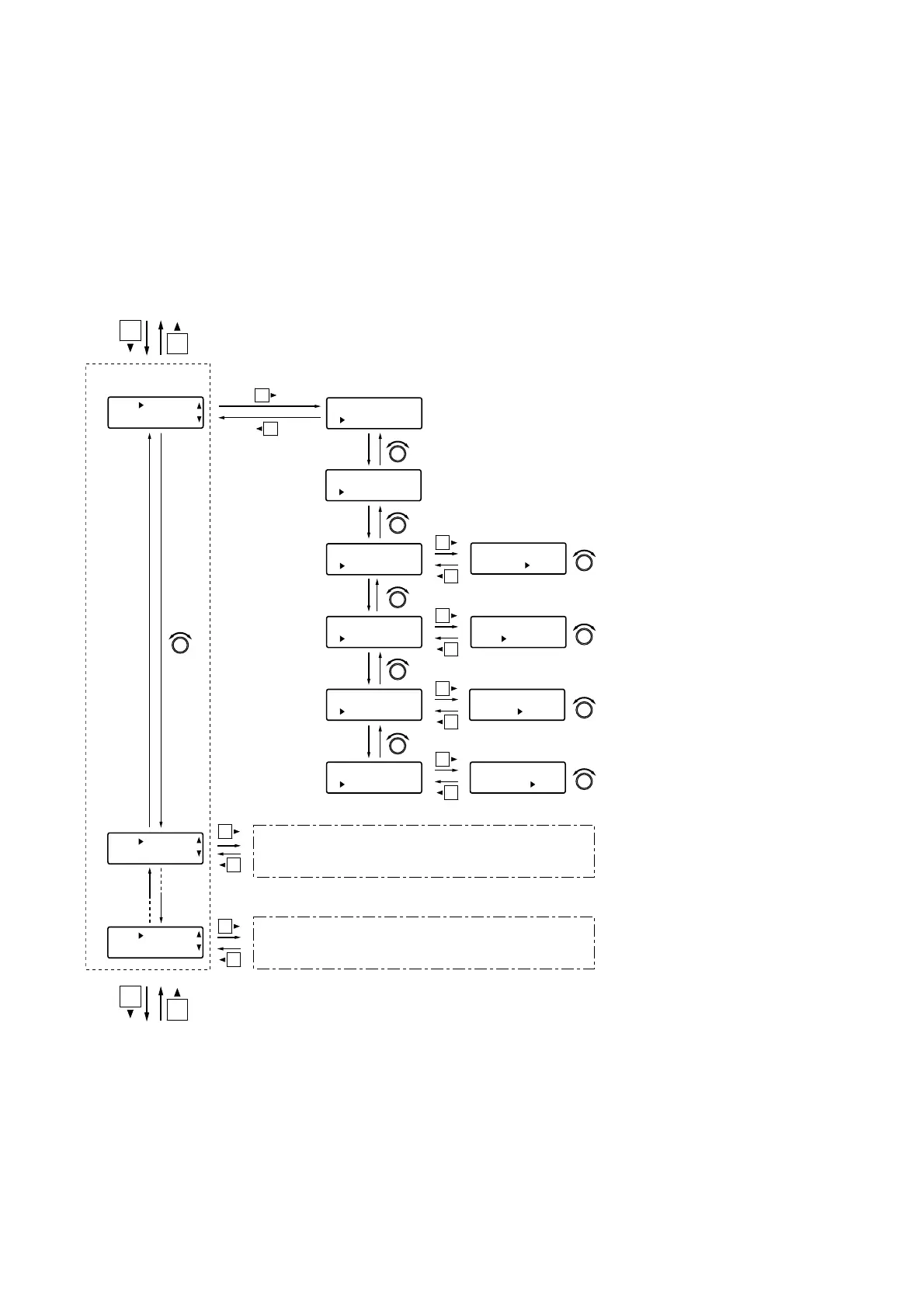
12.5.2. Function assignment to the output contact
The following functions can be assigned to output contacts (1 – 8 when the D-981 or D984-VC is used, and 1
– 16 when the D-983 is used).
Preset memory recall tally, Channel ON/OFF tally, Contact input status tally,
and Line (stereo) input selection tally
The procedures for assigning functions are the same as those used when assigning functions to the input
contacts.
[Screen display operations]
Contact input
status tally
Preset memory
recall tally
Channel ON/OFF tally
Channel number
Preset memory number
Normally break
Normally make
Contact input number
[UTY] RM IN
2:NON
E
[UTY] RM IN
8:NON
E
Line (stereo) input
selection tally
Setting items are the same as above.
Setting items are the same as above.
[UTY] RM OUT
1:BREA
K
[UTY] RM OUT
1BREA
K
[UTY] RM OUT
1MAK
E
[UTY] RM OUT
1 PRESET
1
[UTY] RM OUT
1CH IN
1
[UTY] RM OUT
1RMIN
1
[UTY] RM OUT
1LineSel S2–
1
[UTY] RM OUT
1 : PRESET
1
[UTY] RM OUT
1:CH IN
1
[UTY] RM OUT
1:RM IN
1
[UTY] RM OUT
1:LineSel S2–
1
Output contact
number selection
Input contact number selection (p. 65)
Protect settings (next page)
PARAMETER
PUSH-ENTER
CHANGE
PARAMETER
PUSH-ENTER
CHANGE
PARAMETER
PUSH-ENTER
CHANGE
PARAMETER
PUSH-ENTER
CHANGE
PARAMETER
PUSH-ENTER
CHANGE
PARAMETER
PUSH-ENTER
CHANGE
PARAMETER
PUSH-ENTER
CHANGE
PARAMETER
PUSH-ENTER
CHANGE
PARAMETER
PUSH-ENTER
CHANGE
PARAMETER
PUSH-ENTER
CHANGE
Slot number/line (stereo)
input number
Set to [Normally break]*.
Set to [Normally make]*.
Select the preset memory
number.
Select the channel number.
Select the contact input number.
Select the slot number and line
(stereo) input number for the D-
936R or the D-937SP (only when
the D-936R or the D-937SP is
used).
(Example. S2-1: First line
(stereo) input for the stereo
module inserted into Slot 2)
* Normally break: Turning on the power sets the contact output to "break."
Normally make: Turning on the power sets the contact output to "make."
Note: All contact outputs are at break while the power is off.



 To Next Page