3-5
Chapter 3
INSTALLATION AND SETTING PROCEDURES (HARDWARE)
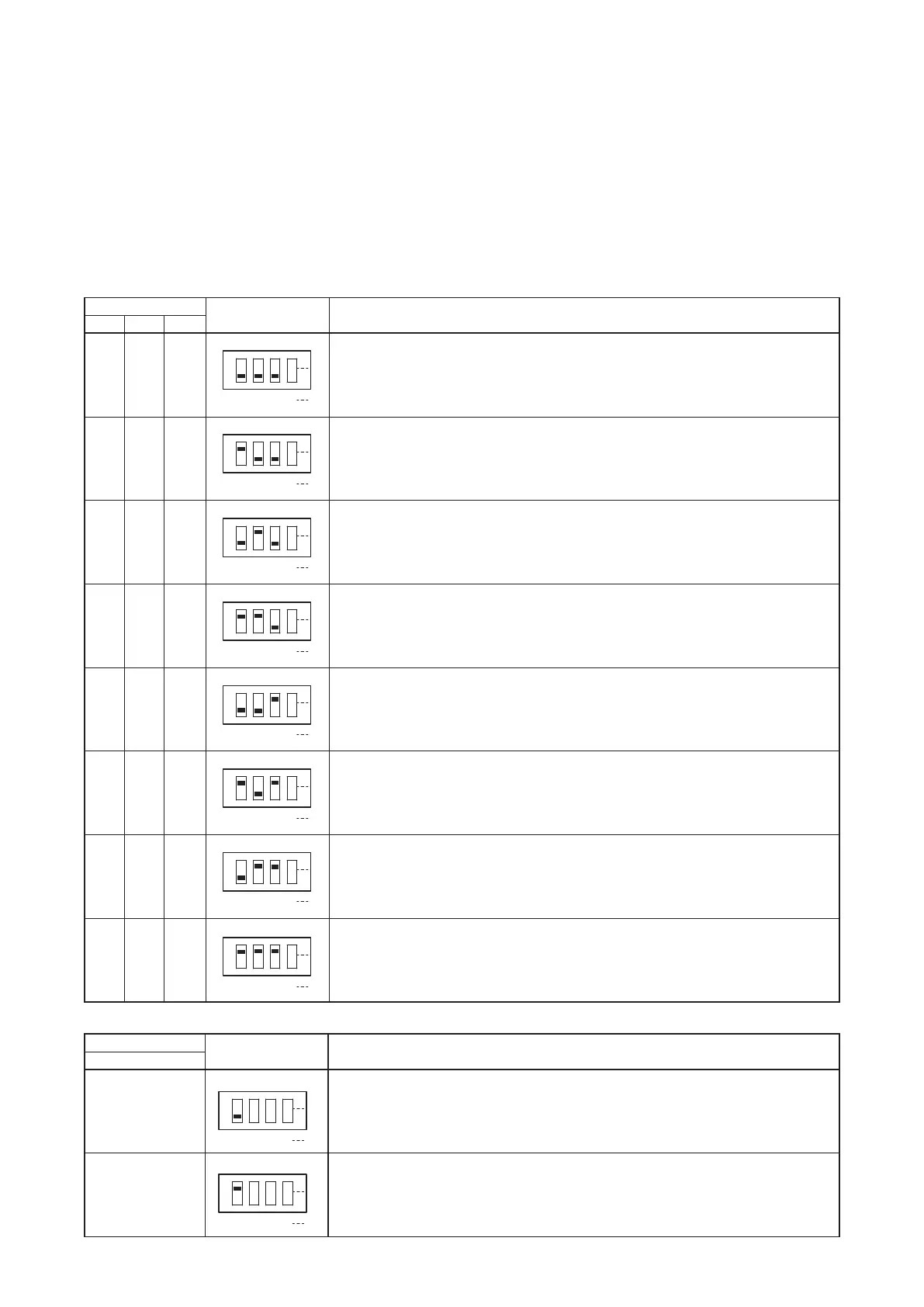
2.2. The Zones Allocation Setting
For the VX-3008F and VX-3016F units, the preset relationship between broadcast zones and power amplier/
line output modules can be changed by the settings of the DIP switch inside the front panel.
VX-3008F: You can perform the zone allocation settings for all-zone emergency broadcast at CPU off state.
Note
For normal broadcasts, use the VX-3000 Setting Software to perform this setting.
VX-3016F: You can perform the zone allocation settings for normal broadcasts, and all-zone emergency
broadcast at CPU off state.
[Modules inside the VX-3008F and output zone configuration]
Switch
Figure Module and output zone conguration
1 2 3
OFF OFF OFF Allocates the Slot 1's output to Zones 1 through 8.
ON OFF OFF Allocates the Slot 1's output to Zones 1 through 7 and the Slot 2's output
to Zone 8.
OFF ON OFF Allocates the Slot 1's output to Zones 1 through 6 and the Slot 2's output
to Zones 7 and 8.
ON ON OFF Allocates the Slot 1's output to Zones 1 through 5 and the Slot 2's output
to Zones 6 through 8.
OFF OFF ON Allocates the Slot 1's output to Zones 1 through 4 and the Slot 2's output
to Zones 5 through 8.
ON OFF ON Allocates the Slot 1's output to Zones 1 through 3 and the Slot 2's output
to Zones 4 through 8.
OFF ON ON Allocates the Slot 1's output to Zones 1 and 2 and the Slot 2's output to
Zones 3 through 8.
ON ON ON Allocates the Slot 1's output to Zone 1 and the Slot 2's output to Zones 2
through 8.
1 2 3 4
ON
1 2 3 4
ON
1 2 3 4
ON
1 2 3 4
ON
1 2 3 4
ON
1 2 3 4
ON
1 2 3 4
ON
1 2 3 4
ON
[Modules inside the VX-3016F and output zone configuration]
Switch
Figure Module and output zone conguration
1
OFF Allows to allocate the Slot 1's output to Zones 1 through 16
(1 channel, 16 speaker selectors)
ON Allows to allocate the Slot 1's output to Zones 1 through 8 and the Slot 2's
output to Zones 9 through 16. (2 channels, 8 speaker selectors)
1 2 3 4
ON
1 2 3 4
ON



 To Next Page