3-58
Chapter 3
INSTALLATION AND SETTING PROCEDURES (HARDWARE)
8.2. Connecting the Cable to the Push-in Terminal Block
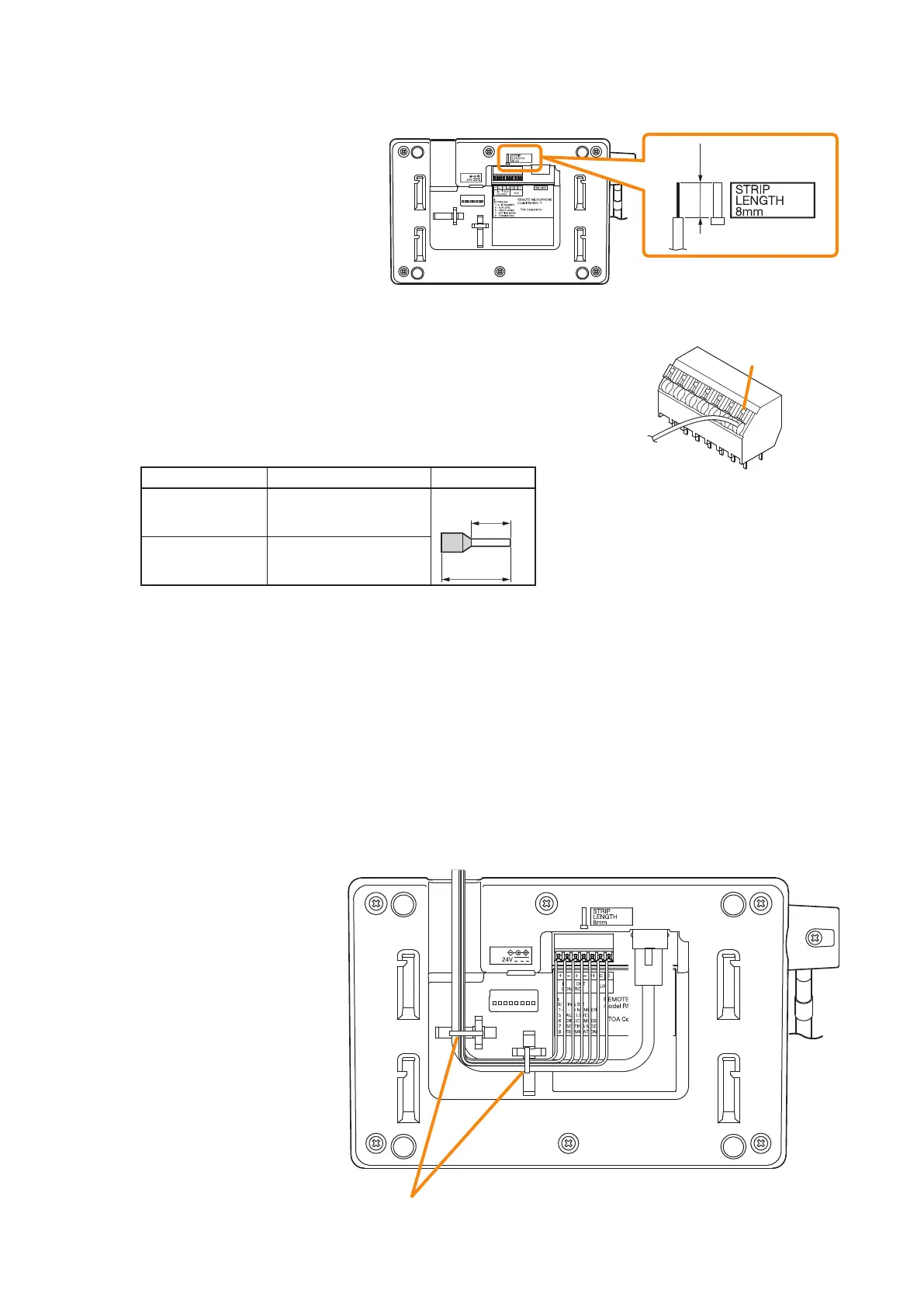
Step 1. Strip the cable sheath 8 mm
(0.31") from the cable end.
Use the strip gauge in the
bottom surface of the RM-500.
Step 2. Connect the cable.
2-1. For solid wire
Insert the cable fully into the hole of the push-in terminal block to
the root of the bare wire.
[Recommended cables]
Diameter of core wire (copper wire): ø0.4 – 1.1 mm (AWG 28 – 17)
2-2. For stranded cable
Crimp the tip of the cable with a ferrule terminal.
[Recommended ferrule terminals]
Manufacturer Model Number Specication
Weidmuller H0,75/14T HBL
14 mm
(0.55")
8 mm
(0.31")
Phoenix Contact AI 0.75-8 BU - 320027
[Recommended harness]
18 AWG or smaller
While pressing the lock switch on the upper side of the push-in terminal block, insert the cable fully
into the hole of the terminal block to the root of the bare wire. Then, release the lock switch keeping
the cable inserted.
Note
Do not press the lock switch by force.
Tip
To remove the cable, pull it out holding down the lock switch.
Step 3. After nishing the cable connections to all the terminals, bundle the cables with the zip tie.
When installing the RM-500 on a table, secure the bundled cables to the RM-500’s bottom surface with
2 cord clamps so that the RM-500 will not be pushed up by the cables.
8 mm
(0.31")
RM-500 bottom
Lock switch
RM-500 bottom
Bundle the cables and secure them to the fixing holes for wiring with
the zip ties supplied with the RM-500.



 To Next Page