3-41
Chapter 3
INSTALLATION AND SETTING PROCEDURES (HARDWARE)
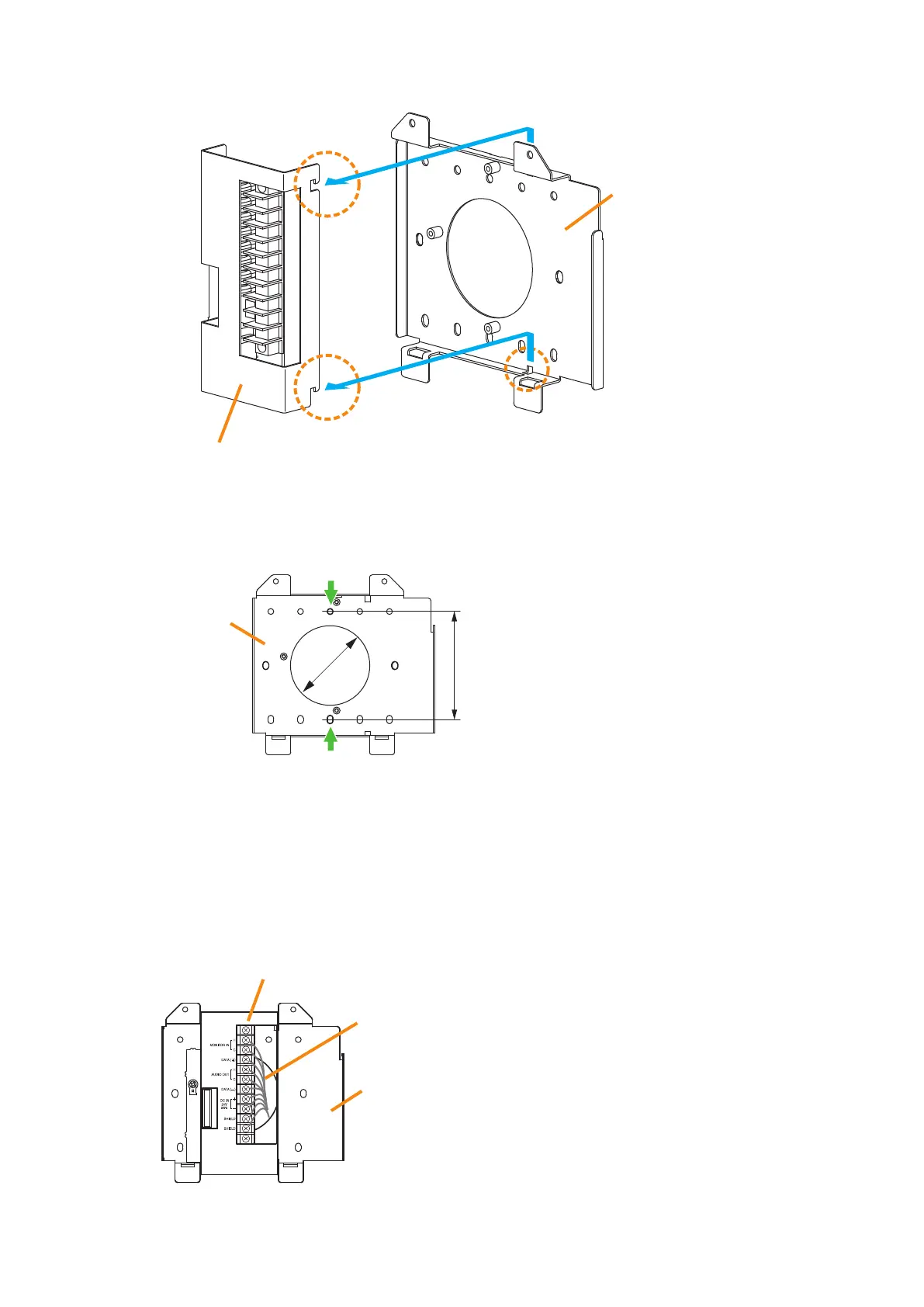
(2) Slide the Bracket A as show below to detach it from the Bracket B.
(3) Attach the Bracket B to the electrical box using 2 screws M3.5 x 20 supplied with the RM-200SF.
(4) Replace the Bracket A.
Reverse the procedures (1) and (2) above.
Note
Take care not to pinch the routed link cable between the Brackets A and B.
Bracket A
Bracket B
Slide the Bracket A upward, then pull it toward you.
Screw holes for mounting to
the electrical box (2 places)
Unit: mm
Bracket B
83.5
ø60
Step 2. Connect the link cable to the screw terminal block.
Wall mount bracket unit
(supplied with the RM-200SF)
Link cable
Bracket A
Bracket B
Note
Put the link cable inside the Bracket A after connection
completion.
Do not allow the link cable to protrude.
The cable may be damaged if it protrudes when the
bracket unit is installed onto the wall.



 To Next Page