SettingUptheParental
Control
The Parental Control tunction works in COl1 unction with
DVDs thai have heen aa_ignccl a raung - which helps you
control the types ot DVDs that your family watches. Then'
are up to 8 rating hwcls on a disc.
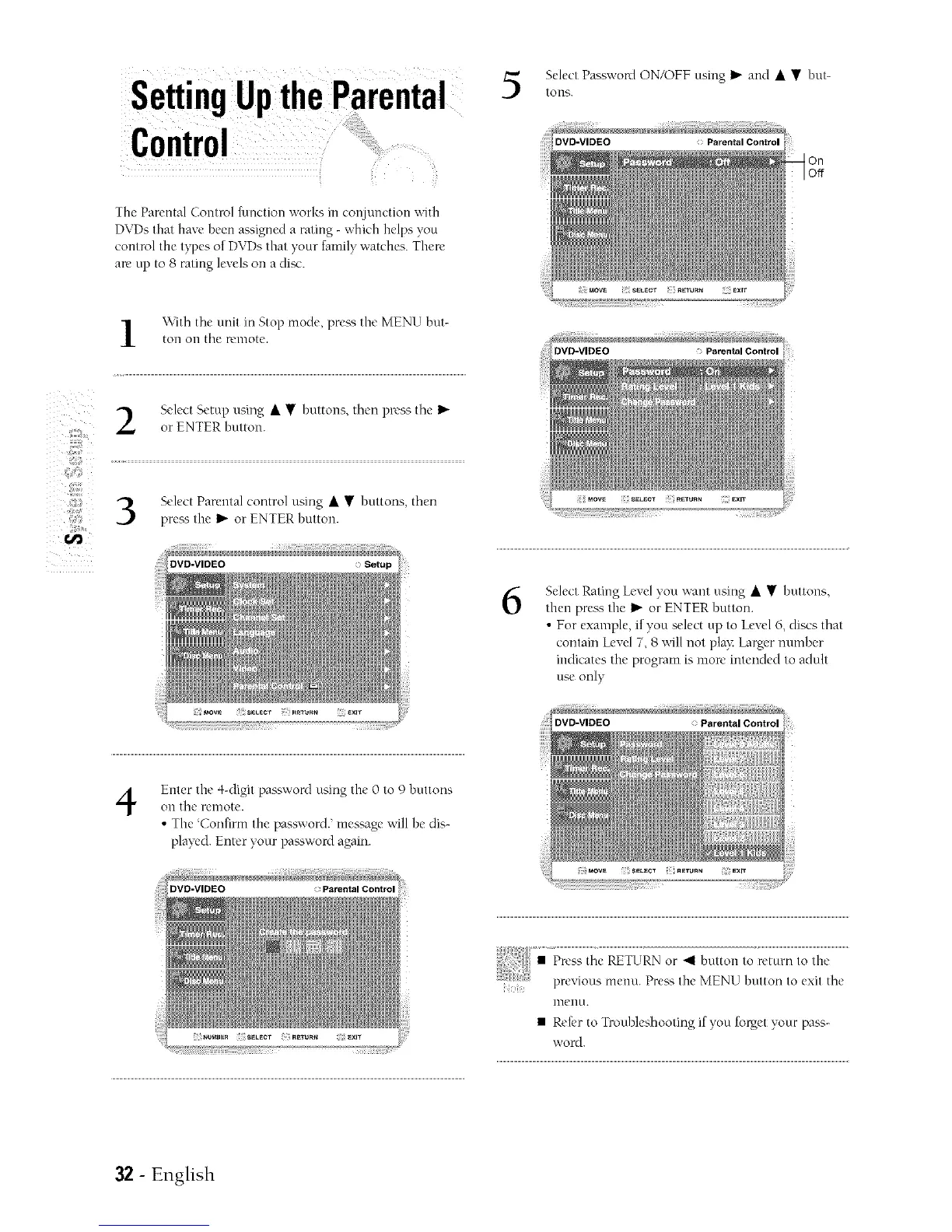
Select Password ON/OFF nsmg I_ and • • hnt-
tOlls.
On
Off
z
z
\\ith tile nnit ill Stop mode, prea_,the MENU hnt-
toll on tile remote.
Select Setup nsing • • hnttons, then press the I_"
or ENTER hutton.
Select Parental control nsing • • huttons, then
pre_ the _ or ENTER button.
DVD=VIDEO Parental Control
6
Select Rating Level you ;,cant using • • huttons,
then prea _,the I_"or ENTER button.
• For example, if you select up to Level 6, discs that
contain Level 7, 8 ;','ill not play: Larger number
indicates the program is more intended to adult
use only
4
Enter the 4-digit password using the 0 to 9 buttons
Oil the remote.
• The Confiml the password.' messagc will he dis-
played. Enter your paKsword again.
lnenu.
• Refer to Tronhleshooting if yon forget your pass-
word.
32 - English



 To Next Page