ViewingTitleList
2
Press the • • button to select Title List, and then
press the ENTER or I_"hutton,
or press the TITLE button on the remote control.
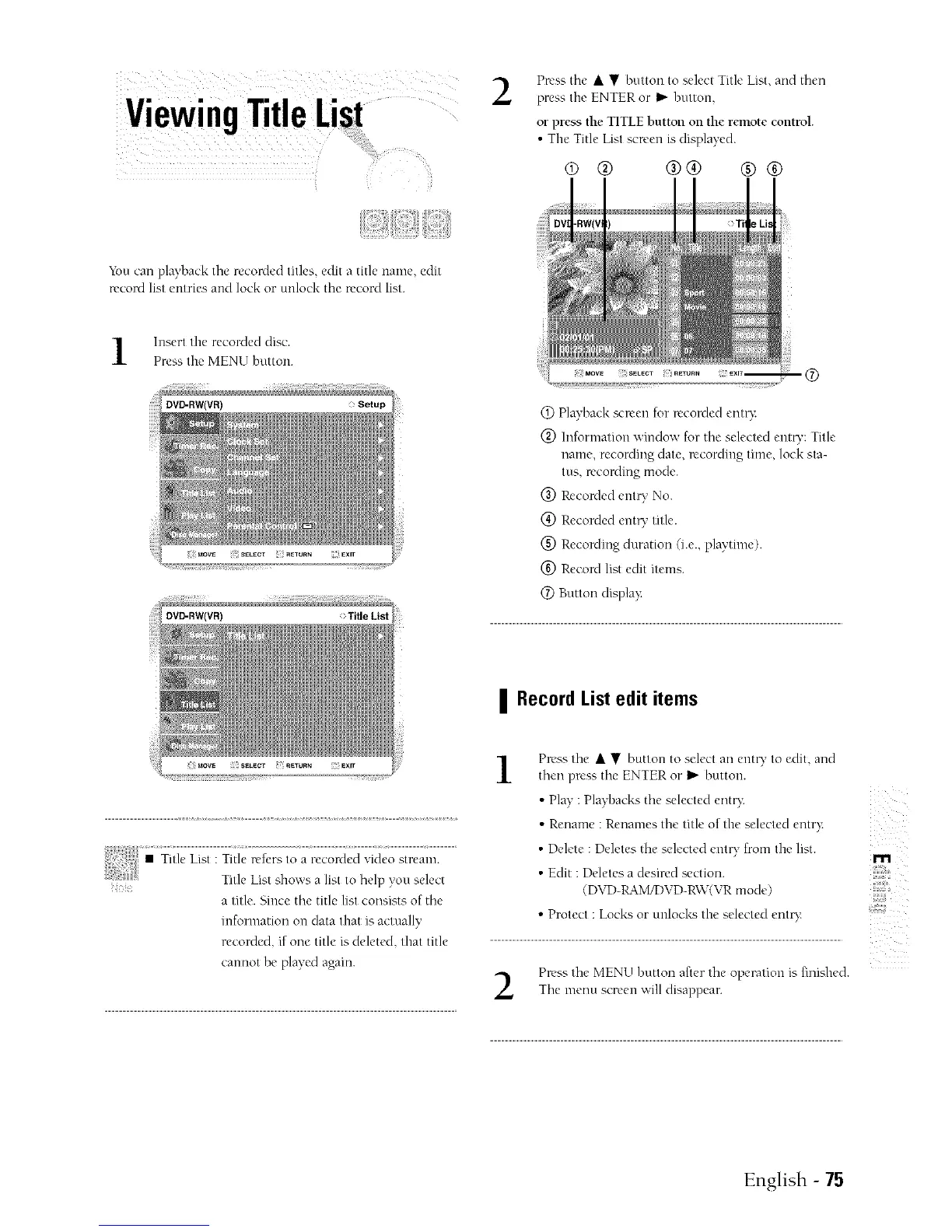
• Tile Title List screen is displayed.
® @ @@ @@
"_bucan playback tile recorded titles edit a title name, edit
record list entries and lock or unlock the record list.
Insert the recorded disc.
Press the MENU button.
DVD-RW(VR)
i
a title. Since the title list consists of the
information on data that is actually
recorded, if one title is deleted, that title
cannot be played again.
@ Playback scr_'en for recorded entry:
@ Information window for tile selected entr}i: Title
name, recording date. recording time, lock sta-
tus. recording mode.
@ Recorded entry No.
@ Recorded ent U title.
(_) Recording duration (i.e., playtime).
(_) Record list edit items.
@ Button displa}:
| Record List edit items
Press tile • • button to select all enn T to edit. and
then press tile ENTER or _ button.
• Play : Pla}q)acks tile selected entr}:
• Rename : Renames tile title of the selected entry:
• Delete : Deletes tile selected ent_' from the list.
• Edit : Deletes a desired section.
(DVD-RAM/DVD-R\V(VR mode)
• Protect : Locks or unlocks the selected ento:
Press tile MENU hutton after tile operation is finished.
Tile menu screen will disappear.
z
m
,,#,@
English - 75



 To Next Page