II Formatting a DVD-RAM/DVD-RW Disc A Pressthe _ _" buttons to select _'s, and then press
-f
fiat, ENTER button.
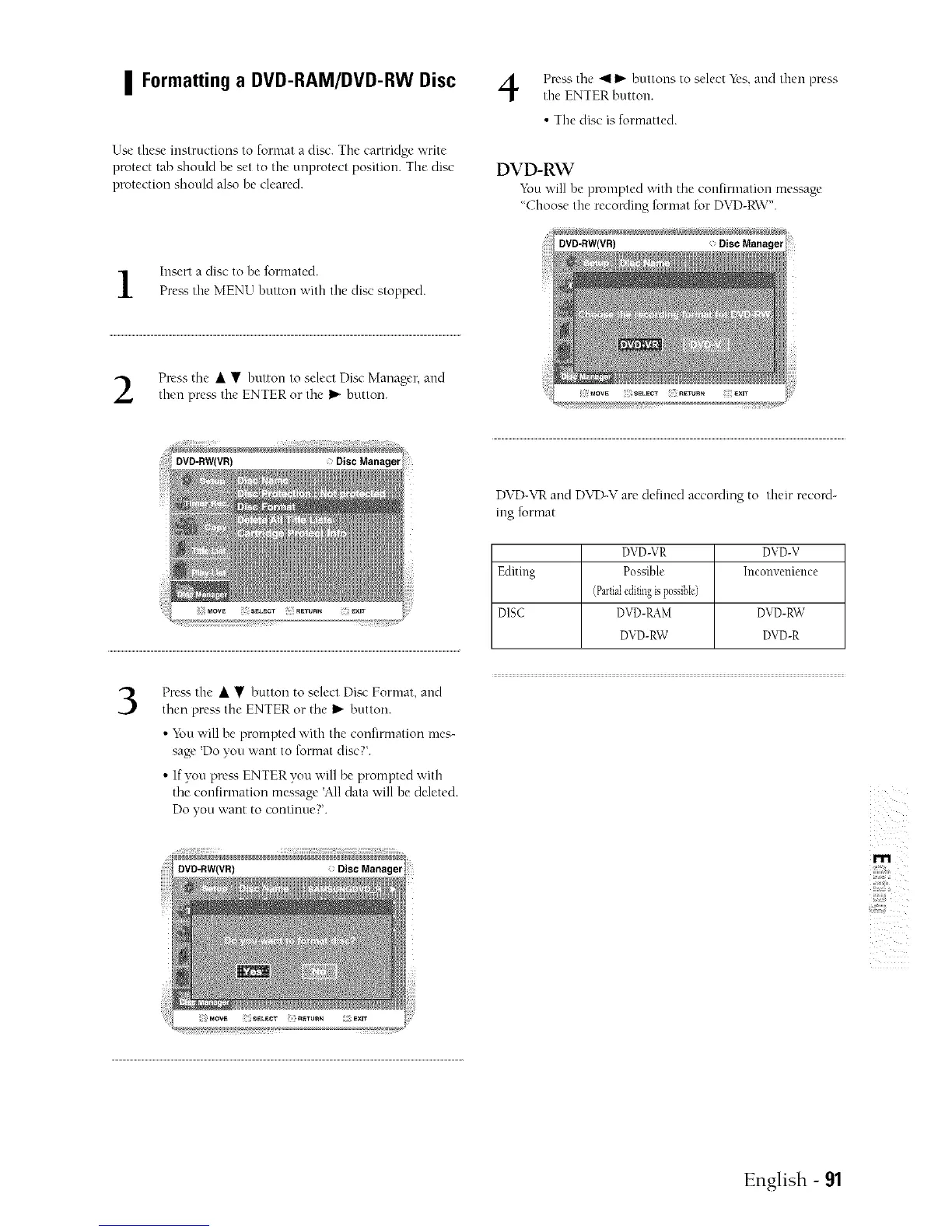
Use these instructions to fornlat a disc. The cartridge ;','rite
protect tab should be set to the unprotect position. The disc
protection should also be cleared.
• The disc is formatted.
DVD-RW
"_k)uwill be prompted with the confirmation message
"Choose the recording format for DVD-RW'.
Insert a disc to be formated.
Prea'; the MENU button with the disc stopped.
Press the • • button to select Disc Manager, and
then prea', the ENTER or the I_ button.
3
Prea'_ the • • button to select Disc Format, and
then press the ENTER or the I_ button.
• "i_ou;','ill be prompted with the confirmation mes-
sage 'Do you want to format disc?'.
• If you pre_'_ ENTER you will be prompted with
the confirmation message 'All data ;;'ill be deleted.
Do you ,,;,ant to continue?'.
DVD-\rR and DVD-V are defined according to their record-
ing format
DVD-VR DVD-V
Editing Possible Inconvenience
(Partialeditir_gispossibIe)
DISC DVD-RAM DVD-RW
DVD-RW DVD-R
z
m
English - 91



 To Next Page