3
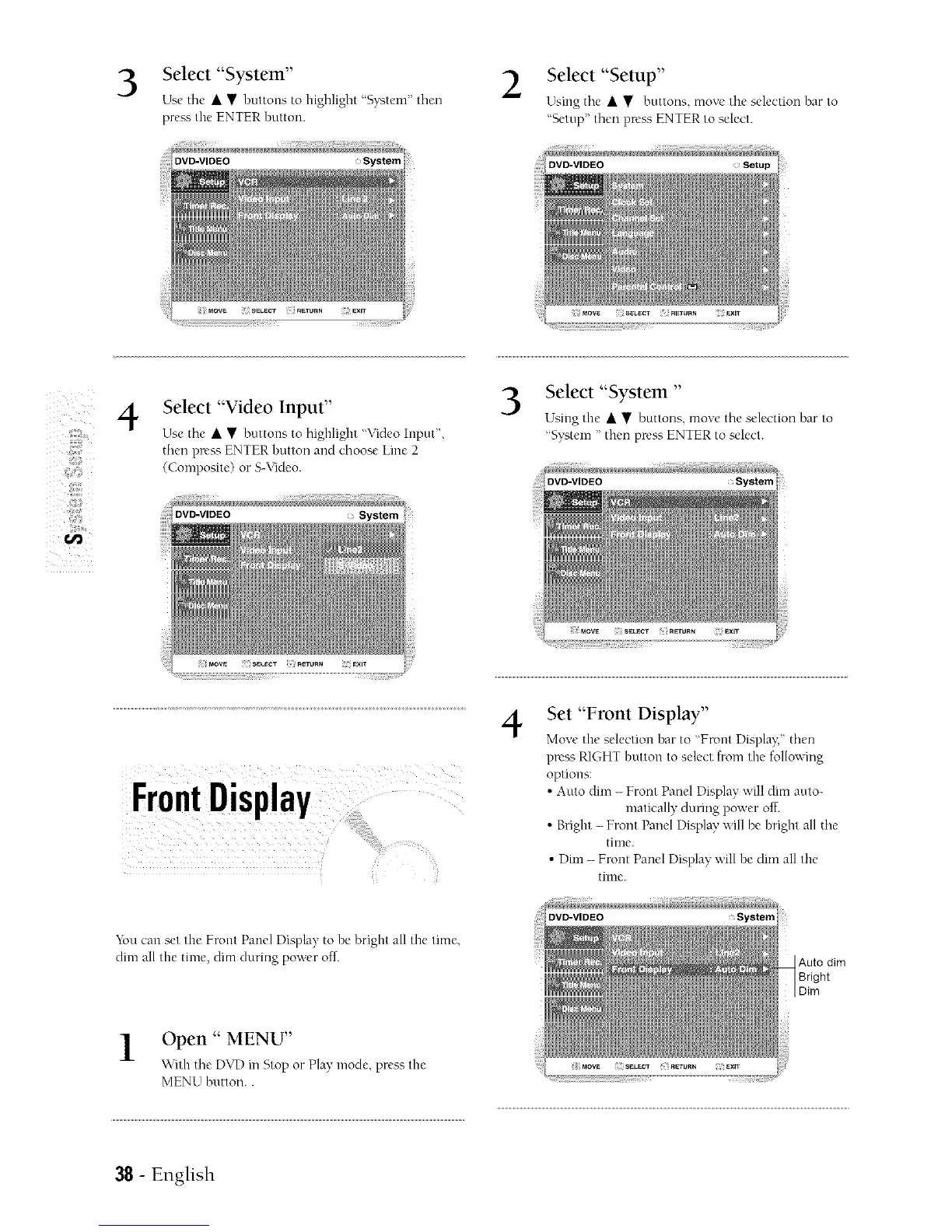
Select "System"
Use tile • • buttons to highlight "System" then
preaa the ENTER hutton.
DVD-VIDEO System
2
Select "Setup"
Using tile • • buttons, move the selection bar to
"Setup" then press ENTER to select.
Setup
z
z
4
Select "Video Input"
Use the • • buttons to highlight "VideoInput',
then press ENTER button and choose Line 2
(Composite) or S-Video.
DVD-VIDEO System
Select "System "
Using the • • buttons, moxe the selection bar to
'System " then press ENTER to select.
DVD-VIDEO System
4
Set "Front Display"
Move the selection har to "Front Display:"then
press RIGHT button to select from the fol[owmg
options:
• Auto dim - Front Panel Display will dim auto-
matically during power off.
• Bright - Front Panel Display will be bright all tile
time.
• Dim - Front Panel Display will be dim all the
time.
You can set the Front Panel Display to be bright al[ the time,
dim all tile time, dim during power off.
Open " MENU"
\Mth the DVD in Stop or Play,mode, press the
MENU button..
: System
Auto dim
Bright
Dim
38 - English



 To Next Page