5 VARIOUS FUNCTIONS
114 Copy Menu List
Copy Menu List
See the following pages for information on using the copy menu.
P.27 “COPY FUNCTIONS”
Copy menu items
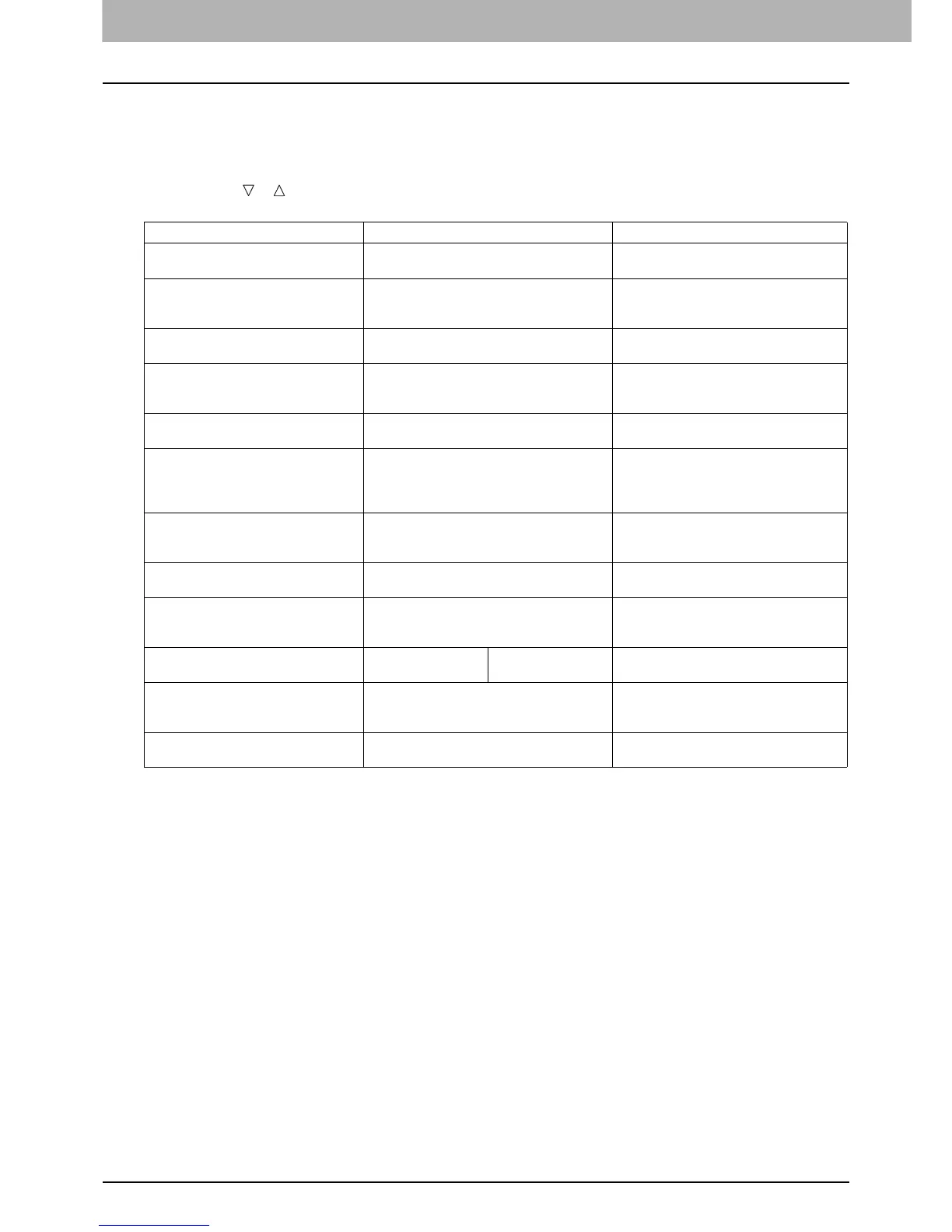
When you press or on the main screen (Copy), you enter the copy menu which allows you to use copy functions.
The table below shows the functions and reference pages available in the copy menu.
Menu Functions Settings Description and Reference Pages
EXPOSURE AUTO, Manual (9 steps) Sets the density level for the copied image.
P.35 “Adjusting the exposure”
ORIGINAL MODE TEXT/PHOTO, TEXT, PHOTO,
BACKGROUND ERASE
Sets an original mode suitable for the
image being copied.
P.36 “Selecting the original mode”
DRAWER Drawer 1 XX, Bypass XX, APS Sets the paper source.
P.37 “Selecting the paper”
ZOOM Manual zoom (25 - 100 - 400%),
FIXED ZOOM, AMS
Sets the zoom ratio for copied images.
P.39 “Enlarging or reducing the copy
size”
FINISHING NON SORT, SORT Sets the finishing mode for ejecting copies.
P.43 “Sorting pages”
2IN1/4IN1 OFF, 2IN1, 4IN1 Copies two or four originals onto one sheet
of paper.
P.44 “Copying two or four pages on
each sheet”
ID CARD OFF, ON Sets the ID card function.
P.46 “Copying both sides of a card on a
sheet”
EDGE ERASE OFF, ON (4 to 15 mm (0.2 to 0.6")) Sets the edge erase function.
P.47 “Erasing the shadow on edges”
IMAGE SHIFT OFF, LEFT MARGIN, RIGHT MARGIN Sets the image shift function.
P.48 “Shifting the pages to the right or
left”
2-SIDED 1 > 1 SIMPLEX,
1 > 2 DUPLEX
BOOK, TABLET Sets the 2-sided function.
P.49 “Copying on both sides”
ANNOTATION OFF, PAGE NO., PAGE No.+DATE/TIME Sets the annotation function.
P.50 “Adding a page number and date/
time on the copied paper”
IMAGE DIRECTION OFF, ON Sets the image direction function.
P.50 “Image direction”



 To Next Page
 Loading...




