1 PREPARATION
10 Components
Components
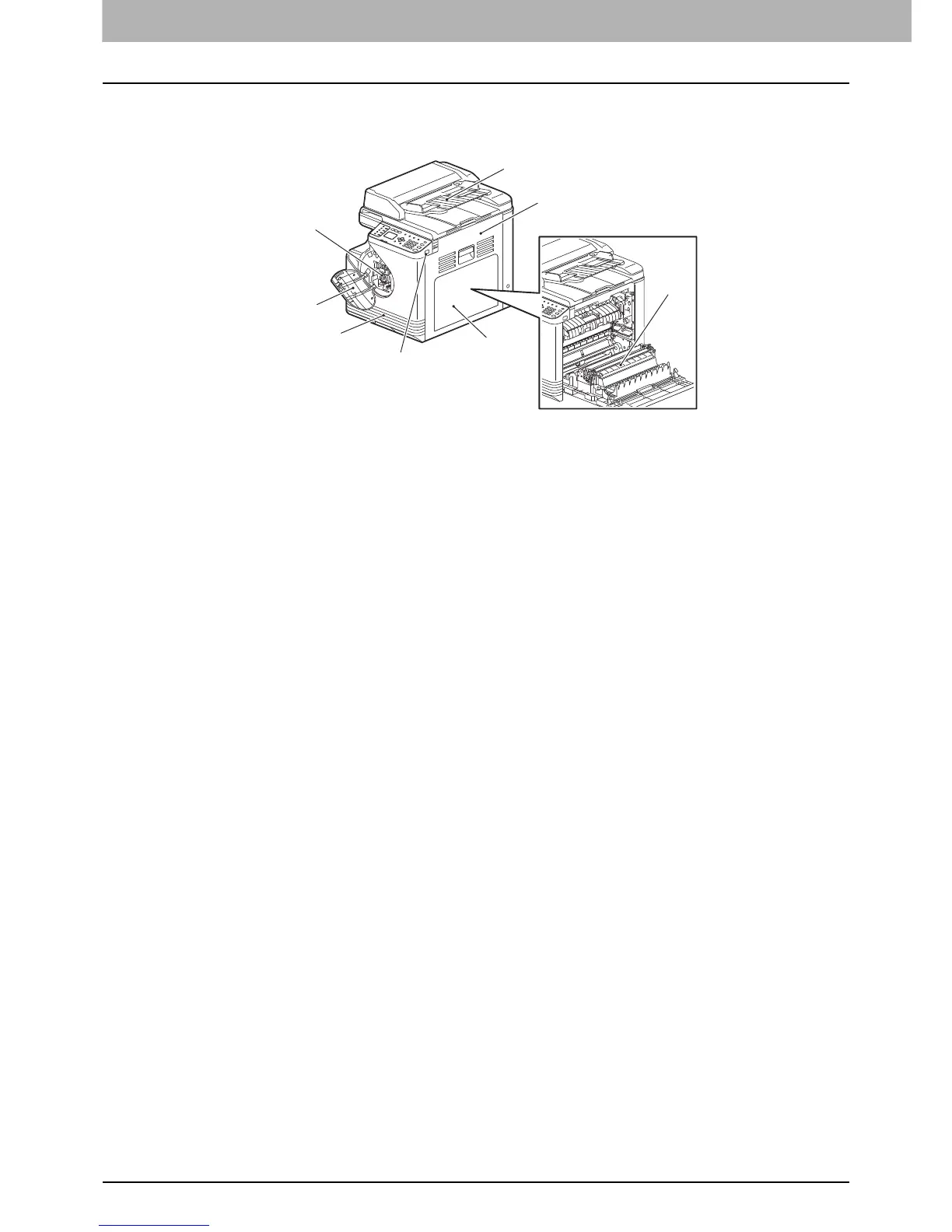
Front/Right/Inner side
1. Automatic Document Feeder (ADF)
Load up to 50 originals (80 g/m
2
or 20 lb. Bond) to scan one sheet after another. (The maximum number you can load
may vary depending on the type of original.)
P.129 “Paper Misfeed”
2. Side cover
3. Automatic Duplexing Unit
Install this to make it possible to print on both sides of paper.
4. Bypass tray
Place special paper such as thick paper, overhead transparencies, or tracing paper.
P.21 “Loading paper on the bypass tray”
P.23 “Loading an envelope on the bypass tray”
5. USB port
Connect a USB device to store scanned data.
6. Drawer
Place up to 250 sheets of plain paper (80 g/m
2
or 20 lb. Bond).
P.19 “Loading paper in the drawer”
7. Front cover
Open this when you replace the toner cartridge.
P.134 “Replacing Toner Cartridge”
8. Toner cartridge
For the recommended toner cartridges, refer to the Safety Information.
P.134 “Replacing Toner Cartridge”
1
2
4
6
8
5
7
3



 To Next Page
 Loading...




