2 COPY FUNCTIONS
46 Copy Settings
Copying both sides of a card on a sheet
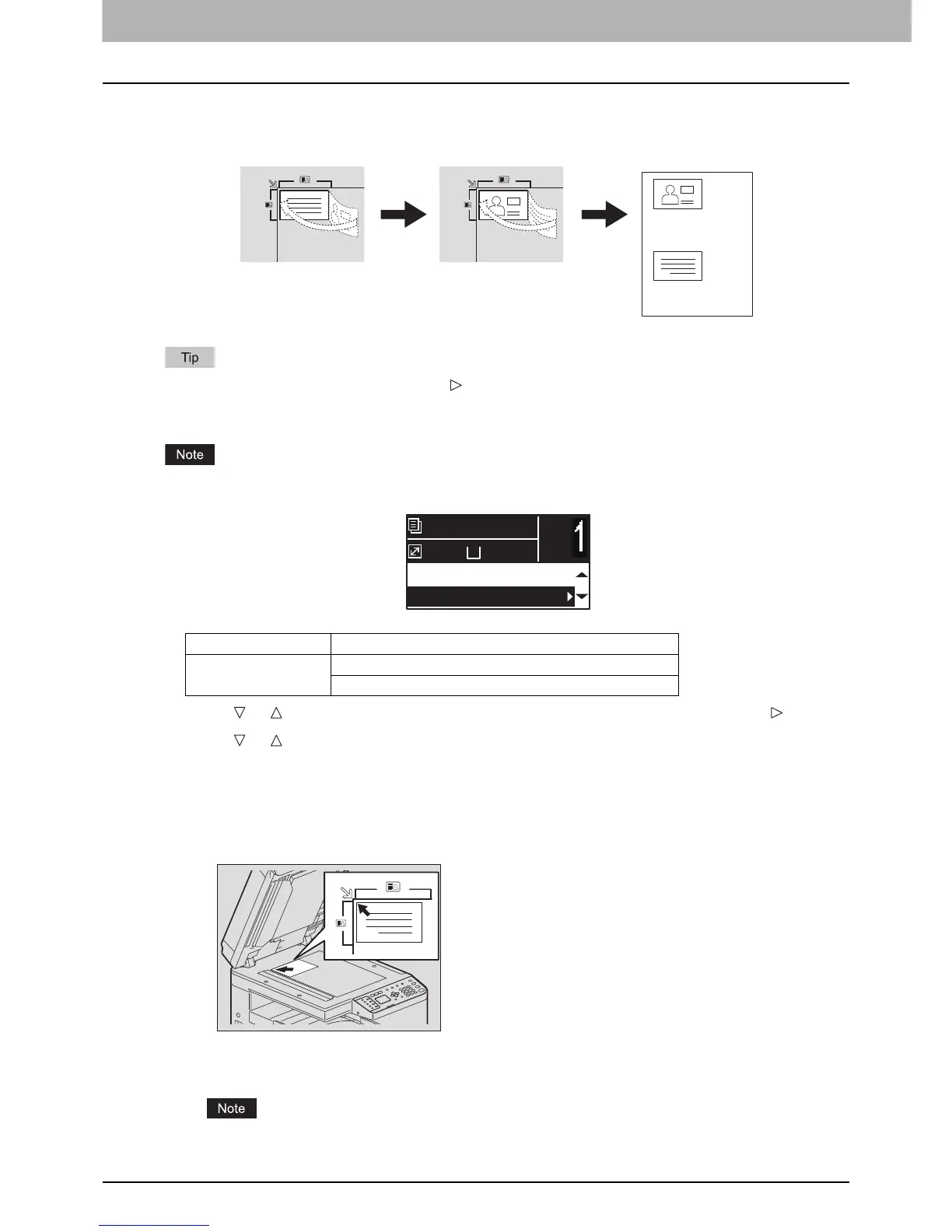
You can copy the front and back of a card on a sheet of paper.
You can directly access this function by pressing . The button operation varies depending on the region.
For regions other than Europe and the Americas:
P.33 “Using the “EXPOSURE” or “ID CARD” function quickly”
Be sure to set the paper size and density, etc. before selecting [ID CARD].
1
Press or to select the item displayed on the LCD screen, and then press .
2
Press or to select the setting item, and then press [OK].
3
Follow the instructions on the LCD screen to use the “ON” function. You are instructed
to make the following settings.
y SET FRONT OF ID CARD
Place the front of a card face down on the original glass, and then press [START].
Make sure that you place the card in a landscape orientation within the frame of the original scale.
y SET BACK OF ID CARD
Turn over the card and place the back surface face down on the original glass, and then press [START].
“CANCEL JOB?” is displayed if there is no operation for a certain period.
Menu Functions Settings
ID CARD OFF
ON
Front side Back side
A4
1
READY
100%
2IN1/4IN1:OFF
ID CARD:OFF



 To Next Page
 Loading...




