3.PRINT FUNCTIONS
Setting Up Print Options 77
3 PRINT FUNCTIONS
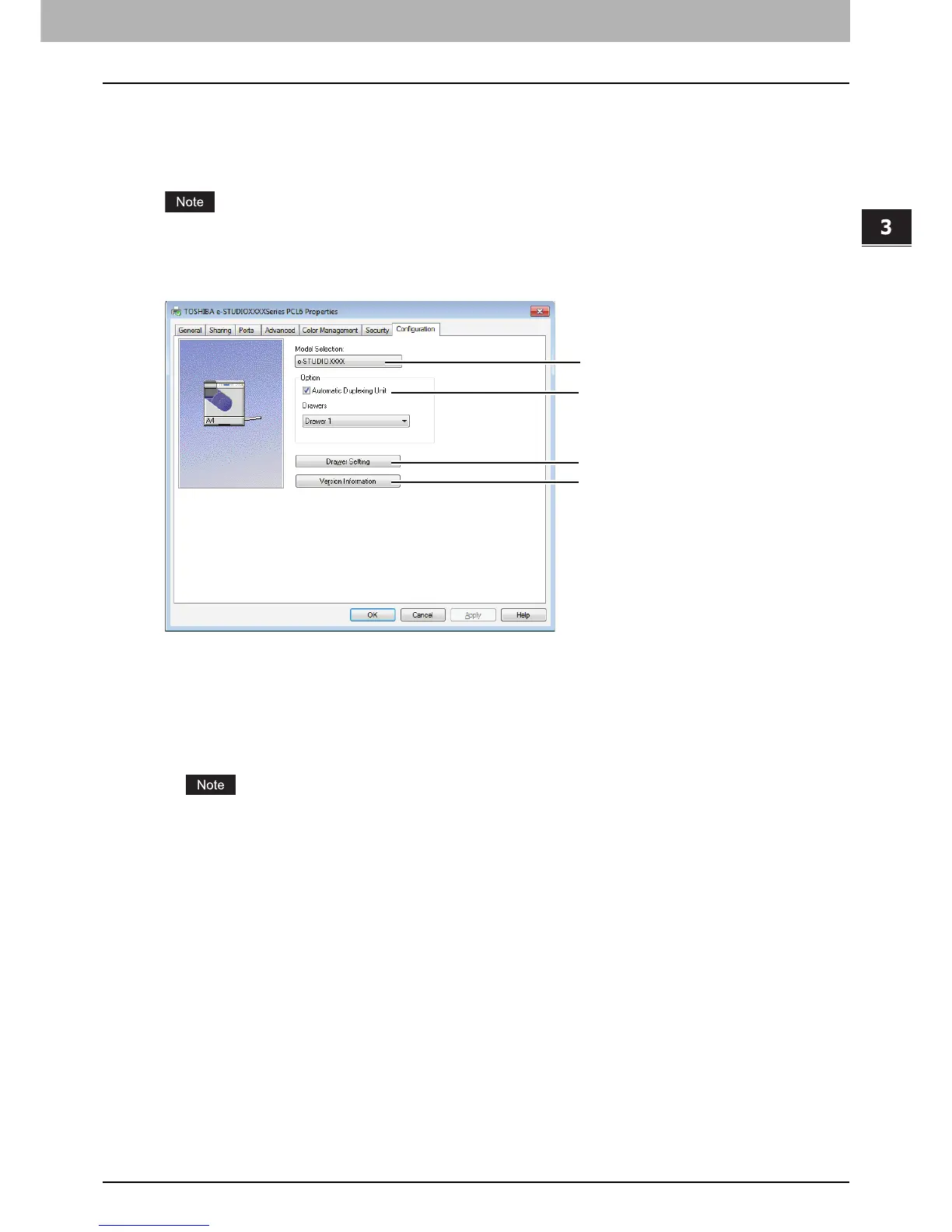
[Configuration] tab
The [Configuration] tab allows you to configure options. When any optional unit is installed in this equipment, set the
configuration of the machine on this tab. The [Configuration] tab can be displayed only from the Printers folder (and not
when displaying the properties from the application’s print dialog box).
In order to set the [Configuration] tab, you must access the printer driver properties from the [Devices and Printers]
folder (Windows Vista / Windows Server 2008: [Printer], Windows XP / Windows Server 2003: [Printers and Faxes]).
For detailed instructions on how to set the [Configuration] tab, see the following page:
P.54 “Configuring options manually”
1) Model Selection
This sets the model type.
2) Option
This option sets whether the following optional devices are installed.
Automatic Duplexing Unit
Select this check box when the Automatic Duplexing Unit is installed.
This setting is selectable only when the model below is specified in the [Model Selection] box.
Drawers
This sets the installation of drawers according to the configuration.
- Drawer 1 — Select this when only Drawer 1 is installed.
3) [Drawer Settings]
Sets the paper size and paper type of each drawer. The [Drawer Settings] dialog box appears by clicking this.
P.78 “Drawer Settings”
4) [Version Information]
Displays the [Version Information] dialog box.



 To Next Page
 Loading...




