7.TROUBLESHOOTING
Before Calling Service Technician 215
7 TROUBLESHOOTING
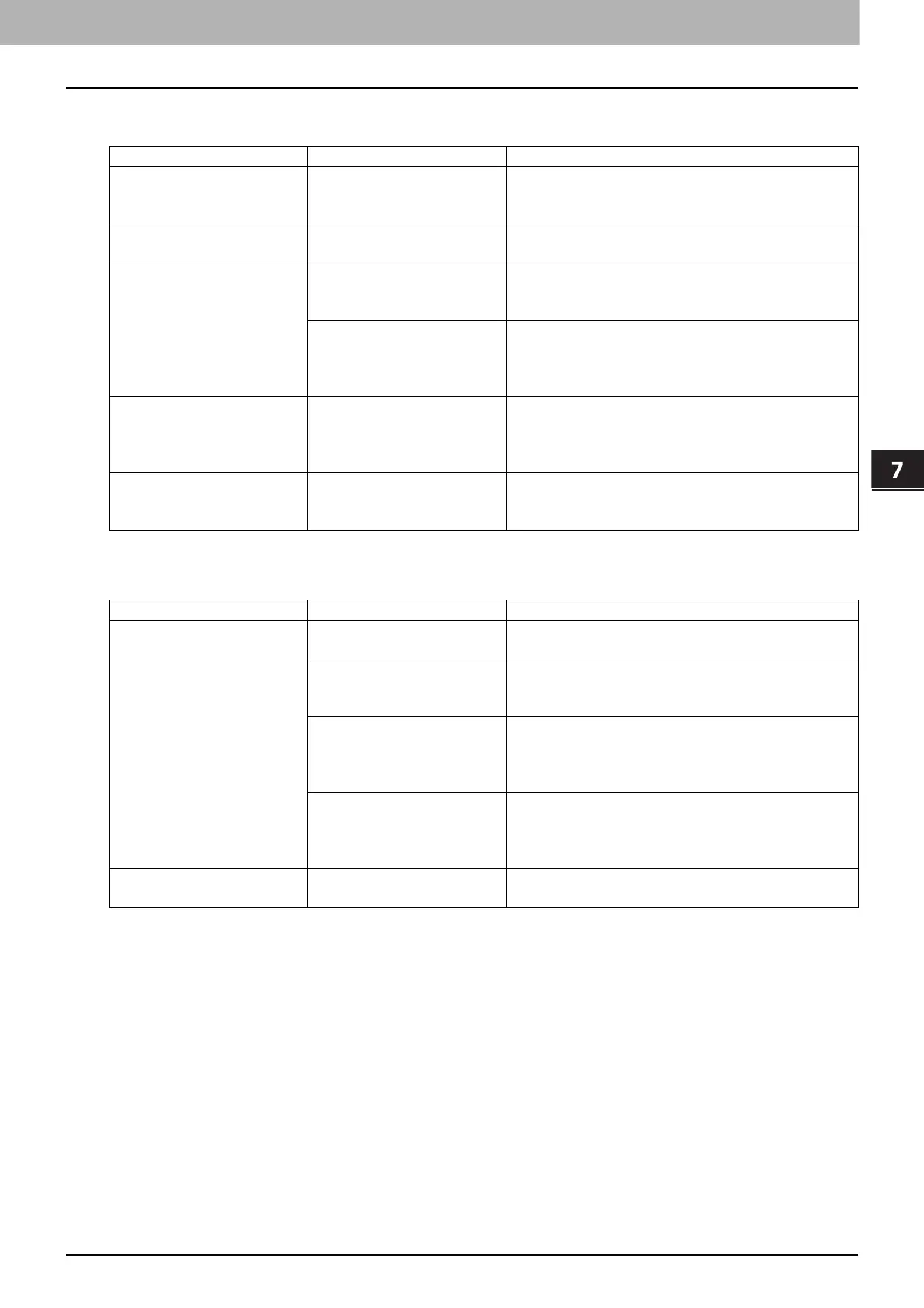
Toner-related items
Original/Paper-related items
Phenomenon Usual cause Countermeasure
“TONER IS LOW” appears
on the LCD screen.
Toner is running out. There is still a little toner remaining in the toner
cartridge. Do not replace the toner cartridge until
“TONER EMPTY” appears on the LCD screen.
“TONER EMPTY” appears
on the LCD screen.
Toner has run out. Replace the toner cartridge with a new one.
“ERROR : TONER”
appears on the LCD
screen.
The toner cartridge is not
installed, or it is installed
incorrectly.
Install the toner cartridge correctly.
The recommended toner
cartridge is not being used.
If you are using a toner cartridge other than the
one we recommend, the equipment may not be
able to detect whether it is installed or not.
P.3 “Recommended toner cartridges”
“TONER IS LOW” does not
appear on the LCD screen,
although toner is nearly
empty.
The recommended toner
cartridge is not being used.
If you are using a toner cartridge other than the
one we recommend, the equipment may not be
able to detect whether it is installed or not.
P.3 “Recommended toner cartridges”
The equipment does not
become ready after the
toner cartridge is inserted.
The toner cartridge
inserted is not usable for
this equipment.
Check that the product name is “T-2507”.
Phenomenon Usual cause Countermeasure
Paper misfeeds. The paper is unsuited for
the equipment.
Check if the paper is acceptable.
P.23 “Paper types not acceptable”
The paper size is not
registered properly in the
equipment.
Register the paper size properly.
P.35 “Preparation 3 - Registering Paper Size
and Type”
Misfed paper is located in
a place you cannot see
easily.
See the message on the LCD screen to recheck
the position where the paper misfeed has
occurred.
P.202 “Paper Misfeed”
There is no gap between
the side guides and paper
in the drawer, or the gap is
too wide.
Adjust the gap between the side guides and the
paper properly.
P.24 “Loading paper in the drawer/Paper Feed
Unit”
Multiple feeding occurs. Sheets of paper clinging to
each other.
Fan the paper well and place it again.



 To Next Page
 Loading...





