7 TROUBLESHOOTING
214 Before Calling Service Technician
Before Calling Service Technician
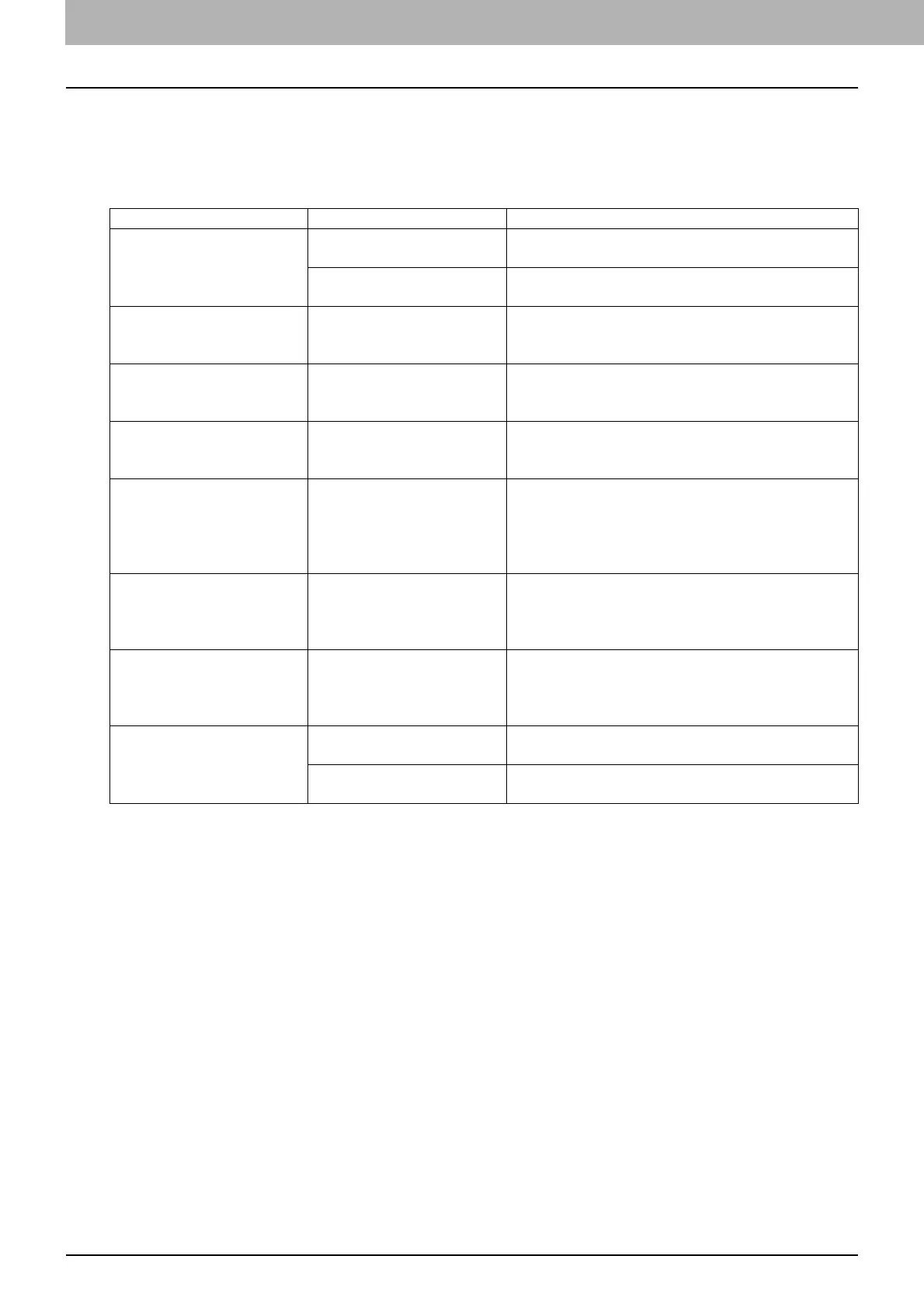
When you encounter troubles, find the symptom listed below and follow the instructions in the
Countermeasure.
General operation
Phenomenon Usual cause Countermeasure
The equipment does not
work at all.
The power is not turned
ON.
Turn ON the power of the equipment.
The power cable is not
plugged in securely.
Plug in the power cable securely.
The button does not
respond to my operation.
It has been a short time
since the power was
turned ON.
Wait for the completion of warm-up and then try
again.
The LCD screen is too
light/dark.
The contrast of the LCD
screen is not adjusted
properly.
Adjust the contrast.
P.179 “User Functions Menu List”
A message is displayed on
the LCD screen.
The equipment has
detected an error status.
See the meaning of the message referring to the
listing below.
P.200 “When This Message Appears”
“SAVING ENERGY”
appears on the LCD
screen.
The equipment is in the
low power mode.
Press any button on the control panel to cancel
this mode. Copying is enabled in the low power
mode.
P.19 “Saving energy when not in use - Energy
saving mode -”
The LCD screen is dim. The equipment is in the
sleep mode.
Press any button on the control panel to cancel
this mode.
P.19 “Saving energy when not in use - Energy
saving mode -”
Copy functions cannot be
set.
Some copy functions that
cannot be set
simultaneously with others
have been set.
Some copy functions cannot be set together with
others.
P.227 “Copying Function Combination Matrix”
The equipment is not
recognized when it is
connected to a PC using a
USB cable.
The cable is not support
the USB2.0 Hi-Speed.
Use a USB2.0 Hi-Speed certified cable.
The equipment is
connected via a USB hub.
Connect the equipment with a PC directly by a
USB cable.



 To Next Page
 Loading...





