3.PRINT FUNCTIONS (Windows)
Before Using the Printer Driver 79
3 PRINT FUNCTIONS (Windows)
Entering department code
1
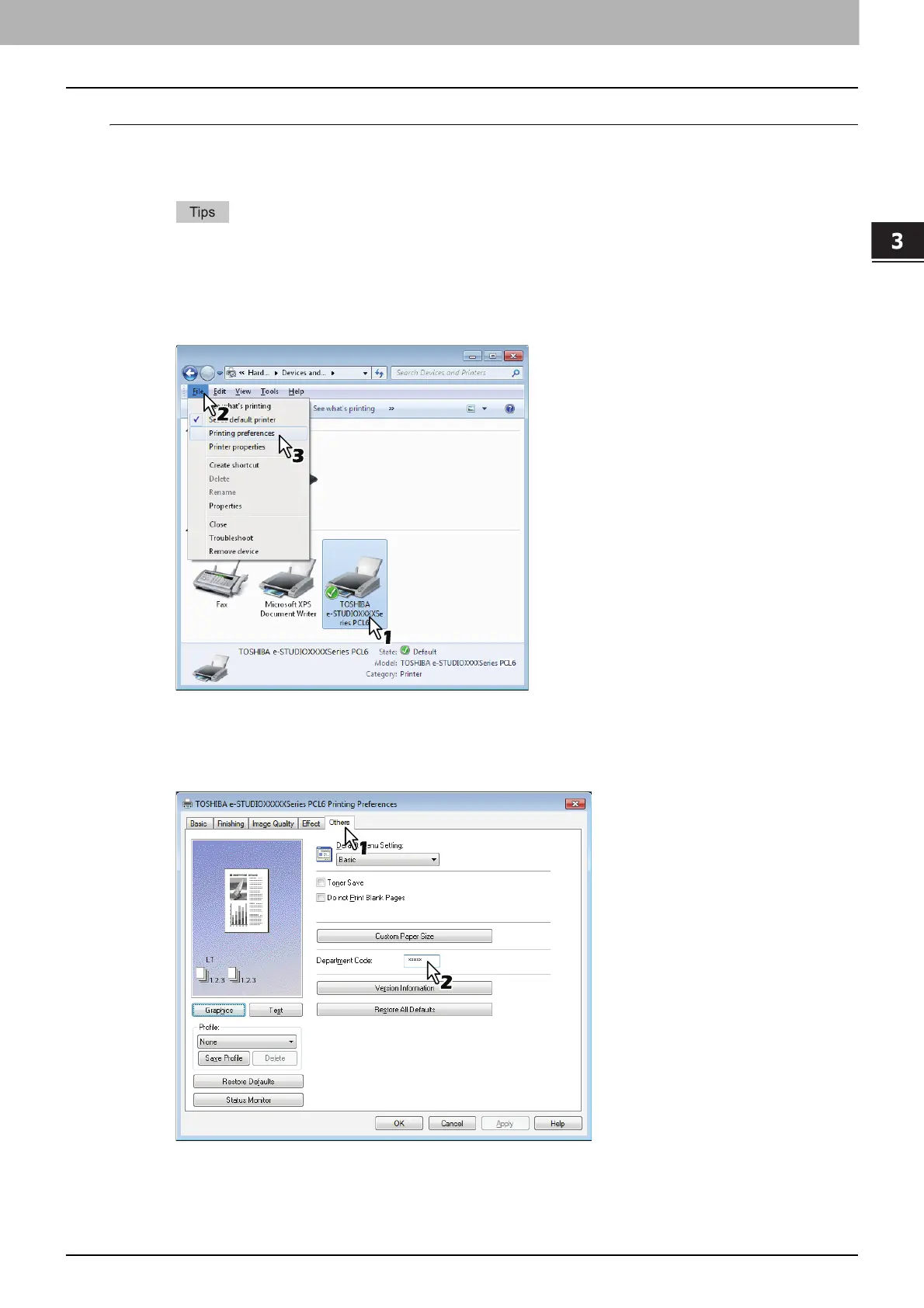
Click [Start] and select [Devices and Printers].
The Printers folder appears.
For Windows Vista or Windows Server 2008
Click [Start] menu, [Control Panel], [Hardware and Sound] and select [Printers].
For Windows 8 or Windows Server 2012, see the procedures in the following section.
P.77 “Accessing the printers folder on Windows 8 / Windows Server 2012”
2
Select your printer, and then click [File] menu and select [Printing Preferences].
If the [File] menu is not displayed, press [Alt].
The printing preferences dialog box appears.
3
Display the [Others] tab menu and enter your department code in the [Department
Code] box.
The department code is a 5-digit number.
4
Click [Apply] or [OK] to save the settings.



 To Next Page
 Loading...





