Methods used to determine what offsets are appropriate will vary from application to application, but will all
generally follow the same steps. In order to determine an offset, a reference measurement will be required.
That reference may include one or more of the following: a Nuclear Density Gauge, Oven Dry Moisture
Measurements, Speedy Moisture Measurements, Sand Cone Apparatus, Balloon Density Apparatus, Density
Drive Cone or other applicable equipment.
Multiple measurements should be taken at three to five representative locations with both the SDG 200 (make
sure both offsets are set to 0) and your appropriate reference equipment. Note the results by each method at
each location and determine the average difference between the SDG 200 results and the reference measurement
results. This average difference will be your offset. If the SDG 200 measures lower than your reference
measurement your SDG 200 offset will be positive. If the SDG 200 measures higher than the reference gauge,
your SDG 200 offset will be negative.
At a particular location, if you are not able to get repeatable measurements with either the SDG 200 or your
reference equipment, there may be an anomaly in the soil that effects the equipment and a new location should
be selected.
!!Arbitrary selection of offsets is not recommended!!
Determining Offset Values
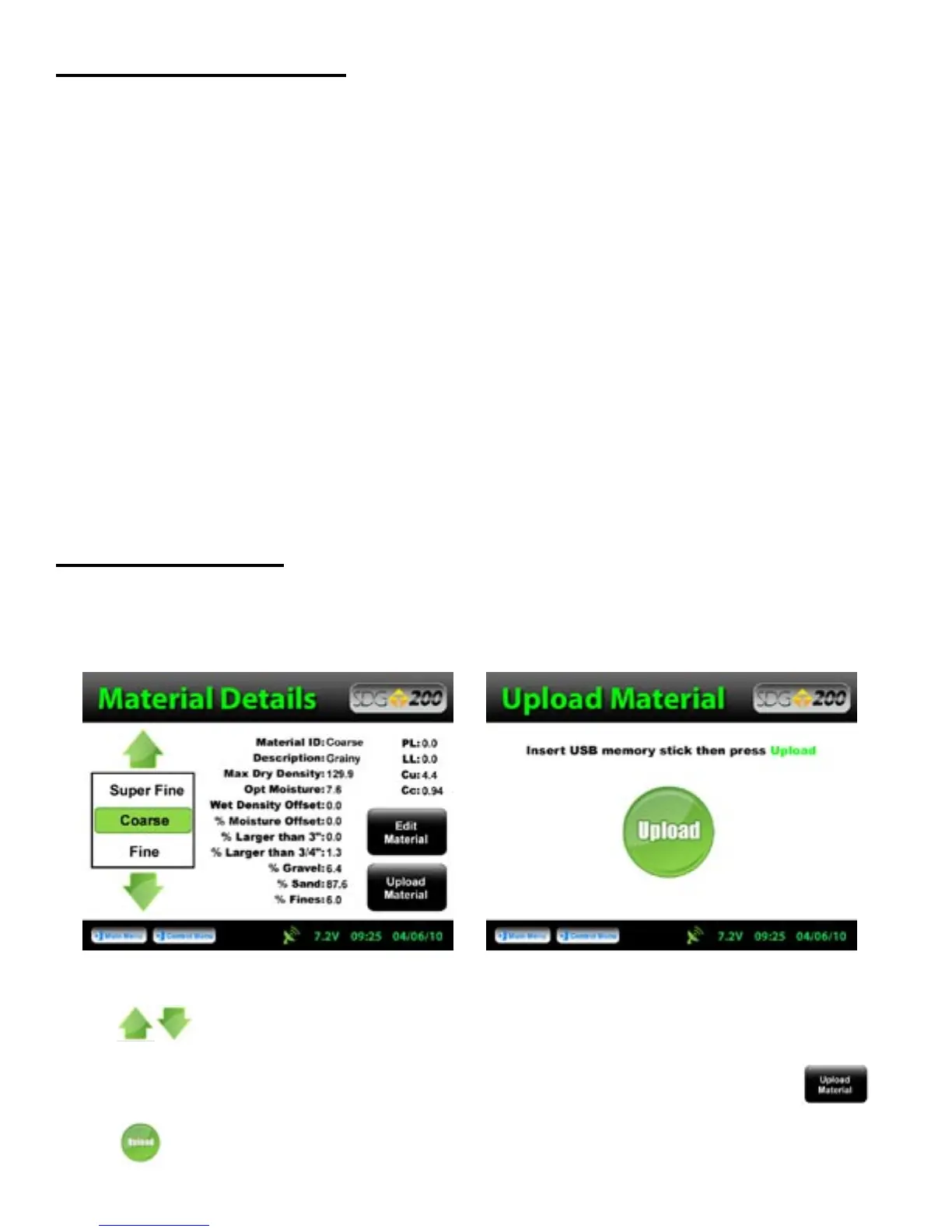
Uploading a Material
A material definition that has been set up using the SDG 200 Gradation Calculator and saved on a USB flash
drive can be uploaded to the SDG 200.
From the Material Details screen choose the material name you wish to overwrite by pressing the up or down
arrows. The green highlighted material name displayed prior to uploading the material will be the
location the new material will be stored. The information that is stored in this location will be overwritten and
you will not be able to retrieve it again. Once you have made your choice, Press Upload Material.
Be sure to have your USB drive inserted into the USB port located on the back of the gauge. Press
Upload.
22



 To Next Page