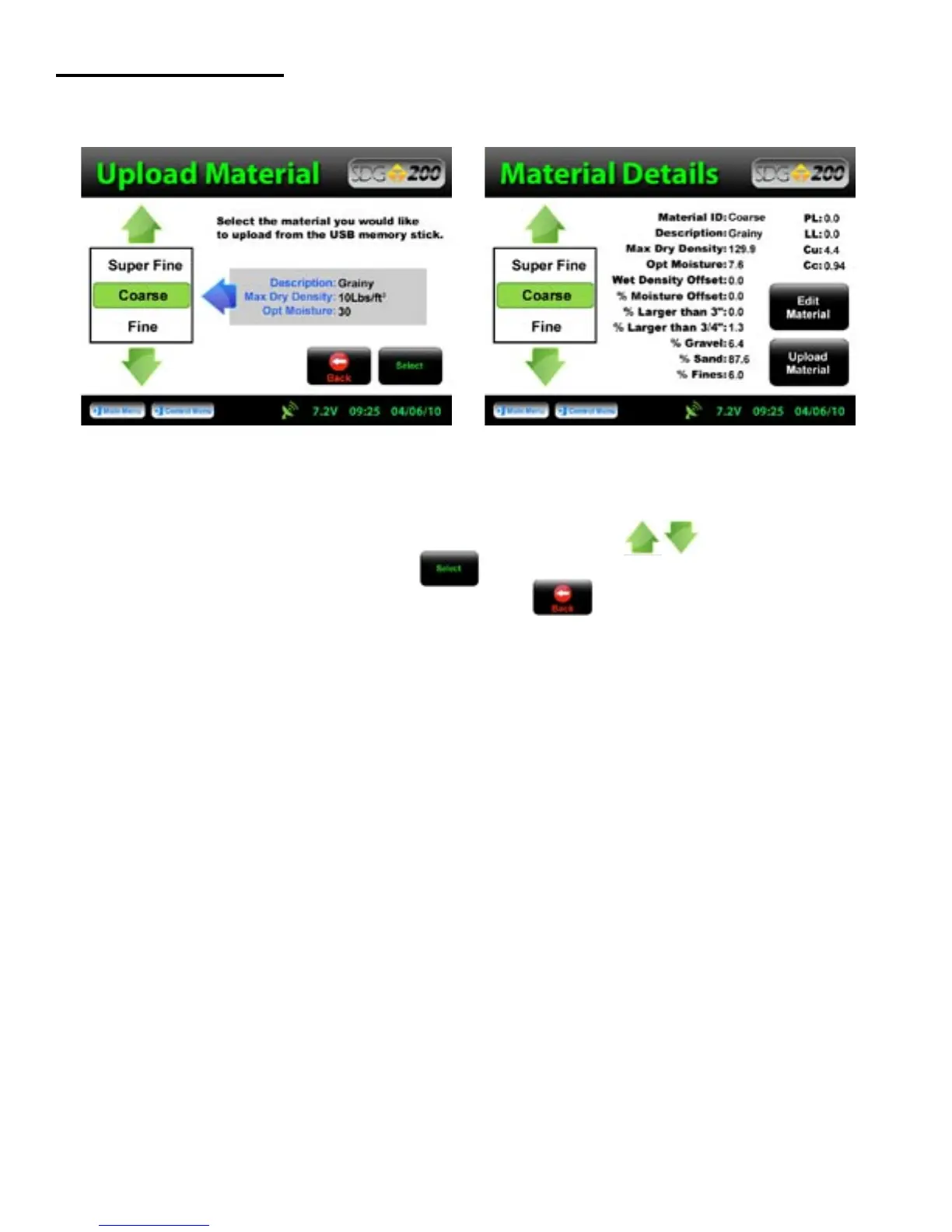
Uploading a Material
The file name of the materials located on the USB drive will appear on the left and some details identifying that
specific material will be displayed on the right. Use the up or down arrows to highlight the material
you wish to upload. Once verified, Press Select to upload the material information into the gauge.
Continue to select additional materials to upload or Press Back to view the material in detail.
Note: Be sure that the units of the gauge are set for the same units as the
material you are uploading. If, for example, the gauge was set in U.S.
Customary units (ex: 150 lb/ft
3
) and you were to upload the material in
SI units (2402.8 kg/m
3
) the gauge will notify you that the density is out
of range. However, it will continue to load the material. If you were
to switch to SI units AFTER the material has been loaded, the density
would convert the 2402.8 as if it were in lb/ft
3
and result in 38,489.2 kg/m
3
.
Correct this by deleting the material, change the units of the gauge and
reload the material or by simply editing the density in the material setup.
See Appendix A for explanations of the SDG MTL Generator
23



 To Next Page