EasyManua.ls Logo

Transtech SDG 200 - Gauge Features Identification

Transtech SDG 200
48 pages
Print Icon
To Next Page IconTo Next Page
To Previous Page IconTo Previous Page
Loading...
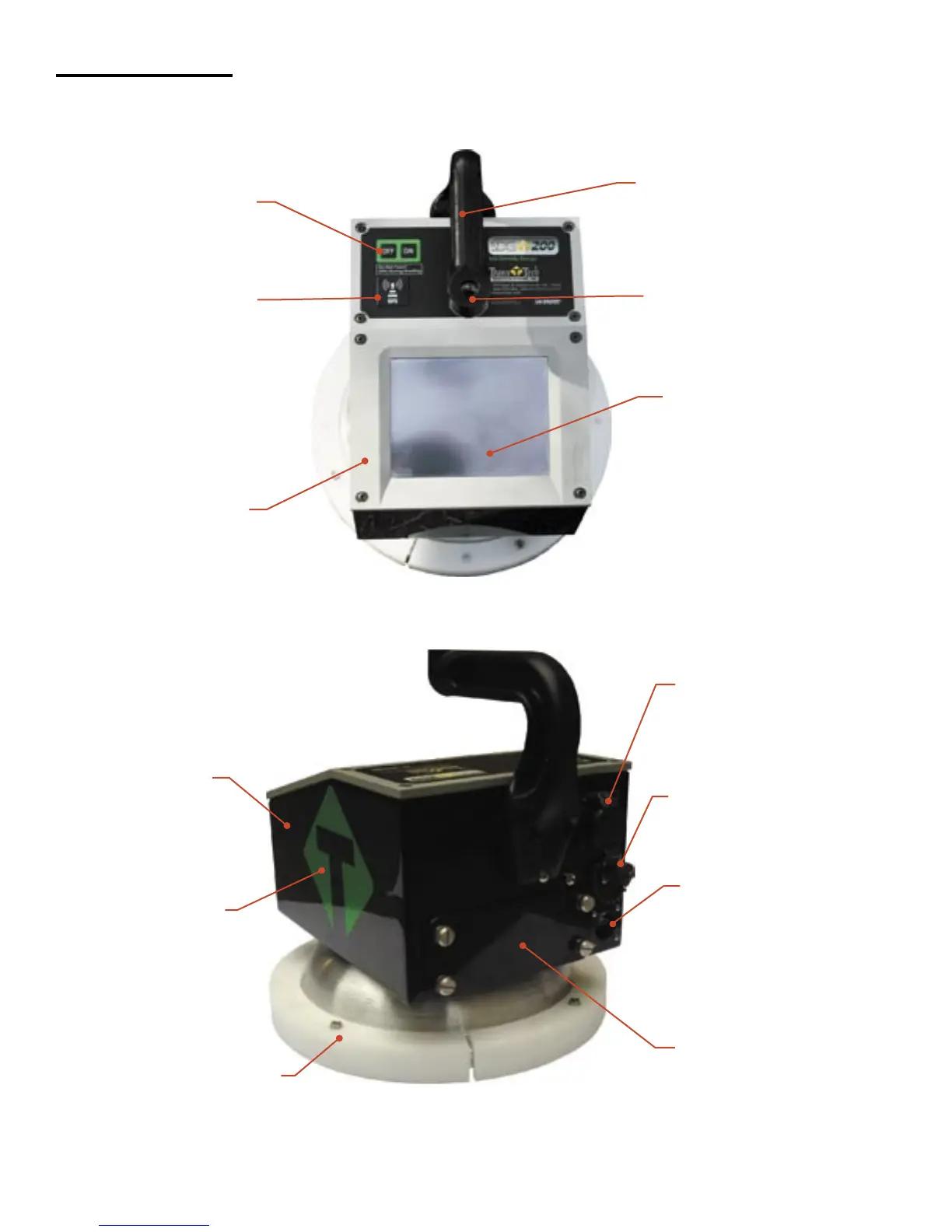
Gauge Features
USB Port
Used to allow
communication between a
flash drive and the gauge
Charger Port
used to connect the ac
or dc charger to gauge
Infrared
Temperature
Sensor
Used to measure the
surface temperature of
the asphalt
Shroud with
10” Sensor Plate
Location where sensor
plate is located
Battery Door
where the battery
is located
Gauge Shell
Body of the gauge
Handle
Used to carry the gauge
TouchScreen
Used to input and
interact with the
gauge
Faceplate
Protective bezel
for touchscreen
GPS Module
Location of GPS
unit on the gauge
(Accurate to
5+- Meters)
On\Off Button
Turns gauge
on and off
Handle Extension
Used to connect handle
extension
Reflective
Vinyl
safety feature for
operation in dark
areas
6

Other manuals for Transtech SDG 200

Related product manuals