TRENDnet User’s Guide TEW-735AP
© Copyright 2015 TRENDnet. All Rights Reserved. 15
Status
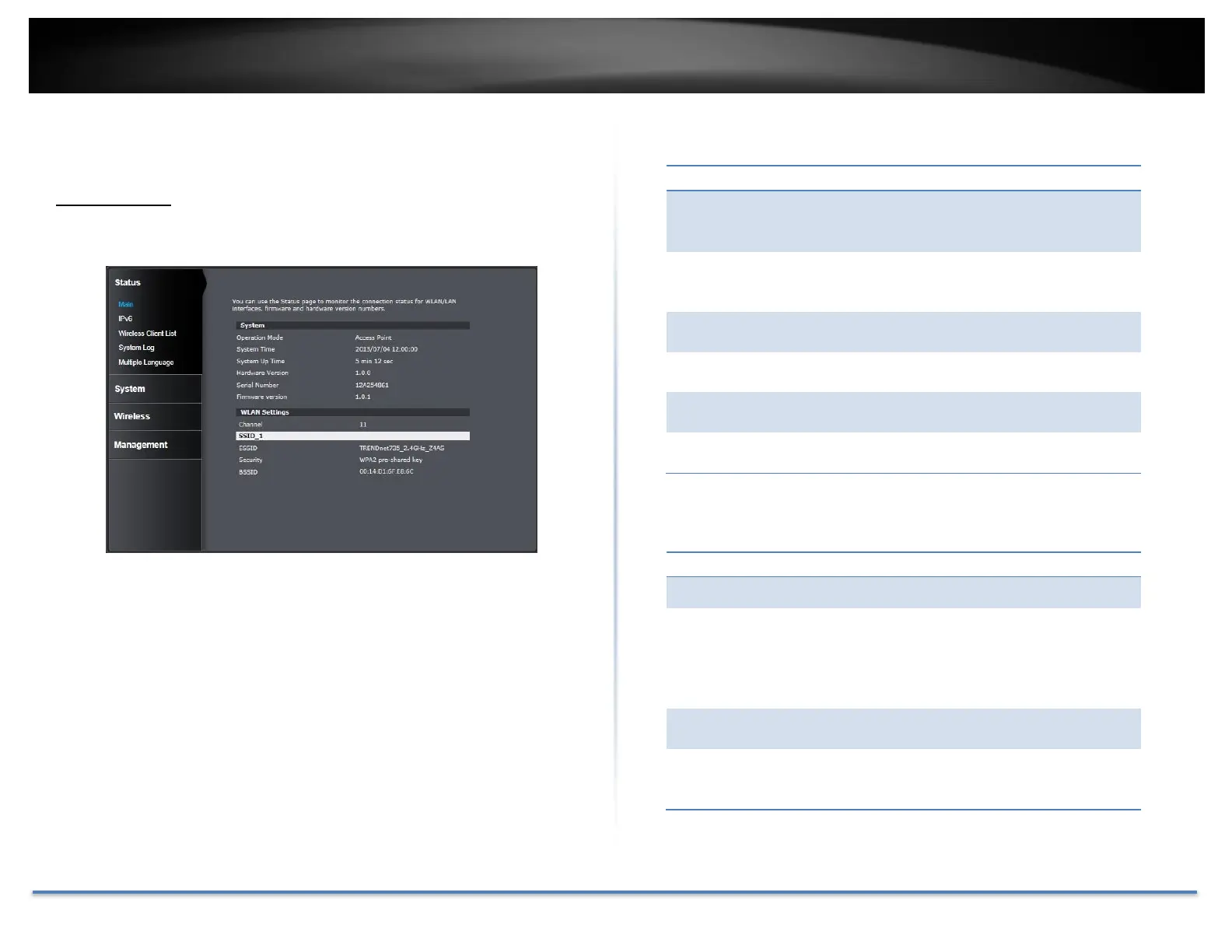
Main status
The Main status page shows the TEW-735AP’s basic information.
Shows which operation mode is currently in use:
Access Point, WDS AP, WDS Bridge, Universal
Repeater.
Shows the system time on the TEW-735AP. This
is important for schedule control and log
accuracy.
Shows the amount of time the TEW-735AP has
been running.
Shows the hardware version of the TEW-735AP.
Shows the serial number of the TEW-735AP.
Shows the firmware version currently in use.
Shows the wireless channel currently in use.
Shows current Service Set Identifier is currently
in use. This SSID is human readable and
performs as ESSID to setup wireless groups. You
can activate up to 4 SSIDs on a single TEW-
735AP.
Shows which type of security encryption is
currently in use for this wireless connection.
Basic SSID. This is a strictly unique SSID to
identify this wireless access point (WAP). It is
also the MAC address of the wireless interface.














 To Next Page