EasyManua.ls Logo

TSC TX200 Series - Bluetooth; Wi-Fi

TSC TX200 Series
73 pages
Print Icon
To Next Page IconTo Next Page
To Previous Page IconTo Previous Page
Loading...
- 50 -
6.6.3 Bluetooth
This option is used to set the printer blustooth settings.
Item
Description
Default
Bluetooth
Name
This item is used to set the local name for Bluetooth.
BT-SPP
Bluetooth PIN
Code
This item is used to set the local PIN code for
Bluetooth.
0000
6.6.4 Wi-Fi
Item
Description
Default
Operating
This item is used to set the operating mode of wireless
local area networks to connect devices to the networks.
Note:
Infrastructure mode requires the use of an access
point for this communication to take place.
Ad hoc mode involves connecting a computer directly
to another computer.
Infrastructure
Scan AP
This item is used to scan the access point devise
N/A
DHCP
This item is used to ON or OFF the DHCP (Dynamic Host
Configuration Protocol) network protocol.
ON
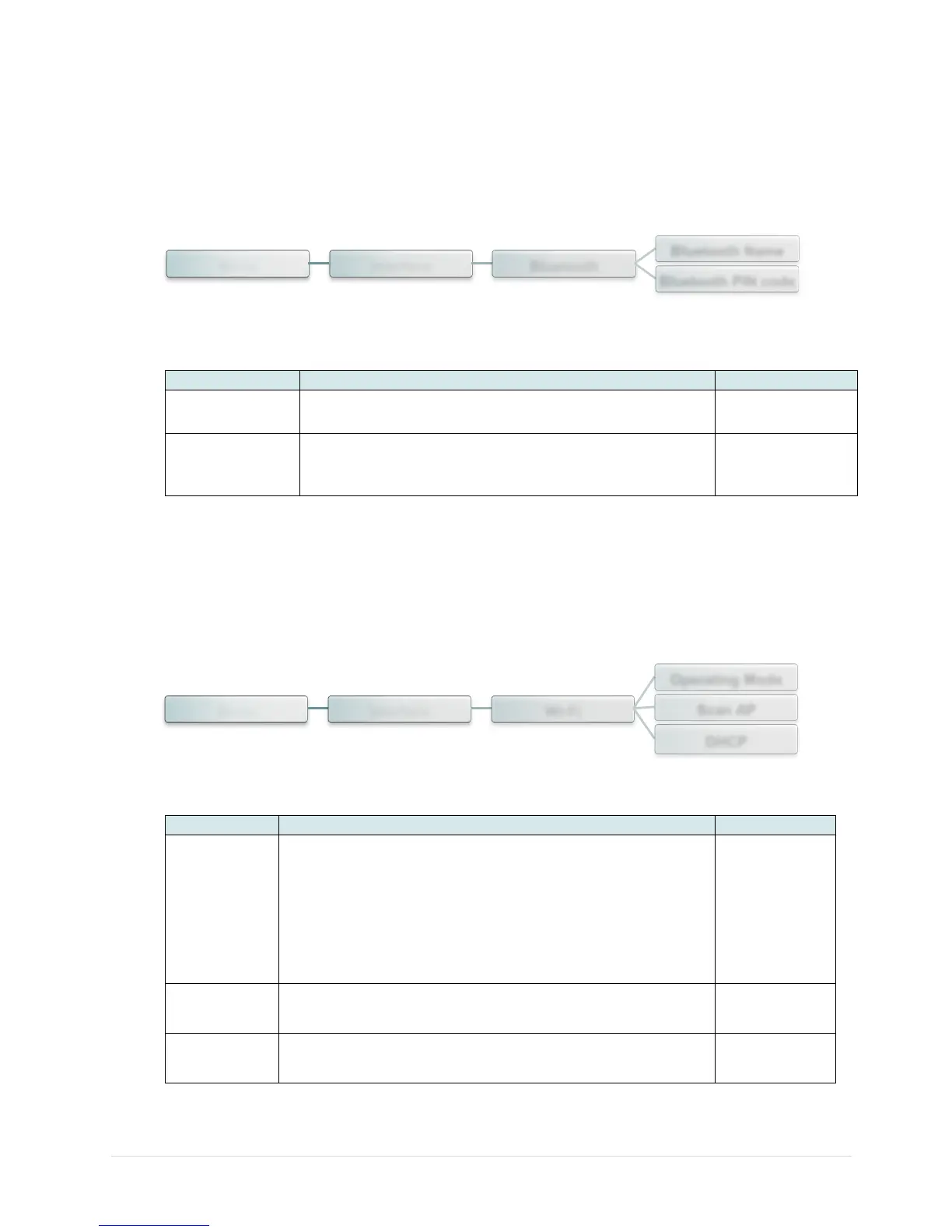
Menu Interface Bluetooth
Bluetooth Name
Bluetooth PIN code
Menu Interface Wi-Fi
Operating Mode
Scan AP
DHCP