Revision C – January 2023
CDS2000 Page | 19
Programming
The Model CDS2000 is factory-set. (Default settings can be found on pages 32-34.) One should only use
the programming guide to change parameters or turn on additional features. To enter the Setup Menu,
turn the power on by holding down the Power button. The Turbines, Inc. logo will be displayed for
approximately 10 seconds and then the Operating Display will appear. From the Operating Display, hold
down the corresponding Details and Alarms buttons for 3 seconds until the Setup Menu is displayed.
General notes regarding the setup screens:
o Menu options that effect system operation or metrology are user password protected.
o Each screen has an Exit option located in the bottom right corner that will redirect the user to the
previous screen.
o The Edit button will allow the user to change a respective setting.
o
Most menu choices support additional help information which is accessible by selecting the “?”
button.
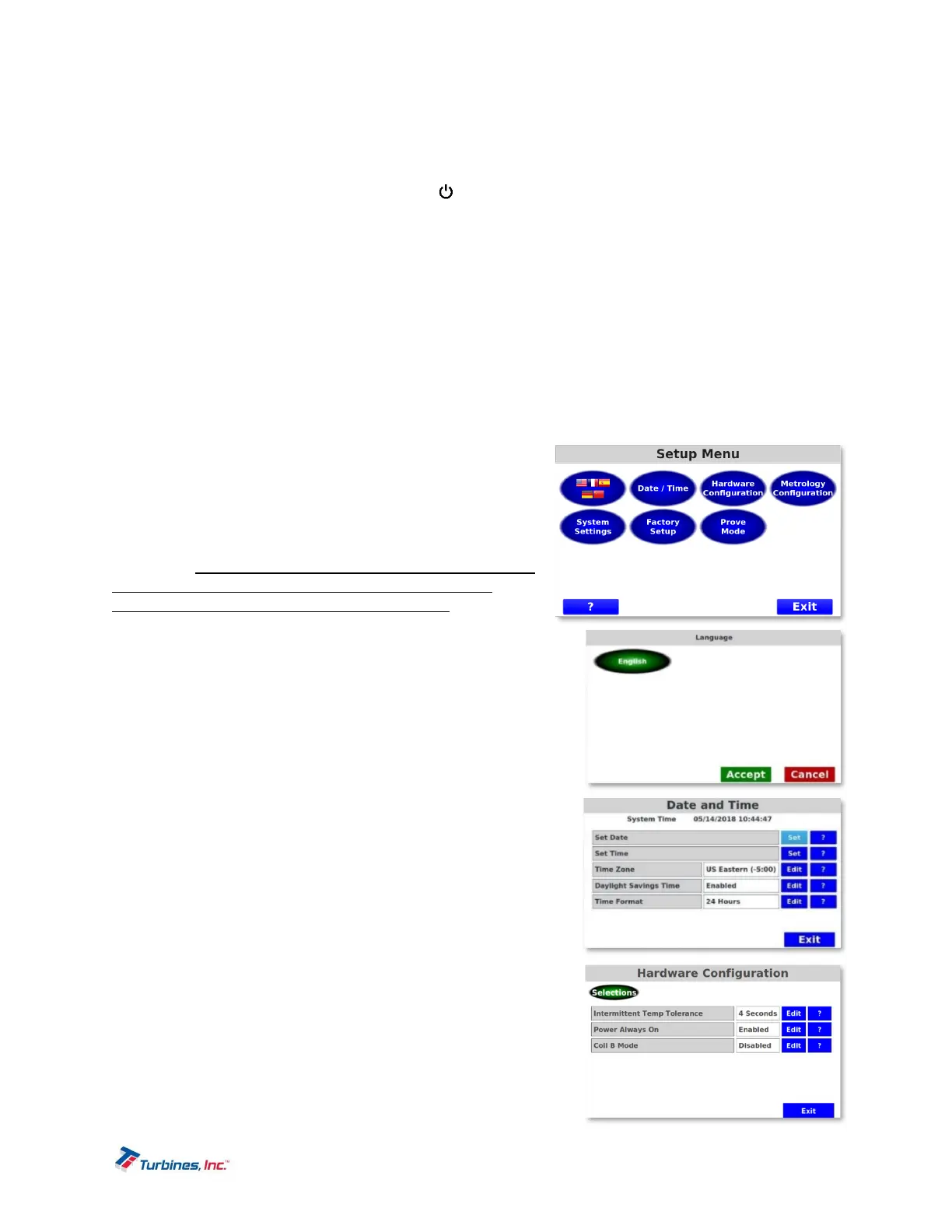
SetupMenu
The Setup Menu is the initial menu that groups a variety of
settings including the following: Language, Date/Time,
Hardware Configuration, Metrology Configuration, System
Settings, Factory Setup and Prove Mode. To enter the Setup
Menu, simply hold down BOTH the DETAILS and ALARMS
softkeys for approximately 3 seconds and the Setup Menu
will appear. Please Note: Once the Setup Menu is active, the
LCD screen becomes a touchscreen. The touchscreen
options are NOT ACTIVE in the Operating Mode. Some
parameters will be greyed out depending upon if the
parameters are sealed or a Factory-Only setting.
LanguageSetup
The Language Setup allows a user to choose a language
preference. The available language is English. To choose a
particular language using the touchscreen capabilities of the
CDS2000, press the preferred language followed by the Accept
button (either the screen or softkey option suffices). The Cancel
button navigates the user back to the Setup Menu. Additional
languages available upon request.
Date/TimeSetup(UserPasswordProtected)
The Date/Time Setup menu allows a user to adjust the Date,
Time, Time Zone, enable Daylight Savings Time (DST) or Time
format (24 hours vs. 12 hours).
HardwareConfiguration(UserPasswordProtected)
The Hardware Configuration menu equips the user with the ability
to adjust both the Intermittent Temperature Tolerance as well as
the Power Always On option.
Intermittent Temperature Tolerance Time is a
programmable timer that specifies a duration of time
which a temperature fault is allowed to exist without
issuing an alarm and disabling the delivery pump.


 To Next Page