Revision C – January 2023
CDS2000 Page | 24
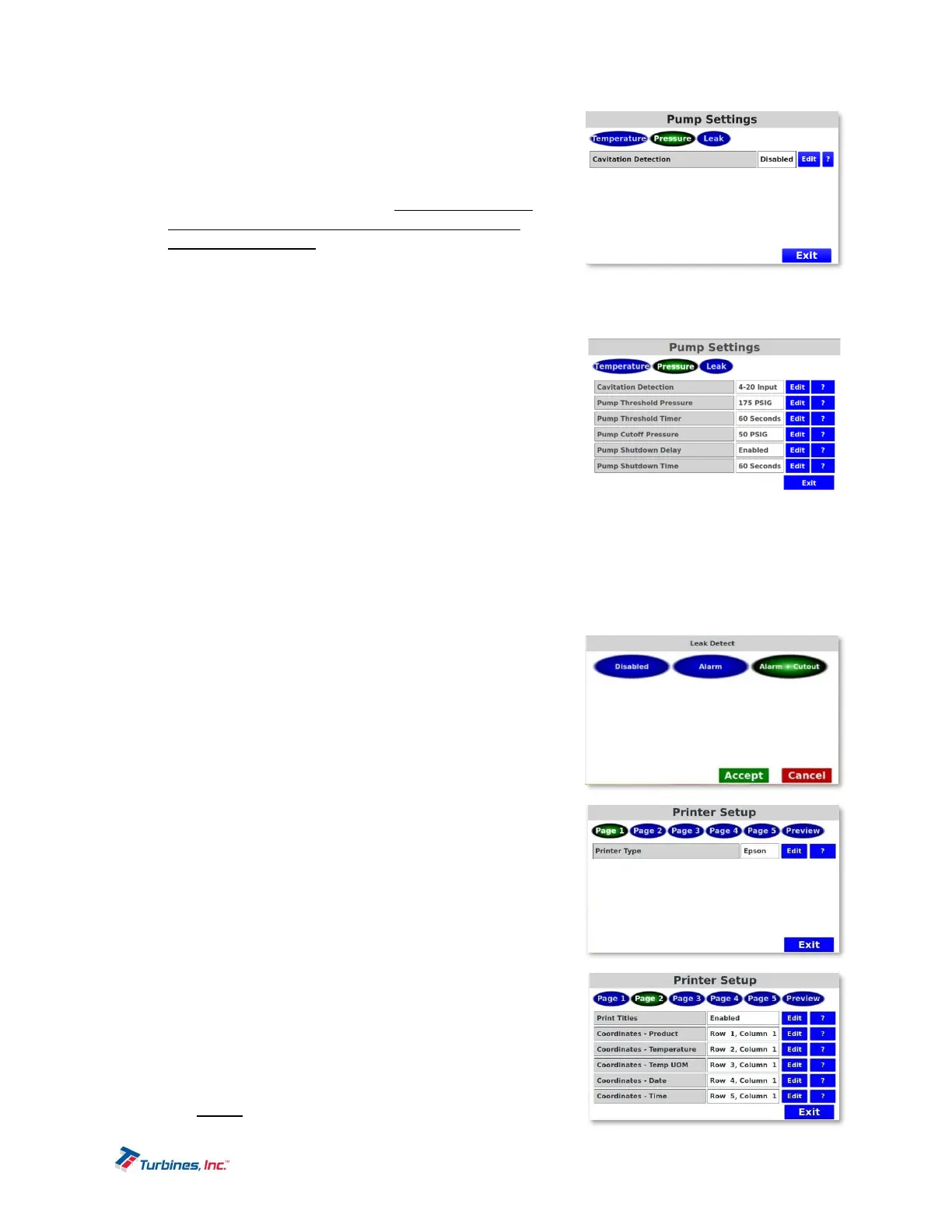
PumpSettings‐Pressure
Cavitation Detection is the monitoring of the pump
discharge pressure for the loss of pressure which would
indicate a loss of prime. Cavitation Detection can be
enabled using the 4-20ma input. Please Note: Pump
Pressure settings will not be populated if Cavitation
Detection is disabled.
Pump Threshold Pressure ensures the minimum
operating pressure is achieved within the time
programmed in Pump Threshold Timer. Once the timer elapses the pump pressure must be
greater than or equal to the value set in Pump Threshold Pressure. Failure to achieve this
pressure will cause the pump to be disabled. If the pump
is enabled after the timer elapses, then the pressure must
remain above the Pump Cutoff Pressure, or the pump will
be disabled through the PCO cable.
Pump Threshold Timer sets the amount of time between
when the pump starts and when Pump Threshold Pressure
must be achieved. If Pump Threshold Pressure is not
achieved before this timer elapses, the system detects a
delivery problem, and the pump is disabled.
Pump Cutoff Pressure is the minimum operating pump discharge pressure that must be
maintained for power to continue being supplied to the pump.
Pump Shutdown Delay can be enabled or disabled and is the programmed time delay between
the moment the pump discharge pressure goes below the Pump Cutoff Pressure to the time the
pump is disabled. When Pump Shutdown Delay is enabled, Pump Shutdown Time will populate.
Pump Shutdown Time is the time allotted between the moment the pump discharge pressure falls
below the Pump Cutoff Pressure to the time the pump is
disabled.
Lower Pressure Alarms (LPA Logic) can be seen on page
39.
PumpSettings‐LeakDetect
This parameter has 3 options: Disabled, Alarm or “Alarm +
Cutout. If set to alarm, then an alarm will be reported but no
additional action is taken. If set to “alarm + cutout” then an alarm
is reported and the pump is disabled. When enabled the leak
detected threshold is set to 200 degrees Kelvin.
Printers
Printer Setup Options:
Printer Type is used to configure the printer type. Current
available types are: DISABLED, EPSON, ZEBRA, and
PEOPLENET. When a printer (other than DISABLED) is
selected, more pages of configuration choices will
become available. The PEOPLENET printer choice
performs a raw data output that is intended to
communicate with an on-board computer system.
Print Titles: When enabled, prints a corresponding title
next to the printed data on the ticket. For example, instead
of printing just the date 5/5/2020 the system will print the
title DATE: 5/5/20.


 To Next Page